CLA-VAL CV-Log-35
Communicating Data Logger
CLA-VAL Europe www.cla-val.ch cla-val@cla-val.ch 23 - CLOG35UE A 07/22
© Copyright CLA-VAL Europe - Specifications subject to change without notice - no contractual illustrations. Reduce your waste - Sort your rubbish
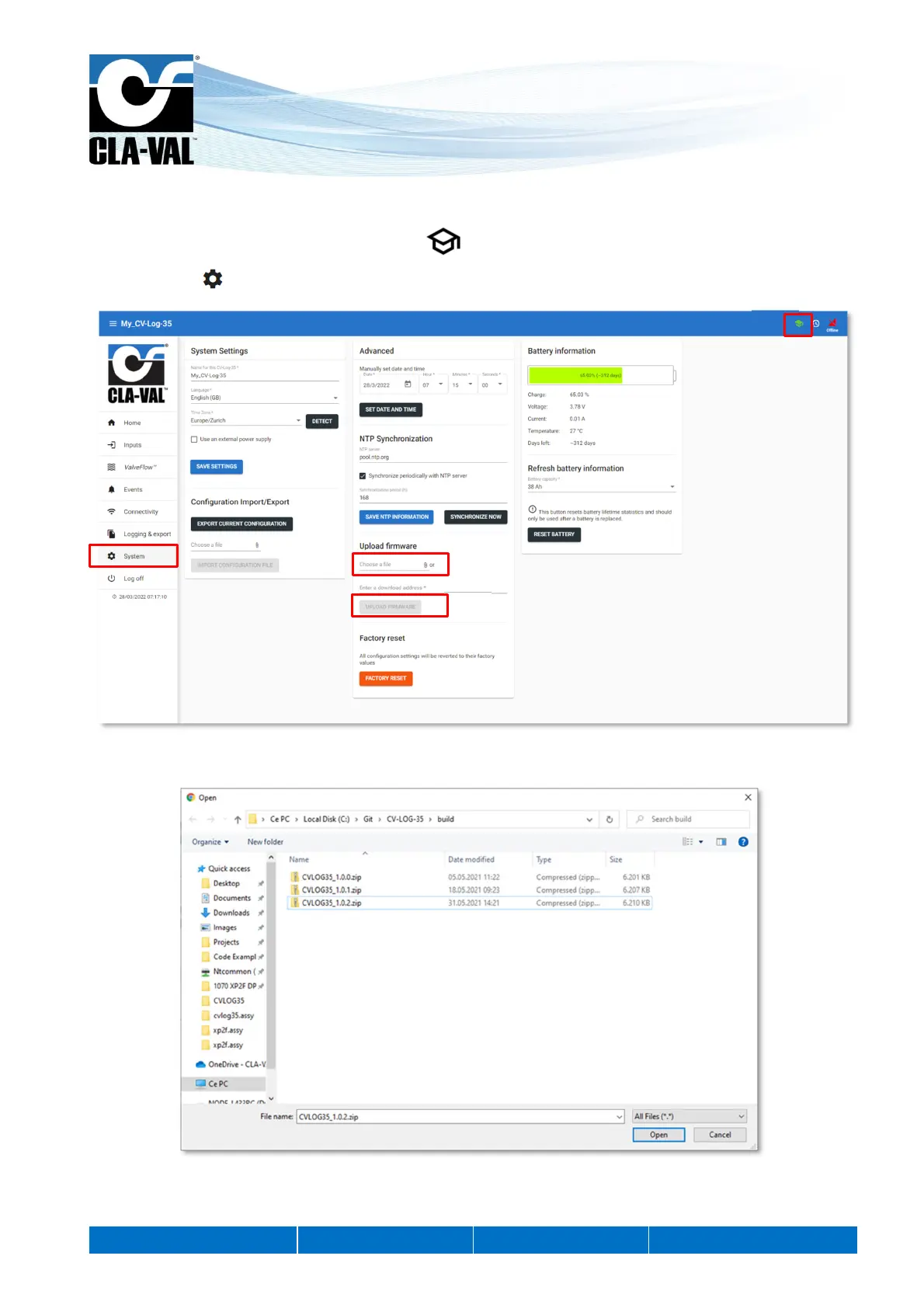
9.13 FIRMWARE UPDATE
1. This chapter must be in advanced mode, click on .
2. Click on the " System" menu.
3. In the «Upload firmware» submenu, locate and select the distribution ZIP file for example "CVLOG35_1.0.2.zip".
4. Click on the "UPLOAD FIRMWARE" button and wait a few minutes.
5. Completely power off the CV-Log-35 to apply the update. To do so, press the product button for 5 seconds to turn off
the WiFi.
2.
3.
4.
1.



 To Next Page