CLA-VAL CV-Log-35
Communicating Data Logger
CLA-VAL Europe www.cla-val.ch cla-val@cla-val.ch 19 - CLOG35UE A 07/22
© Copyright CLA-VAL Europe - Specifications subject to change without notice - no contractual illustrations. Reduce your waste - Sort your rubbish
9.9 REGISTER ON LINK2VALVES (COMMUNICATION OPTION)
Link2Valves
TM
is the CLA-VAL web platform (https://cla-val.ch) that allows the remote management of your CV-Log-35 as
well as the visualization of its data history.
To use it, you need a Link2Valves account. Please contact CLA-VAL to get one for free.
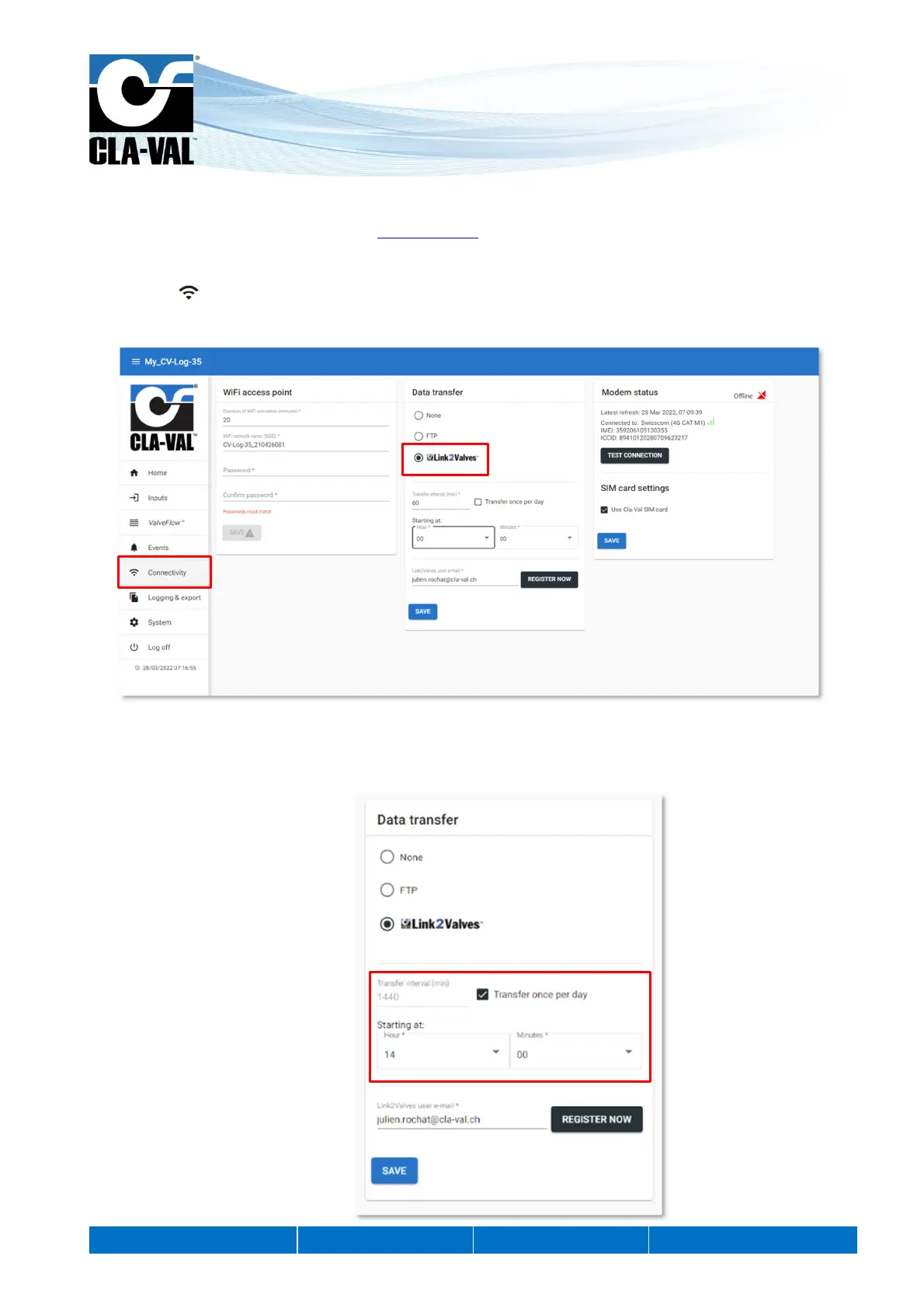
1. Click on " Connectivity".
2. Under « Data Transfer », choose the "Link2Valves" option.
3. Choose the transfer interval and the time from which the interval will start. This interval will determine the frequency of
communications of the CV-Log-35 and Link2Valves. Please note that a faster interval will have a negative impact on
the battery life of the unit, and generate potential additional costs.
1.
2.
3.



 To Next Page