Need help?
Do you have a question about the Clarity E713CC and is the answer not in the manual?
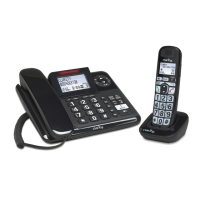
Comprehensive guide for the Clarity E713CC amplified phone with answering machine.
Essential safety guidelines for operating the telephone, covering general usage and hazards.
Details risks related to electrical connections, usage environment, and product operation.
Advises users on preventing hearing damage from high volumes and potential skin irritation.
Instructions for safe battery installation, handling, and proper disposal methods.
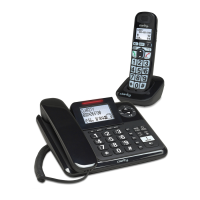
Lists all items included in the package and provides optimal placement advice for the base unit.
Step-by-step connection guide for the base unit and advice for ADSL broadband compatibility.
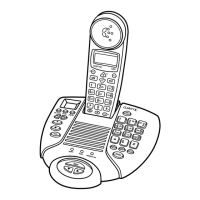
Identifies and explains the buttons and features of the corded base unit.
Explains indicators, display, memory keys, and the clear/mute function on the corded base.
Details the functions of navigation, redial/pause, delete, and playback buttons on the corded base.
Describes flash/page, answer on/off, volume, boost, and speakerphone functions on the corded base.
Explains the meaning of various icons and indicators shown on the corded base LCD screen.
Outlines the menu structure and how to navigate using keys in idle mode on the corded base.
Provides guidance on entering text and a character lookup table for the corded base.
Covers preparatory dialing, direct dialing, and calls from directory, CID, and redial lists.
Explains call timing functionality and in-call volume adjustments for the corded base.
Basic call handling, volume adjustment, boost, and mute functions for the corded base.
Instructions for saving frequently used numbers into memory keys on the corded base.
Using memory keys and making calls during power outages with the corded base.
How to redial numbers and store them in the directory using the corded base.
Deleting redial entries and using the handset locator via the corded base.
Using intercom and setting up 3-way conference calls from the corded base.
Step-by-step guide to adding and modifying contacts in the directory on the cordless handset.
Procedures for reviewing and removing contacts from the cordless handset directory.
Setting up and using speed dial numbers on the cordless handset.
Details on using the Caller ID service feature with the cordless handset.
Accessing and saving incoming call information to the cordless handset directory.
Removing call records and selecting the base unit's display language.
Configuring the phone's date, time, and display language settings.
Customizing ringtones and managing cordless handset registration status.
Selecting between tone and pulse dialing modes for the phone system.
Configuring key press feedback, area code, and voicemail access number.
Managing voicemail alerts and registering new cordless handsets to the base.
Step-by-step instructions for registering additional cordless handsets to the telephone base.
Basic operation of the answering machine and recording custom greetings (OGM).
Recording, playing, and deleting outgoing messages, and listening to received messages.
Recording personal memos and managing incoming calls via the answering system.
Configuring the answering delay, message length, and outgoing message language.
Enabling call screening, changing remote access codes, and setting message alerts.
Steps for setting up the charging base and inserting batteries into the cordless handset.
Instructions for the first-time charging of the cordless handset for optimal performance.
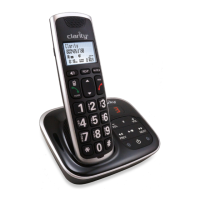
Identifies and labels all the buttons and controls on the cordless handset.
Explains functions of redial/pause, boost, mute, volume, and talk off/clear buttons on the handset.
Details functions of the keypad, microphone, talk/flash, menu, speaker, tone, and visual ringer.
Information on earpiece usage, headset compatibility, and volume navigation.
Explains the meaning of icons displayed on the cordless handset screen.
Outlines the menu hierarchy and navigation for the cordless handset.
Guidance on entering text and a table for character input on the cordless handset.
How to adjust audio tone and activate the audio boost feature on the handset.
Managing call volume and using the mute function during calls on the handset.
Instructions for muting calls and initiating external calls from the cordless handset.
Methods for direct dialing and using speed dial numbers on the cordless handset.
Procedures for making calls using stored contacts and call history on the cordless handset.
Features like call timing, tone dialing, and call handling for the cordless handset.
Using chain dialing to access numbers during an active call on the cordless handset.
Accessing numbers via chain dialing and reviewing the redial list on the cordless handset.
Managing the redial list and using the handset locator feature.
Instructions for initiating intercom calls between cordless handsets.
How to transfer an ongoing call to another cordless handset.
Setting up and participating in conference calls with cordless handsets.
Procedures for managing contacts, including adding, viewing, and searching on the cordless handset.
Modifying existing contacts and removing them from the cordless handset directory.
Assigning numbers to speed dial keys and using them to make calls on the cordless handset.
Removing numbers from speed dial locations on the cordless handset.
Understanding Caller ID information and the missed calls notification on the cordless handset.
Explains why Caller ID might not display and how to format CID entries.
Accessing and reviewing the list of incoming calls on the cordless handset.
Saving CID information to the directory and clearing entries on the cordless handset.
Changing the display language on the cordless handset screen.
Controlling the visual indicator for new voicemail messages on the cordless handset.
Manually setting the date and time on the cordless handset.
Configuring automatic CID time updates and customizing ringtones on the cordless handset.
Adjusting ringer volume and enabling/disabling key press tones on the cordless handset.
Step-by-step guide for registering a new cordless handset to the telephone base.
Instructions for removing all registered cordless handsets from the telephone base unit.
Addresses problems like no messages recorded, remote operation failure, and connection issues.
Troubleshooting tips for when the answering machine is out of range or has no display.
Solutions for a non-functional cordless handset or lack of dial tone.
Troubleshooting problems with dialing out and general cordless handset performance.
Resolving issues with range, speakerphone sound quality, and handset ringing.
Addressing interference affecting ringing and problems with Caller ID service.
Resolving specific Caller ID and voicemail indicator display problems.
Notes on limitations when used with PBX systems and grounding function absence.
Detailed technical data for the answering machine base, handset, and charger.
Information regarding compatibility and ordering of additional cordless handsets.
 General
| Brand | Clarity |
|---|---|
| Model | E713CC |
| Type | Cordless Telephone |
| Number of Handsets | 1 |
| Caller ID | Yes |
| Call Waiting | Yes |
| Volume Control | Yes |
| Speakerphone | Yes |
| Hearing Aid Compatible | Yes |
| DECT 6.0 Technology | Yes |
| Frequency | 1.9 GHz |
| Battery Life | Up to 10 hours talk time |
| Answering Machine | Yes |
| Display | LCD |
| Headset Jack | 2.5mm |
| Battery Type | NiMH |
| Amplification | Up to 50dB |

 To Next Page