9
© Copyright 2020. All rights reserved.
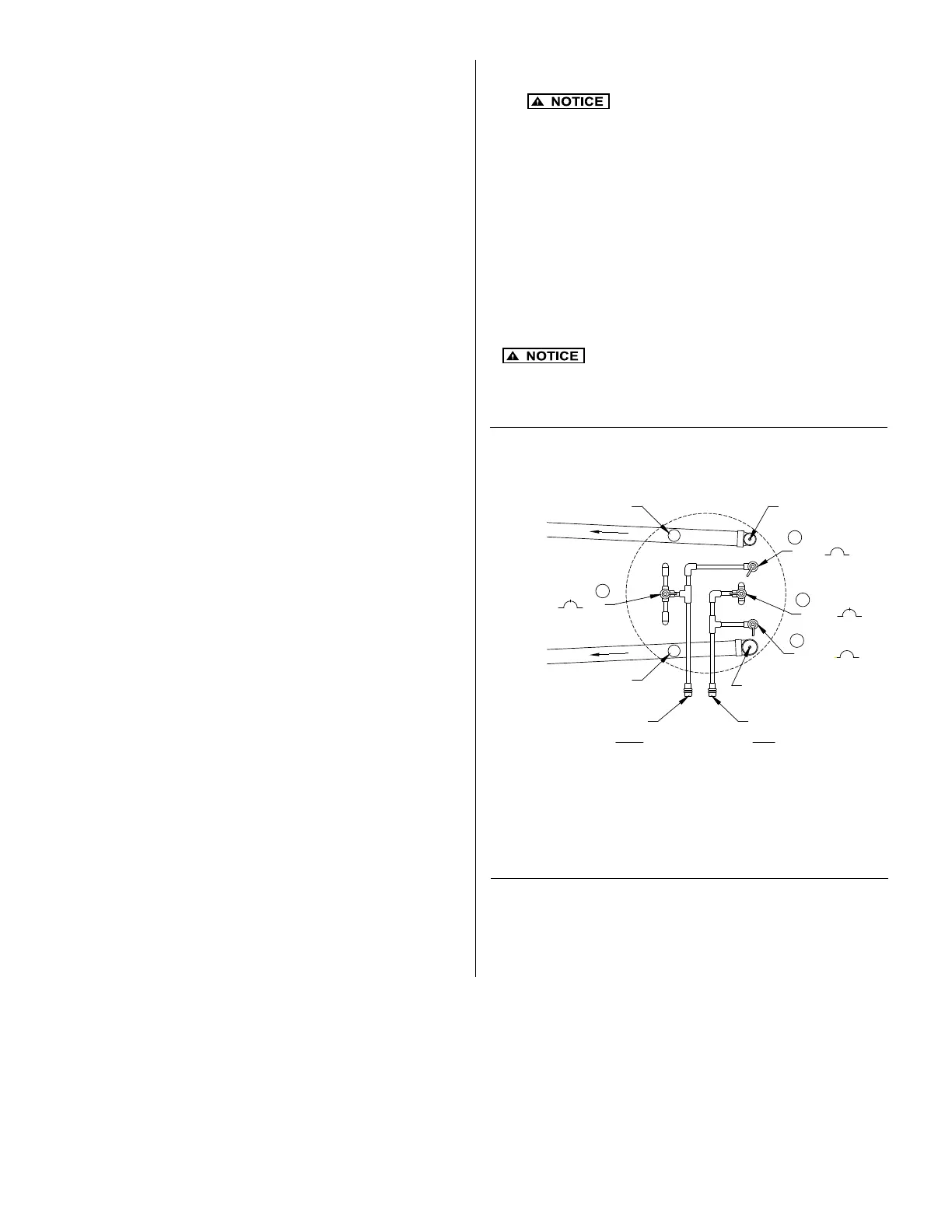
There are two aeration systems provided within the aeration
chamber: normal aeration and backwash. Valves (1 and 3) are set
at 50%. Observe the air ow on each side of the unit to verify equal
ow. If there is an obvious discrepancy in air ow between the two
sides, adjust the valves (1 and 3) so that the ow is equal.
1
2
3
4
CLEAN-OUT
FLOW RECIRC. PIPE
SLUDGE TRANSF. PIPE
CLEAN-OUT
ARERATION AIR-IN
(BLUE)
BACKWASH AIR-IN
(RED)
CLEAN-OUT SLUDGE TRANSF.
CLEAN-OUT RECIRC.
GREY 0 100
RED 100 100
GREY 0 100
50
BLUE 100 100
50
Figure 13 - Aeration Flow Adjustment
1. Connect house sewer pipe or septic tank outlet, if
required, to the unit inlet. Make certain only household
waste enters the unit (no foundation drains, gutter
drains, oor drains, etc.).
2. Connect the outlet pipe to the outlet of the unit.
PIPING INSTALLATION
HIGH WATER ALARM FLOAT INSTALLATION
The Fusion
®
alarm panel assembly includes a high water alarm
oat switch that is used to monitor the liquid level in the Fusion
®
unit. The switch should be tethered to one of the gray, vertical
air lines in the aeration chamber with a 3" (76 mm) tether
length. The cord should pass through the opening in the partition
wall between the aeration and anaerobic chamber and allow
the oat to hang in the outlet bafe of the anaerobic chamber.
1. The oat switch should be tethered to one of the gray,
vertical pipes in the aeration chamber. When the oat is
in the horizontal position, the cord should be at least 1"
(25 mm) below the top of the partition wall opening in
the anaerobic chamber bafe.
2. Place the cord into the clamp and secure to gray aeration
pipe. NOTE: Do not install the cord under the clamp.
3. Position the oat with a 3" (76 mm) tether.
4. Tighten the clamp with a screwdriver. Be careful not to
overtighten as this may cause damage to the plastic clamp.
5. Make sure the oat cord is not allowed to touch the
excess clamp band during operation as this may cause
damage to the cord.
6. The oat switch cord should be installed in an electrical
conduit connecting the alarm panel to the Fusion
®
unit. The
electrical conduit must be rated for burial, and should be
properly sealed to prevent gases from entering the alarm
panel.
7. A 1/2" (13 mm) bulkhead tting (supplied by others) should
be used to connect the electrical conduit to the Fusion
®
unit.
A hole must be drilled through the wall of the Fusion
®
unit
between the red and blue bulkhead ttings to facilitate
this connection.
8. Please be certain that the bulkhead tting for the electrical
conduit forms a watertight connection with the FRP wall
of the Fusion
®
unit.
9. Electrical conduit from the Fusion
®
unit to the alarm
panel can be buried in the same trench as the air lines.
10. The control switch can be wired directly into the alarm
panel. See Figure 7.
1.
All electrical installations must follow the
National Electrical Code and/or your local/state electrical
codes.
2. The blower should be directly wired into the alarm panel.
The alarm panel must be located in a dry location that is
accessible for maintenance. Please see Figure 7 and the
wiring diagram and instructions enclosed with the alarm
panel.
3. Make certain the timer within the control panel is set to the
proper time. The timer unit display should be set to 10 hrs.
and the timer dial needle set to 3.6 for 36 hours. This will
activate an alarm if the blower doesn't go into backwash
cycle within a 36-hour time frame.
ELECTRICAL CONNECTIONS
START UP
An installation and start-up check list (CL0057)
is furnished with the information package in the blower box.
Please use this as a guide and ll out all sections and return to
your distributor.
Valve Legend:
1. Aeration Blue 3. Backwash Red
2. Recirculation Gray 4. Sludge transfer Gray


 To Next Page
 Loading...