6 7
English
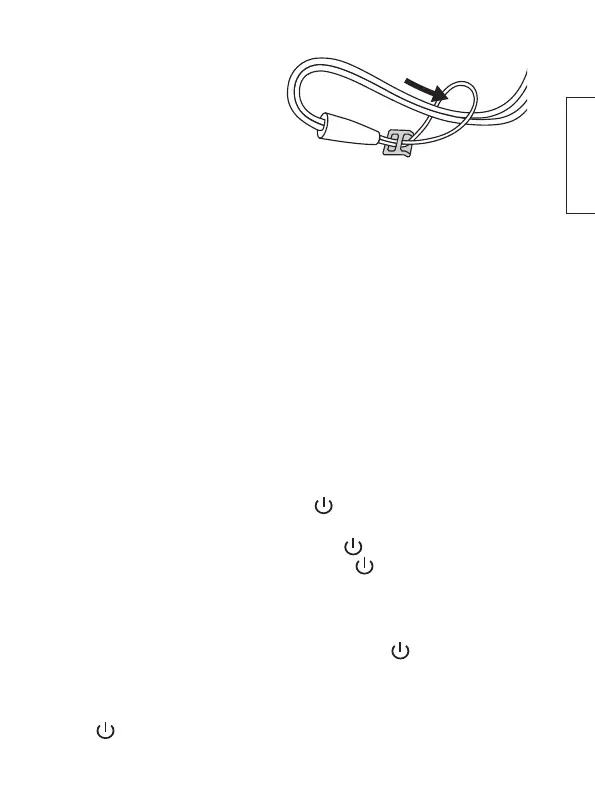
Wrist strap
Attach the wrist strap to the
radio by threading it through
the ring (11).
Aerial
Fold out and extend the aerial (15) fully for the best signal reception.
The radio signal reception is usually best when the aerial is in an
upright, vertical position.
Listening using headphones (sold separately)
1. Turn the volume down.
2. Connect the headphones to the 3.5mm headphone socket (20).
3. Put the headphones on and carefully increase the volume to a
comfortable level.
Note: Audio output through the loudspeaker stops as soon as
headphones are connected.
On/off
1. Switch on the radio by holding [ / MODE ]. “Welcome to
Digital Radio” will appear on the display.
2. Switch off the radio by first holding [ / MODE ] until the radio
is in standby mode, and then holding [ / MODE ] again until
“Good Bye” appears on the display.
Standby mode
1. Put the radio in standby mode by holding [ / MODE ] when
the radio is switched on until the time and date are shown on
the display.
2. To switch the radio on from standby mode, press
[ / MODE ] briefly.


 To Next Page