6 7
English
Using the radio
Power supply
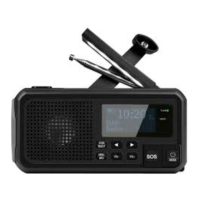
Emergency radio that can be powered by the built-in rechargeable
lithium-ion battery and by standard replaceable AAA batteries.
Charging the built-in lithium-ion battery
The battery can be charged in 3 different ways:
1. USB: Connect the USB cable supplied to the USB-C port (22)
and a USB charger (sold separately). It takes approximately
6–8 hours to fully charge the battery.
2. Dynamo: In an emergency, the battery can be charged using
the built-in electricity generator. Extend the crank and turn it to
charge the battery.
3. Solar panel: Put the solar panel in the sun to trickle charge
the battery. This is primarily intended to extend the battery time,
not to charge the battery fully.
The battery indicator on the display shows the current charge
status. When the battery is charging, the “INPUT” LED (13) is red.
Operating the radio using AAA batteries
We recommend that you mainly use the radio’s built-in
lithium-ion battery. If AAA batteries are inserted, the radio
will use them regardless of the charging status of the built-in
lithium-ion battery. We therefore recommend that you only
use AAA batteries when the built-in lithium-ion battery is flat
and you are not able to charge it.
1. Remove the battery cover (17) by sliding it downwards.
2. Insert 3 x AAA/LR03 batteries. Check the polarity markings
in the bottom of battery compartment to make sure that you
insert the batteries correctly.
3. Refit the battery cover.


 To Next Page