EasyManua.ls Logo

Clas Ohlson iDeco Stereo 100BT - User Manual

Clas Ohlson iDeco Stereo 100BT
44 pages
Print Icon
To Next Page IconTo Next Page
Loading...
EnglishSvenskaNorskSuomi EnglishSvenskaNorskSuomiDeutsch
Ver. 20130704
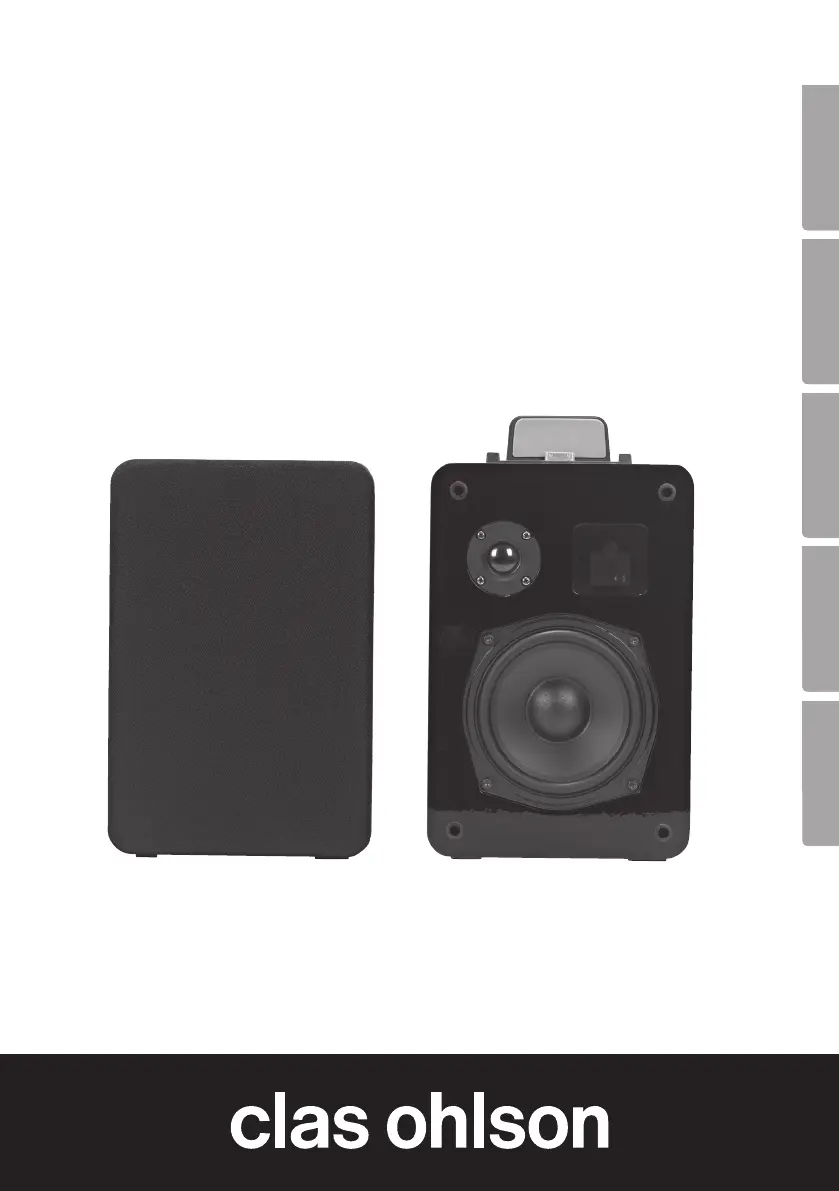
iPod/iPad/iPhone speakers
with Bluetooth
iPod/iPad/iPhone-högtalare med Bluetooth
iPod-/iPad-/iPhone-høyttaler med Bluetooth
Bluetooth-kaiutin iPodille/iPadille/iPhonelle
iPod/iPad/iPhone-Lautsprecher mit Bluetooth
Art.no Model
38-4996 iDeco Stereo 100BT
38-4997 iDeco Stereo 100BT
38-5039 iDeco Stereo 100BT

Questions and Answers

  • A
    Amber AdamsAug 2, 2025
    What to do if playback doesn't work when my iPod/iPhone/iPad is connected to my Clas Ohlson iDeco Stereo 100BT via the dock?
    • J
      Jennifer WhitakerAug 2, 2025
      If playback doesn't work when your iPod/iPhone/iPad is connected to your Clas Ohlson speakers via the dock, try the following: * Ensure the volume is turned up on both the speakers and your device. * Select the (IP) function via [INPUT]. * Test playback directly on your device before connecting it. * Ensure your device is properly connected to the dock. * Check that the connectors on the dock and your device are undamaged and free from obstructions.
  • S
    schwartzbrettAug 8, 2025
    What to do if video playback doesn't work on my TV screen while connected to the VIDEO-OUT port on Clas Ohlson iDeco Stereo 100BT Speakers?
    • S
      Stephanie GreenAug 8, 2025
      If video playback isn't working on your TV screen while connected to the VIDEO-OUT port on your Clas Ohlson speakers, try these steps: 1. Ensure the (TV) function is selected via the [SETUP] button. 2. Verify that all cables are undamaged and properly connected. 3. Confirm that your TV is correctly set to accept incoming signals via the connected cable. 4. Test video playback directly on your iPod/iPhone/iPad before connecting it. 5. Ensure your iPhone/iPod is properly connected to the dock. 6. Make sure the connectors on the dock and your iPod/iPhone/iPad are undamaged and free from obstructions.
  • K
    kochvictoriaAug 13, 2025
    What to do if playback doesn't work when my iPod/iPhone/iPad is connected to my Clas Ohlson iDeco Stereo 100BT Speakers via Bluetooth?
    • J
      Jeremy SandersAug 13, 2025
      If playback isn't working when your iPod/iPhone/iPad is connected to your Clas Ohlson speakers via Bluetooth, make sure of the following: * The volume is turned up on both the speakers and your device. * The (BT) function is selected via [INPUT]. * Your device and the speakers are properly connected.
  • M
    mleeAug 20, 2025
    What to do if playback doesn't work when my iPod/iPhone/iPad is connected to my Clas Ohlson iDeco Stereo 100BT via the AUX-IN port?
    • B
      Brandon GrayAug 20, 2025
      If playback doesn't work when your iPod/iPhone/iPad is connected to your Clas Ohlson speakers via the AUX-IN port, please check the following: * The volume is turned up on both the speakers and your device. * The (AU) function is selected via [INPUT]. * The cable connecting the device and the speaker is undamaged and correctly connected.
  • P
    Peter HolmesAug 26, 2025
    How to fix Clas Ohlson iDeco Stereo 100BT Speakers that will not switch on?
    • J
      John HuntAug 26, 2025
      If your Clas Ohlson speakers won't switch on, ensure that the mains lead is undamaged and properly connected to both the wall and the speaker outlet. Also, verify that the wall socket is live.

Summary

Safety Precautions

Buttons and Functions Overview

Control Panel and Display

Overview of the control panel and display with numbered components.

Back Panel Ports and Connections

Details of the connections and ports on the back panel of the speaker.

Remote Control Operation

Remote Control Button Functions

Detailed explanation of each button's function on the remote control.

Remote Control Range and Usage

System Installation Guide

Operating Instructions: Power and Apple Device Playback

Powering On and Input Source Selection

Steps for powering on the speaker system and selecting input sources.

Apple Device Playback Methods

Instructions for playing audio/video from Apple devices via dock or Bluetooth.

Connecting via AUX IN

Video Output to TV

Product Care and Maintenance

Troubleshooting Common Issues

Product Disposal Guidelines

Technical Product Specifications

Declaration of Conformity Statement

Clas Ohlson iDeco Stereo 100BT Specifications

General IconGeneral
BrandClas Ohlson
ModeliDeco Stereo 100BT
CategorySpeakers
Frequency Response60Hz - 20kHz
Signal-to-Noise Ratio≥70dB
TypeBluetooth Speaker
ConnectivityBluetooth

Related product manuals