13
English
6.5 Switch on the TENS/EMS machine
Read the safety instructions before switching on
the machine. Pay particular attention to circumstances
when the machine must not be used. The TENS/EMS
machine is not a toy, but a powerful treatment aid.
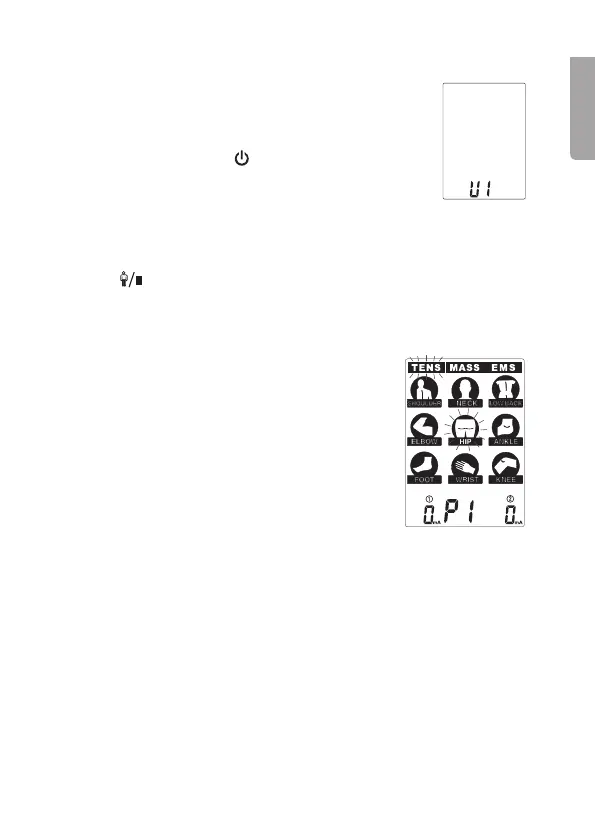
Switch on the machine: Press [
], the display lights up.
6.6 Select the user
There is a memory for 2 different users (U1) and (U2), so that 2 people can
use the product with individual settings.
1. Press [
] to select user 1 or 2.
2. Press [S] to confirm the selected user.
6.7 Choose a treatment and treatment area
1. There are 3 different treatments: TENS, MASSAGE
or EMS. Press [M] to select the required treatment.
2. There are 9 different treatment areas. Press [S] to
select the treatment area.
3. The selected treatment and the treatment area flash.
6.8 Select the treatment programme
For the 3 treatments and the 9 treatment areas there is a total of
78 treatment programmes. TENS and EMS has 27 programmes and
MASSAGE has 24 programmes.
Press [P] and select the treatment programme (P1, P2, P3, U1* or P4) for
the treatment area you have chosen. P1, P2, P3, U1 or P4 is shown at
the bottom of the display for the selected programme.
The treatment programmes have a different wavelength, pulse rate and
pulse width. Diagrams with a description of all programmes can be found at
the end of the User Guide.
* See section 6.16 Individual settings U1


 To Next Page