9
English
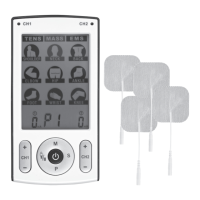
8. [M] In standby mode, select the treatment: TENS – MASS – EMS.
9. [CH 2+] Increase the intensity on channel 2. Adjustment from 0 (off) to max.
In setting mode: Adjust the user program parameter.
10. [CH 2-] Decrease the intensity on channel 2. Adjustment from max to 0 (off).
In setting mode: Adjust the user program parameter.
11. [S] Confirm the selected users, select the treatment area, open or
delete data in memory.
- Confirm the selected user U1 or U2.
- Choose the treatment area. Press to step between 9 different
treatment areas.
- Press and hold for 3 seconds to open memory mode (in standby mode).
- Press and hold for 3 seconds and confirm deletion of memory data
(in memory mode).
12. [P] Standby mode: Select the treatment programme P1, P2, P3 or P4
before the treatment starts.
- The programmes have a different wavelength, pulse rate and pulse
width. Diagrams with a description of all programmes can be found
at the end of the User Guide.
13. Belt clip
14. Battery cover
15. Connection for channel 1
16. Connection for channel 2


 To Next Page