
 Need help?
Do you have a question about the ClearFox CU-M and is the answer not in the manual?
The control unit must be shut down properly by pressing the OK button for > 10s, not by disconnecting mains and batteries.
After the first start, the plant type must be selected, and the unit will restart.
The Service PIN for accessing the login service menu is 1111.
Details for Wi-Fi connection: SSID, password, IP address, username, and service password.
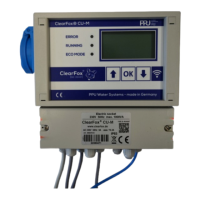
Overview of the ClearFox® Control Unit CU-M as a programmable control unit for decentralized STP with an IoT platform and webserver.
Safety warnings and instructions for opening the casing of the control unit, emphasizing live components and disconnecting power.
Instructions for connecting Blower and Valves (Filling, Clearwater/Discharge, Sludge Return, Aeration/Denitrification) and alarm beacon for Air-SBR.
Details on connecting Blower/Aerator, Pumps/Valves (Filling, Clearwater, Sludge), alarm beacon, and float switch for Pump-SBR.
Instructions for connecting Blower/Aerator, Sludge return, alarm beacon, and float switch for One-Tank SBR.
Details for connecting Blower/Aerator, Pumps/Valves (Filling, Clearwater, Sludge), alarm beacon, and float switch for continuous plants.
Indicates that the section for Drippling Filter is still in progress.
Guide to connecting the control unit via Wi-Fi for operation and monitoring using a browser.
Explains how to connect the control unit to the internet using Station (ST) mode via Wi-Fi.
How to acknowledge, delete, and manage different alarm states of the ClearFox® Control Unit CU-M.
Overview of process steps for the Air-SBR system, including normal mode.
Details on how water level measurement is performed using the filling airlift and offsets.
Process for automatic calibration of the 'calibrated minimum' after 14 days of operation.
Procedure for manually calibrating the water level measurement by noting pressure values.
Instructions on how to change levels for Normal/Eco-Mode and Overfill Alarm via web pages or service menu.
Detailed process steps for Pump-SBR in normal and eco modes.
Guide to assigning functions/outputs for the Pump-SBR system.
Detailed process steps for One-Tank SBR, including cycle timing and aeration.
Guide to assigning functions/outputs for the One-Tank SBR system based on day/night/holiday operation.
Description of process steps for continuous plants, including day/night/holiday modes.
Guide to assigning functions/outputs for continuous plants based on operation modes.
Information regarding the standard menu structure and self-explanatory nature of its options.
Information regarding the standard webpages and their self-explanatory nature.
Methods for transferring ASW, FW, and web pages using USB or Wi-Fi.
Step-by-step guide for transferring data (ASW package) via Wi-Fi, including connecting and updating.
Instructions for transferring data via USB, including formatting the stick and following LCD prompts.
 General
| Category | Control Unit |
|---|---|
| Manufacturer | ClearFox |
| Model | CU-M |
| Operating Temperature | -20°C to +60°C |
| Protection Class | IP65 |
| Weight | 0.5 kg |

 To Next Page