In s t a l l a t I o n Gu I d e 3
Fo o t st a n d as s e m B l y (sI n G l e mo n I t o r )
CAUTION : The feet are installed with the monitor face down. Make sure the face of
the monitor rests on a flat, clean, soft, non-abrasive surface to prevent any damage
to monitor screen. Also, due to the weight of the monitor, make sure a team of two
or more people are available when moving the Console and/or Display to prevent
personal injury or damage to the product.
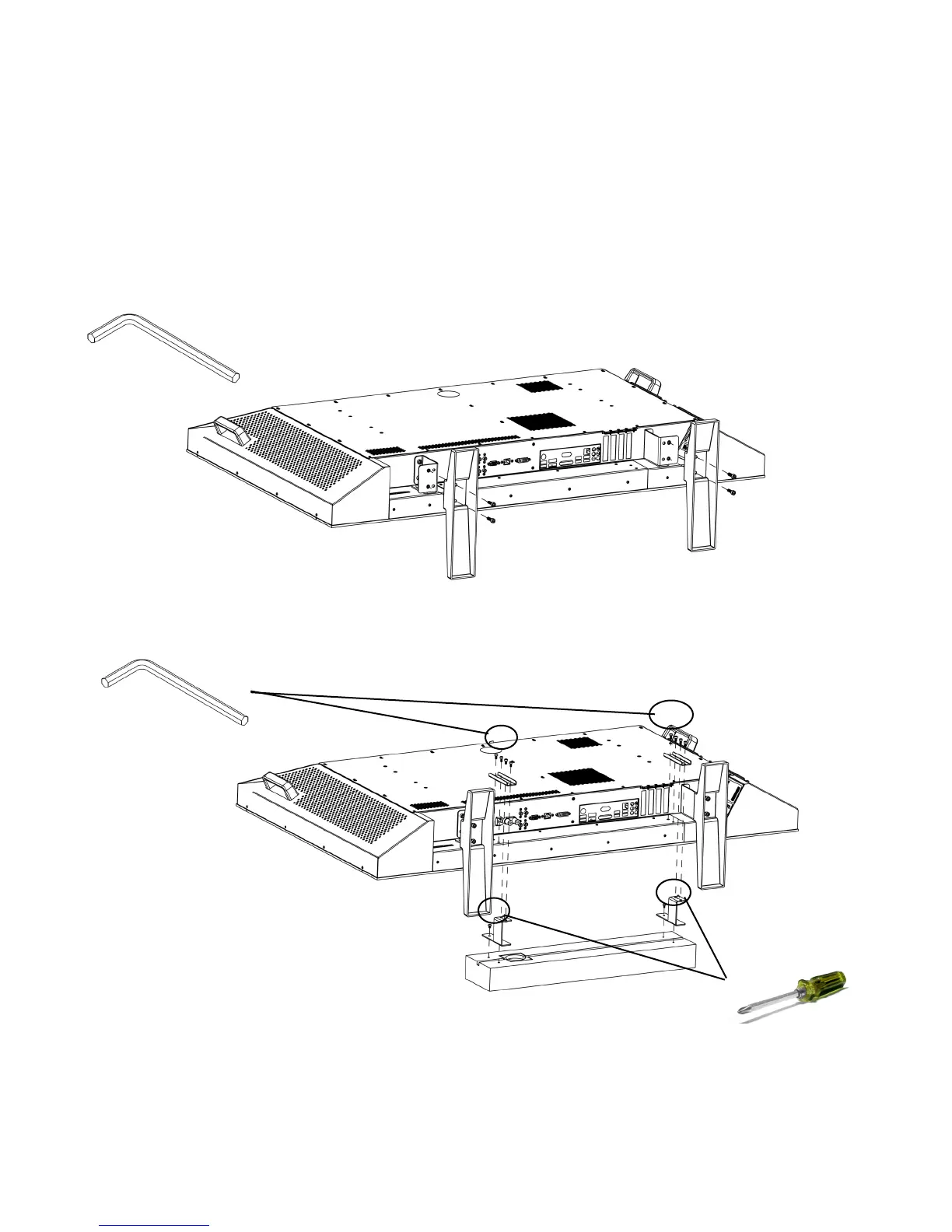
Place the Collaborate Console face-down on a flat, clean, soft, non-abrasive surface as 1.
shown below and attach the feet brackets to the console, then attach the feet to the brackets
as shown.
Review port locations on page 2 and make the appropriate cable connections.2.
While the unit is still face-down connect the soundbar cables. (See port locations on page 3.
2.) Then install the Collaborate Soundbar using the Short Soundbar Mounting Brackets the
and the screws provided and those on the soundbar as shown. The unit may need to be
repositioned to provide adequate room for mounting the soundbar.
5 mm
3 mm








 To Next Page