Advanced Configuration ~ Presets
58
Technical Services Group ~ 1-800-283-5936 (USA) ~ 1-801-974-3760
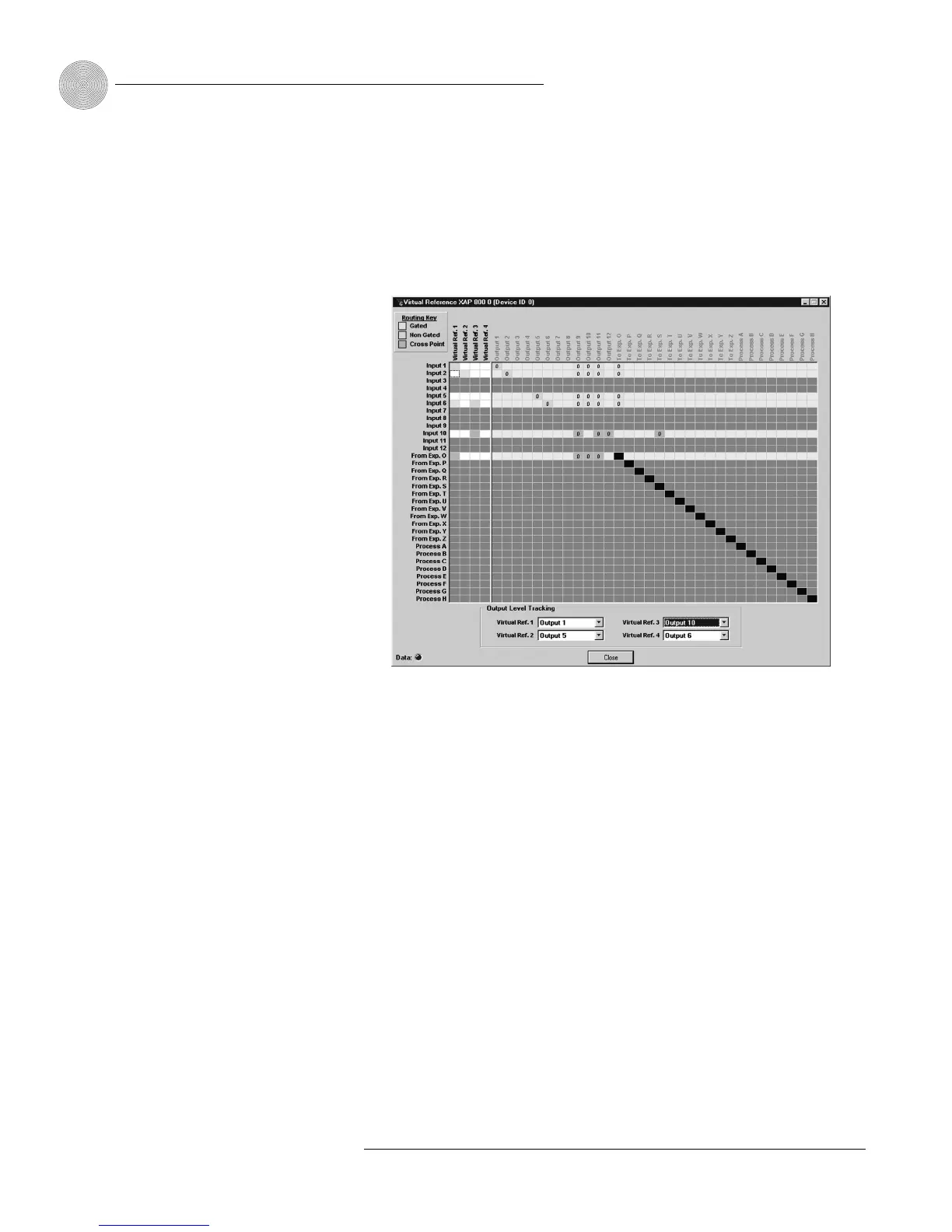
Virtual Reference. The Virtual Reference button opens the preset Virtual Reference
window. Using the Virtual Reference window, you can select which signals will be
used by the four Virtual Reference points in this preset configuration.The only input
rows which will be shown in this window are the input rows which are active in the
Preset Matrix Screen.The routing matrix (right pane) in this window is read-only.
Use the Virtual Reference portion of the window to select input channels for Virtual
Refs. 1–4.
As with the standard (non-preset) Virtual Reference configuration, you will
need to select an output from the Output Level Tracking lists for each Virtual
Reference you configure. See page 34 for more information on creating Virtual
References.
Print Preset. Print Preset opens a Print Preview window and allows you to print a
copy of your preset settings.The preset must be saved before it can be printed.
Save Preset. Saves the current preset.
Clear Preset. Clears current preset settings.
Exit Preset. Returns you to the Matrix screen in the Configuration mode.
Figure 4.6. Assigning virtual references to the preset
To enable Acoustic Echo
Cancellation or to change
which outputs, expansion
bus references, or virtual
references will be used for this
preset, open the Acoustic Echo
Canceller window from the Inputs
1–8 configuration window.
✍✍








 To Next Page