14 P2543BA | 2021-01 Apex Tool Group
1
EN
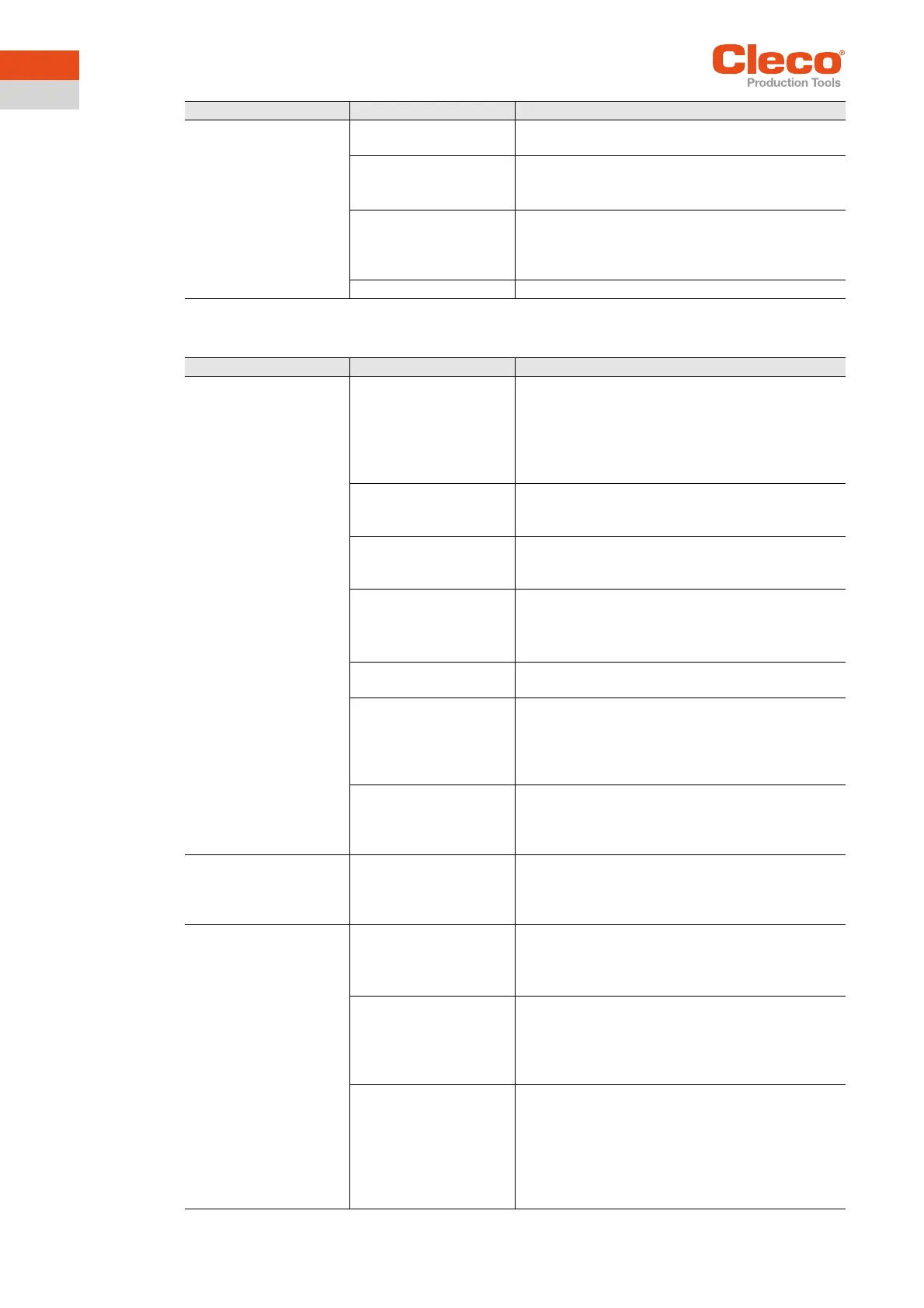
10.2 WLAN data communication between controller and tool
Expected number of
test rundowns is not
achieved with one
charge of the battery.
Battery is not fully
charged.
Use fully charged battery.
The warning threshold
for undervoltage is not
set to minimum value.
On the controller screen Tool Setup > Tool Set-
tings > Others > Battery.
Reduce the Undervoltage (V).
High torque is needed
during a fastening
sequence, e.g. for
coated fasteners.
If a high torque is needed for a longer period of
time, e.g. for several turns, the number of run-
downs that can be achieved with one battery
charge will be significantly reduced.
Battery is at end of life. Use new battery.
Problem Possible causes Remedy
Problem Possible cause Remedy for mPro400GCD (SW S168813)
No WLAN data commu-
nication between the
controller and tool.
The IP address of the
tool is not correctly
entered in the
controller.
1. On the controller screen Tool Setup, check
whether the IP address of the tool has been
entered in the field Type.
2. Otherwise, mark the line and <Edit>.
IP address of tool – see Tool in submenu Wireless
Settings.
Tool not yet parameter-
ized with the correct
WLAN settings.
Use LiveWire Utilities Configuration Software
to setup tool.
WLAN settings are dif-
ferent for tool and
access point.
Reconfigure the tool (network name, encryp-
tion, network key).
A filter for MAC
addresses is activated
at the Access Point.
Add the MAC address for the tool to the list of
approved addresses at the Access Point.
MAC adress of tool – see
• On the tool in the Wireless Settings submenu.
Port 4001 is disabled
by a firewall.
Configure the firewall such that the required
IP/MAC addresses can use port 4001.
The wireless channel at
the access point is out-
side the range sup-
ported by the tool.
Change the wireless channel setting at the
access point to the right wireless channel with
respect to country code. See Quick Installa-
tion Guide – CTBP & CTBA Data Transmis-
sion P2545K.
Tool is already
assigned to another
controller.
Check whether another controller already has
a connection to this tool. In other words,
another controller is using the same IP
address.
IP address cannot be
pinged.
IP Address already
exists in network. In this
case, the tool will not
build up a connection.
Check the physical connection (RSSI values).
Check the assigned IP address.
Occasional interrup-
tions in WLAN data
communication.
Distance between the
access point and the
tool is too great.
1. On the tool use WLAN icon to check signal
strength at the tool.
2. If necessary, reduce the distance between the
access point and the tool.
The tool is already
assigned to another
controller.
1. Check whether the tool (IP address) is also
assigned to another controller.
2. If yes, delete the assignment in the other
controller.
A tool can only be assigned to one controller.
Excessive data traffic
on WLAN Network.
Reduce data traffic on WLAN Network.
1. On the controller screen Basic, increase the
Trigger Torque.
2. On the controller screen disable the torque
graph data transmission:
Advanced > Controller > General > Trace
Recording



 To Next Page