Clickfree Portable Backup Drive for Macintosh: User Guide Restoring my content (HD)
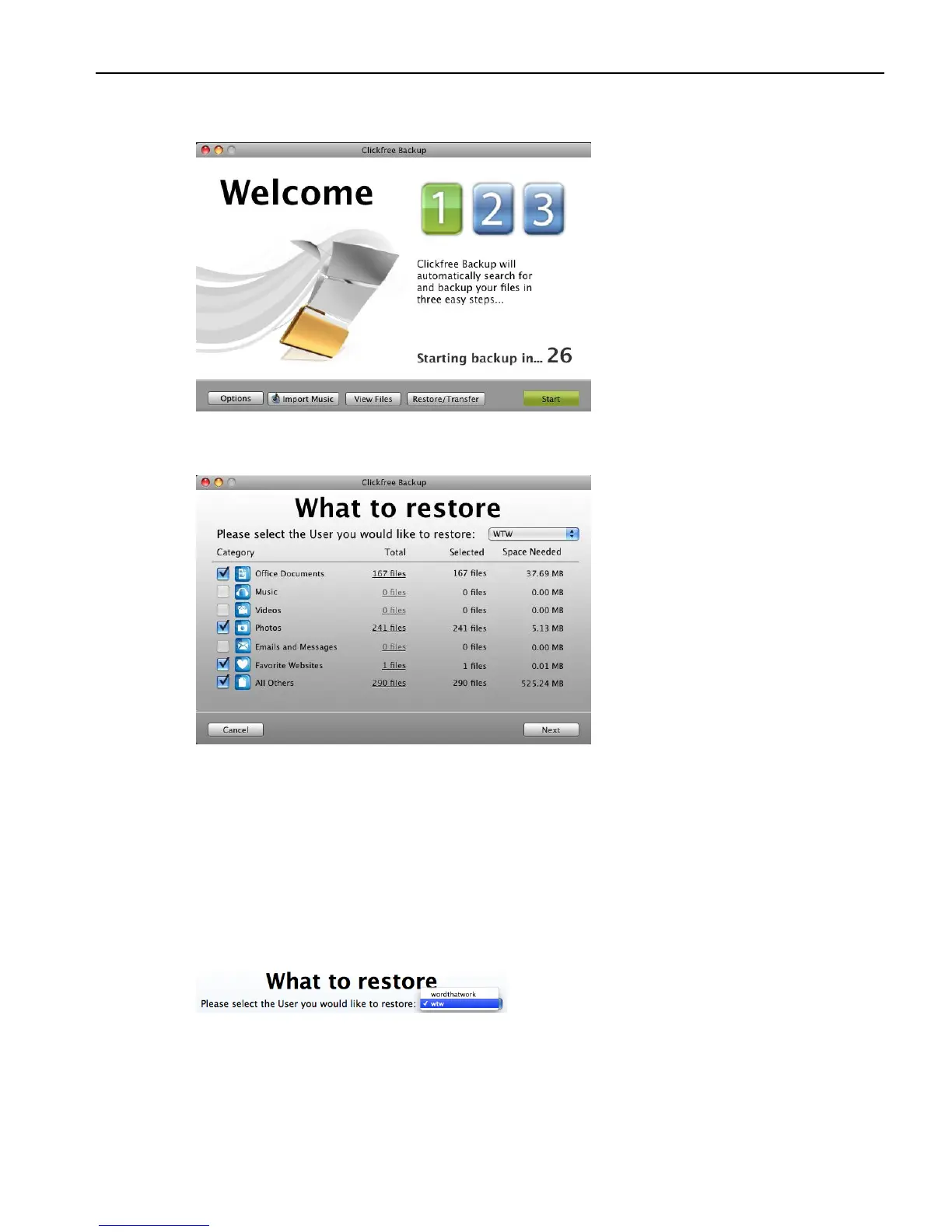
Because you have backed-up content on your Portable Backup Drive, the countdown
window now shows buttons at the bottom to allow you to View Files and Restore files.
5. Before the countdown gets to zero, click Restore/Transfer. The What to restore
window appears.
Note that all of the categories that have backed-up content are checked off in the
Categories column.
6. Before you click Next to restore all of your content, or select categories to be restored,
look at the user name in the Please select the User you would like to restore box.
If your Portable Backup Drive contains backups created for your user name, the Please
select the User you would like to restore box by default contains your user name, and,
unless you change it, the content to be restored will come from your user account.
7. Click the arrow at the right of the Restore From box:
The list that appears contains the names of all of the users whose files have been backed
up on your Portable Backup Drive.



 To Next Page