4 - WATER CONNECTIONS
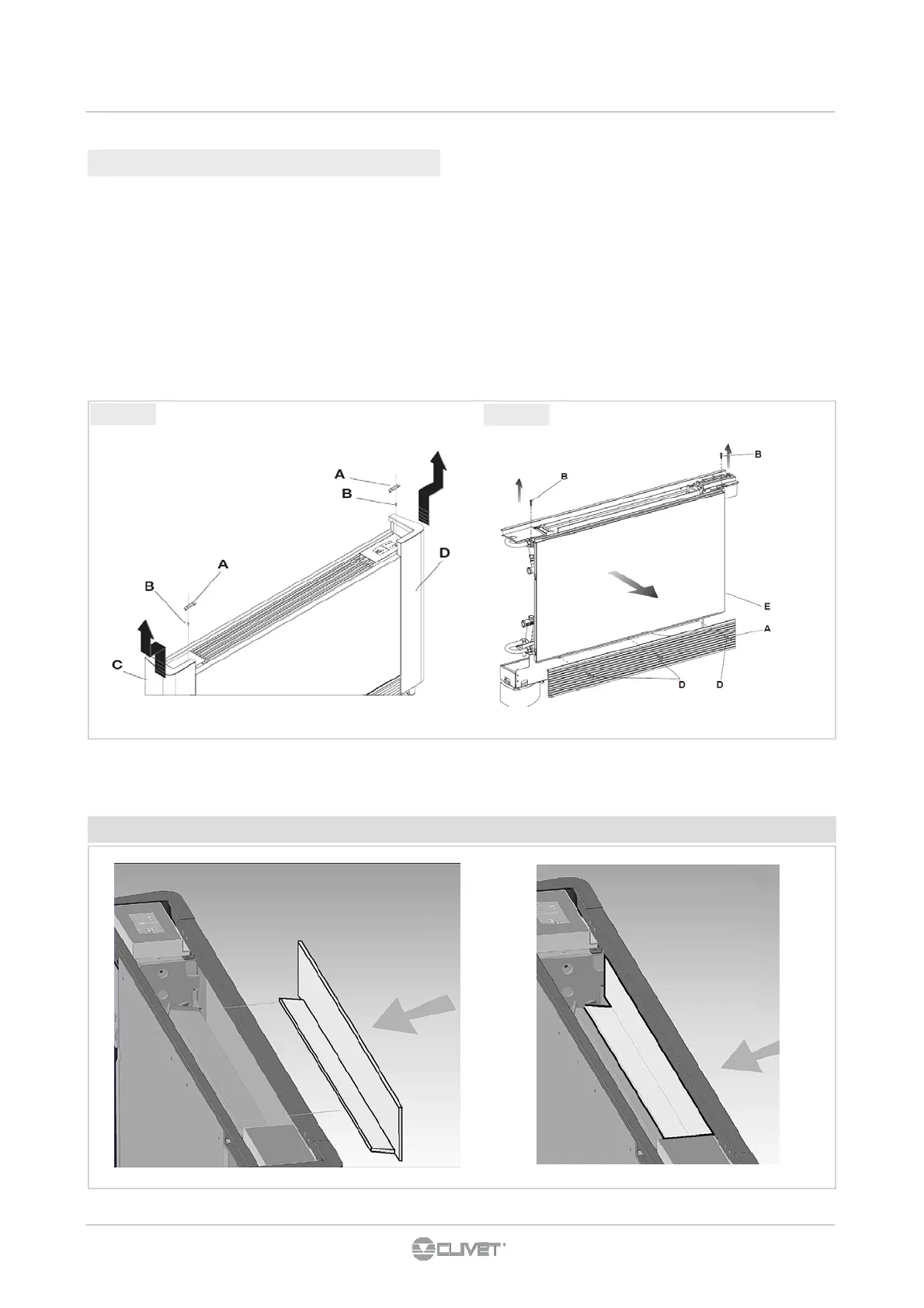
fig 4.4
fig 4.5
4.4.2 Dismounting control panel
• Position the system master switch to OFF.
• Dismount the door that accesses the collector units (fig.
20 ref. A) unscrewing the two fixing screws (fig. 4.6 ref. B).
• Dismount the control panel (fig. 4.6 ref. C) unscrewing the
two fixing screws (fig. 4.6 ref. D).
• Unplug the control board (fig. 4.6 ref. E).
• Unplug the connectors of the electrical connections.
• Remove the cables inside the machine and re-insert them
from the opposite side.
• For the motor connection, use the special cable for right
hand fixtures , available as an accessory.
• Invert the mounting positions of the door (fig. 4.6 ref. A) with
the control panel (fig. 4.6 ref. C) and remount them in their
respective positions.
• Dismount the condensation collection tray (fig. 4.6 ref. F)
and remount it on the opposite side with the relative fixing
screws (fig. 4.6 ref. G).
The insulating panel must be in the shown position , otherwise the battery is not crossed by air



 To Next Page