4
NOT SURE WHAT A FUNCTION DOES?
Refer to the How to Use Basic Functions
and How to Use Advanced Functions
sections of this manual for a detailed
description of how to use your air conditioner.
SPECIAL NOTE
Button designs on your unit may dier
slightly from the example shown.
If the indoor unit does not have a particular
function, pressing that function’
the remote control will have no eect.
TIPS FOR USING REMOTE CONTROL
The remote control must be used within 8
meters of the unit.
The unit will beep when remote signal is
received.
Curtains, other materials and direct
sunlight can interfere with the infrared
signal receiver.
Remove batteries if the remote control
will not be used more than 2 months.
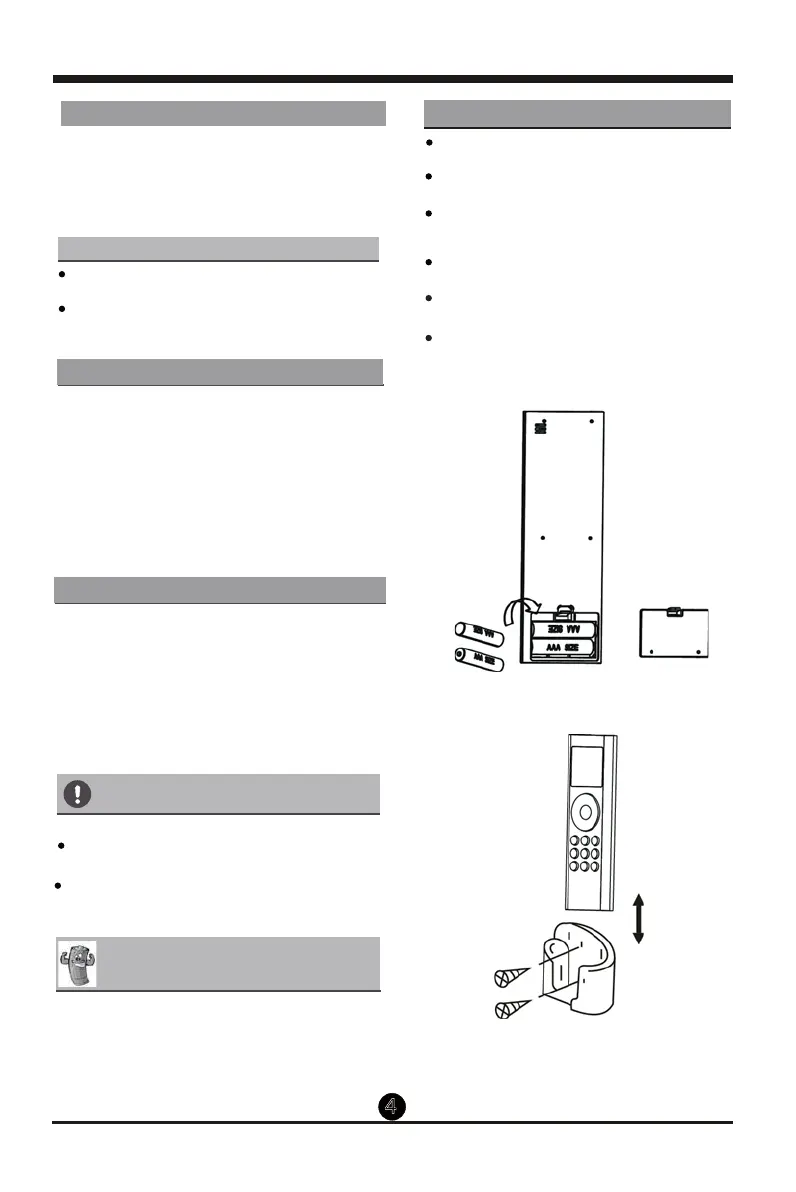
INSERTING AND REPLACING BATTERIES
INSTALLING REMOTE CONTROL HOLDER
Your air conditioning unit comes with two
AAA batteries. Put the batteries in the
remote control before use:
1. Remove the back cover from the remote
control, exposing the battery compartment.
2. Insert the batteries, paying attention to
match up the (+) and (-) ends of the
batteries with the symbols inside the
battery compartment.
3. Install the back cover on.
The remote controller can be attached to a wall
or stand by using a remote controller holder
(optional part, not supplied with the unit).
Before installing the remote controller, check
that the air conditioner receives the signals
properly.
the remote controller in the holder.
1.
2. Install the holder with two screws.
3. Put
BATTERY NOTES
For optimum product performance:
Do not mix old and new batteries, or
batteries of dierent types.
Do not leave batteries in the remote control
if you don’
more than 2 months.
BATTERY DISPOSAL
Do not dispose of batteries as unsorted
municipal waste. Refer to local laws for
proper disposal of batteries.
HANDLING THE REMOTE CONTROLLER
Remove the back cover
to install batteries
Put the remote controller
in the holder.
s button on
t plan on using the device for
.
Prevent any liquid from falling into the
remote controller
If other electrical appliances react to the
remote controller
appliances or consult your local dealer


 To Next Page