14
How To Use The Advanced Functions
The TURBO function makes the unit work
extra hard to reach your present temperature
in the shortest amount of time possible.
When you select TURBO feature in COOL
mode, the unit will blow cool air with
strongest wind setting to jump-start the
cooling process.
When you select TURBO feature in HEAT
mode, for units with Electric heat elements,
the Electric Heater will activate and
jump-start the heating process.
Airborne bacteria can grow in the moisture
that condenses around heat exchanger in
the unit. With regular use, most of this
moisture is evaporated from the unit.
When the self clean feature is activated,
your unit will clean itself automatically. After
cleaning, unit will turn o automatically.
You can use self clean feature as often as
you like.
Note: You can only activate this function
in COOL or DRY mode.
Self clean function
LOCK function
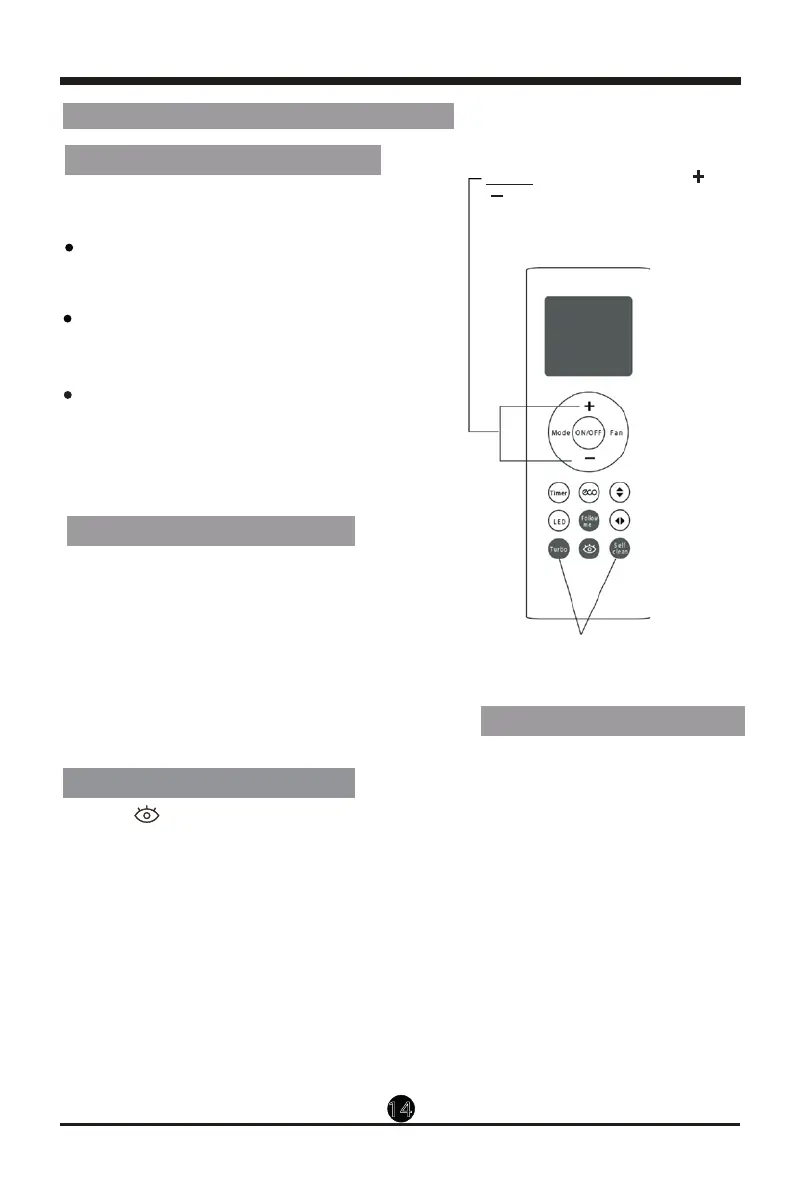
Press Turbo button and Self clean
button simultane ously for one second
to lock or unlock the keyboard.
Hold together for one second
to activate LOCK function
Hold down Turbo/Fresh button for 2 seconds,
the Fresh feature will be activated. The
Ionizer/Plasma Dust Collector(depending on
models) is energized and will help to remove
pollen and impurities from the air (For model
RG66B4(2H)/BGEF only).
TURBO function(TURBO/FRESH) function
Note: The Intelligent eye function will stop if
you press the other buttons except Timer and
LED buttons.
INTELLIGENT EYE function
Press the button to activate wind flow
follow people feature, the fan speed is Auto,
and the auto swing feature is activated.
Press it again to stop and activate the wind
flow away people feature. The fan speed is
Auto, and the auto swing feature is turned off.
Press it the third time to stop the wind flow
away people feature.
NOTE: Press and hold Temp and
buttons together for 3 seconds will
alternate the temperature display
OO
between the C & F scale.


 To Next Page