9
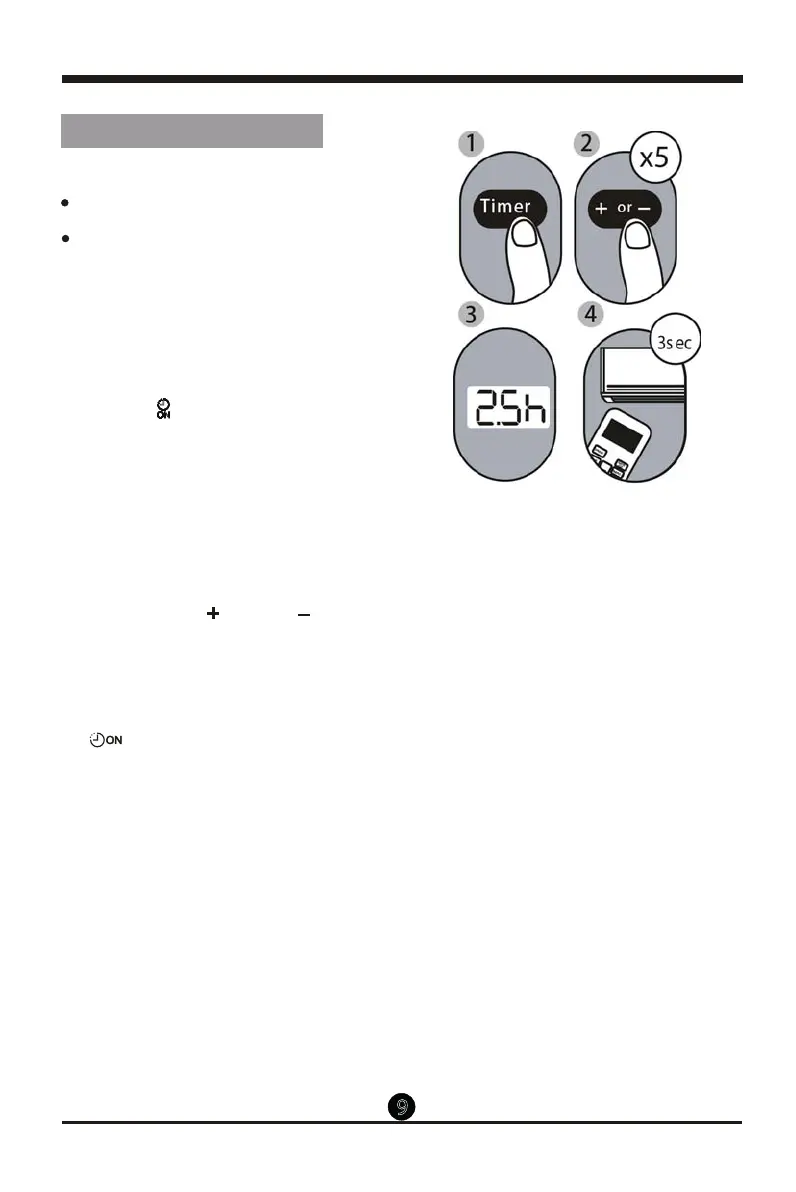
Example: Setting unit to turn on after 2.5
hours.
2.
Press the Temp or Temp button
repeatedly to set the time when you want
the unit to turn on.
3. Wait 3 seconds, then the TIMER ON
function will be activated. The digital
display on your remote control will then
return to the temperature display. The
" " indicator
remains on and this
function is activated.
TIMER ON function
The TIMER ON function allows you to set
a period of time after which the unit will
automatically turn on, such as when you
come home fr om work.
Your air conditioning unit has two
timer-related functions:
TIMER ON - sets the amount of timer after
which the unit will automatically turn on.
TIMER OFF - sets the amount of time after
which the unit will automatically turn o.
Setting the TIMER function
1.
This number indicates the
amount of time after the current time
that you want the unit to turn on.
For example, if you set TIMER ON for
2.5 hours, will appear on the
screen, and the unit will turn on after
2.5 hours.
Press the
Timer
button, the Timer on
indicator" "
displays and ashes.
By
default, the last
time period that you set
and an "h" (indicating hours)will appear
on the display.
Note:
" 2.5h "


 To Next Page