M08P40G16-00 WSH-XEE2 10.2-120.2 27
7 Control
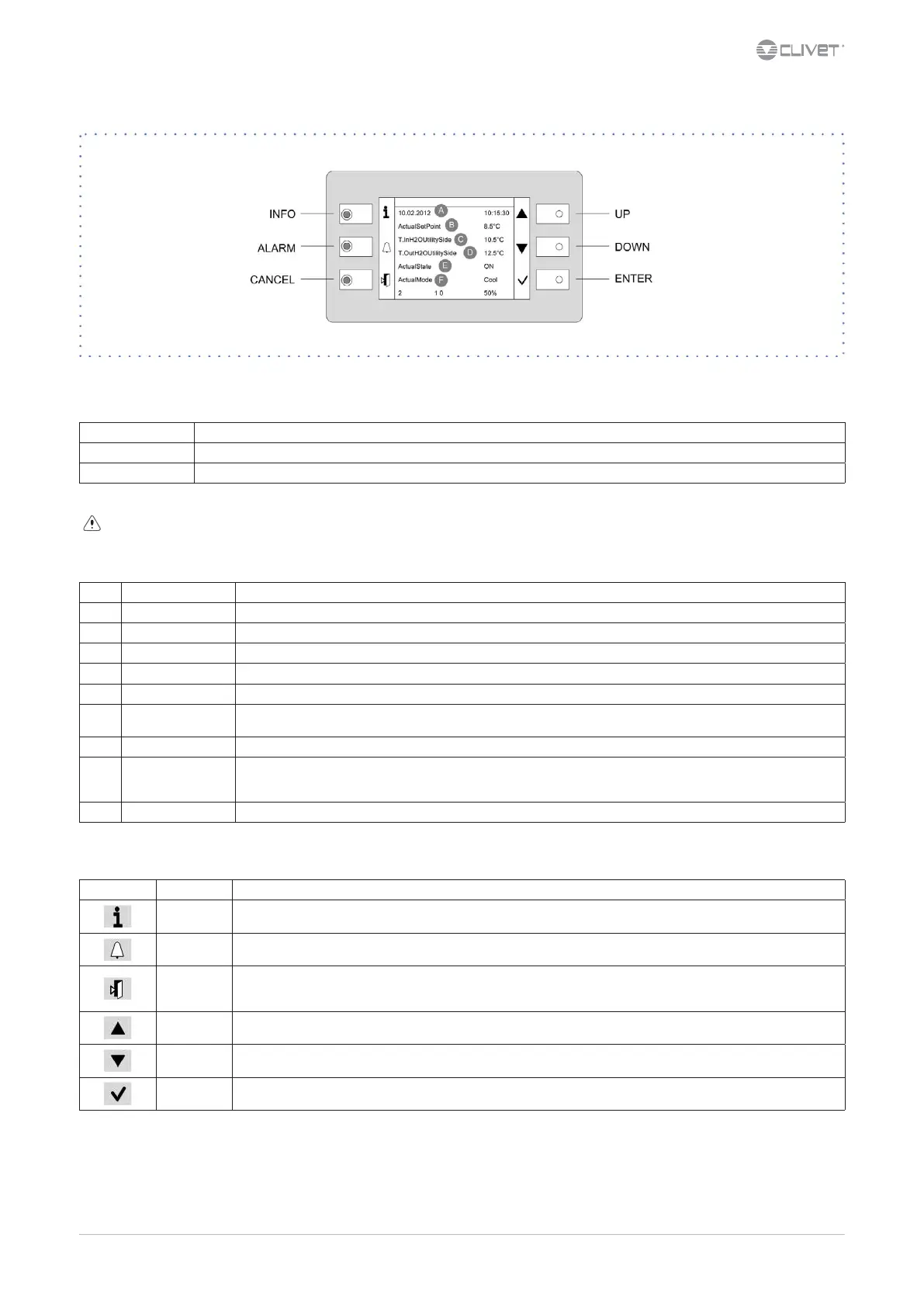
7.1 Led
INFO Not used
ALARM Blink / xed = alarm present
CANCEL not used currently
Heat: Heating (not used)
7.2 Display
Ref. Variable Description
A Date - Time
B ActualSetPoint Temperature setting
C T.InH2OUtilitySide Water inlet temperature utility side
D T.OutH2OUtilitySide Water outlet temperature utility side
E ActualState On / o / eco / pmp On
F ActualMode
Cool: water cooling
Heat: HEATING
2 Installed compressors
1 - 0
Compressors ON
example: circuit 1 = 1 compr. On
circuit 2 = 0 compr. On
50% Heating capacity
7.3 Keys
Symbol Name Description
Info Main menu
Alarm Alarm display
Cancel
Exit
Previous level
Keyboard settings
Up Increases value
Down Decreases value
Enter
Conrm
Password



 To Next Page