M08P40G16-00 WSH-XEE2 10.2-120.2 29
7.7 Scheduler
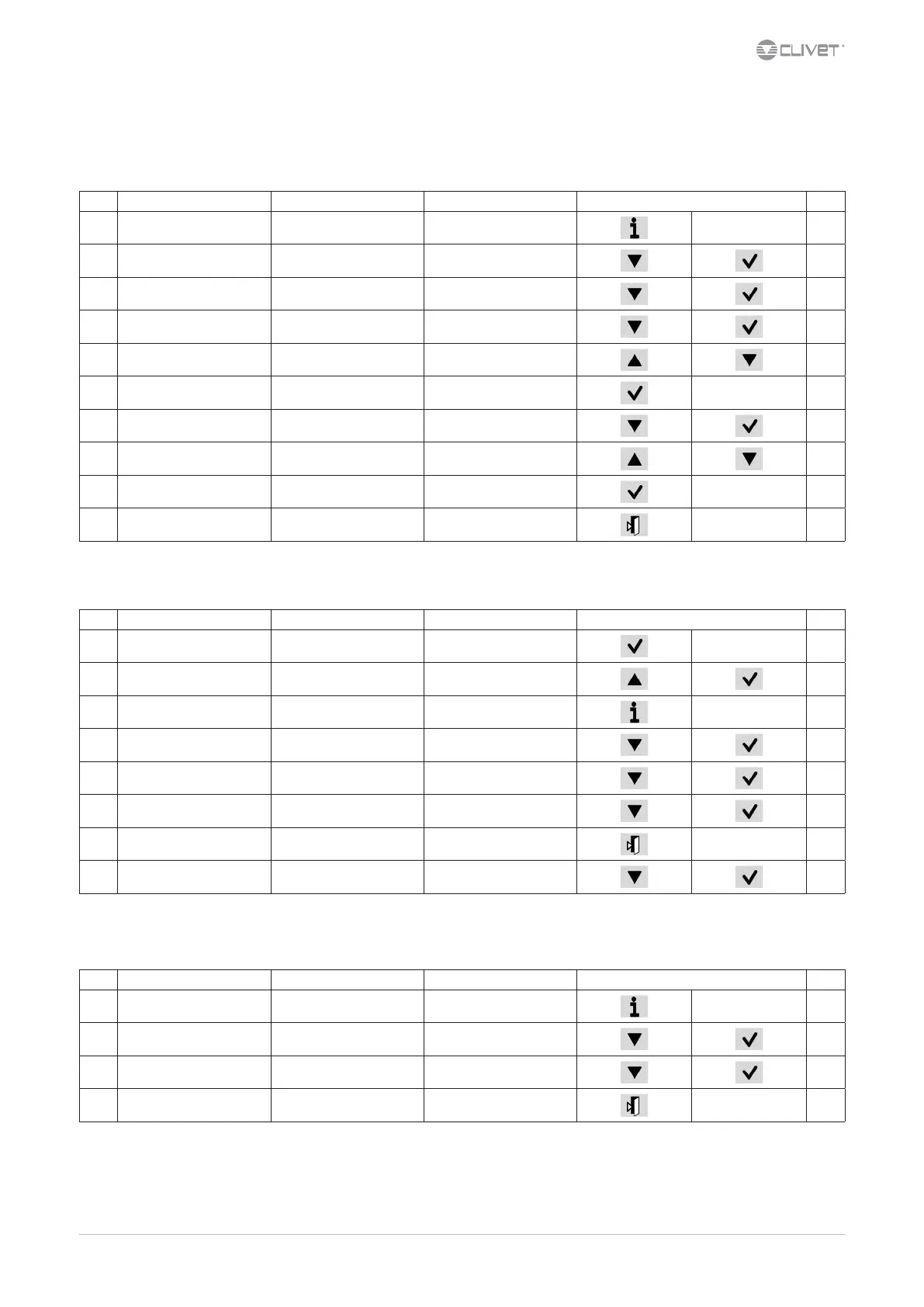
It is possible to set 6 events (O, Eco, On, Recirculating) for each week day.
Step Display Action Menu/Variable Keys Notes
1 Press
2 Main menu Select Scheduler
3 Scheduler Select Day
4 Select Time
5 Set Event time
6 Conrm
7 Select Value
8 Set On/Eco..
9 Conrm
10 Exit
Enable Scheduler
Step Display Action Menu/Variable Keys Notes
1 Press 3 sec.
2 Password Set Password
3 Press *
4 Main menu Select Unit Parameters
5 Select Option cong
6 Set P0052=1
7 Press 3 sec.
Select Local connections
* Unit Parameters menu is displayed
7.8 Display the status
Step Display Action Menu/Variable Keys Notes
1 Press
2 Main menu Select Machine State
3 Select General, circuit, ecc..
4 Exit




 To Next Page