Cloud drive intelligent technology Co.,Ltd
Empower and serve the global eBike industry
Business Cooperation
Jim@clouddrive.tech
Page
5
of 19
4. Button Definition
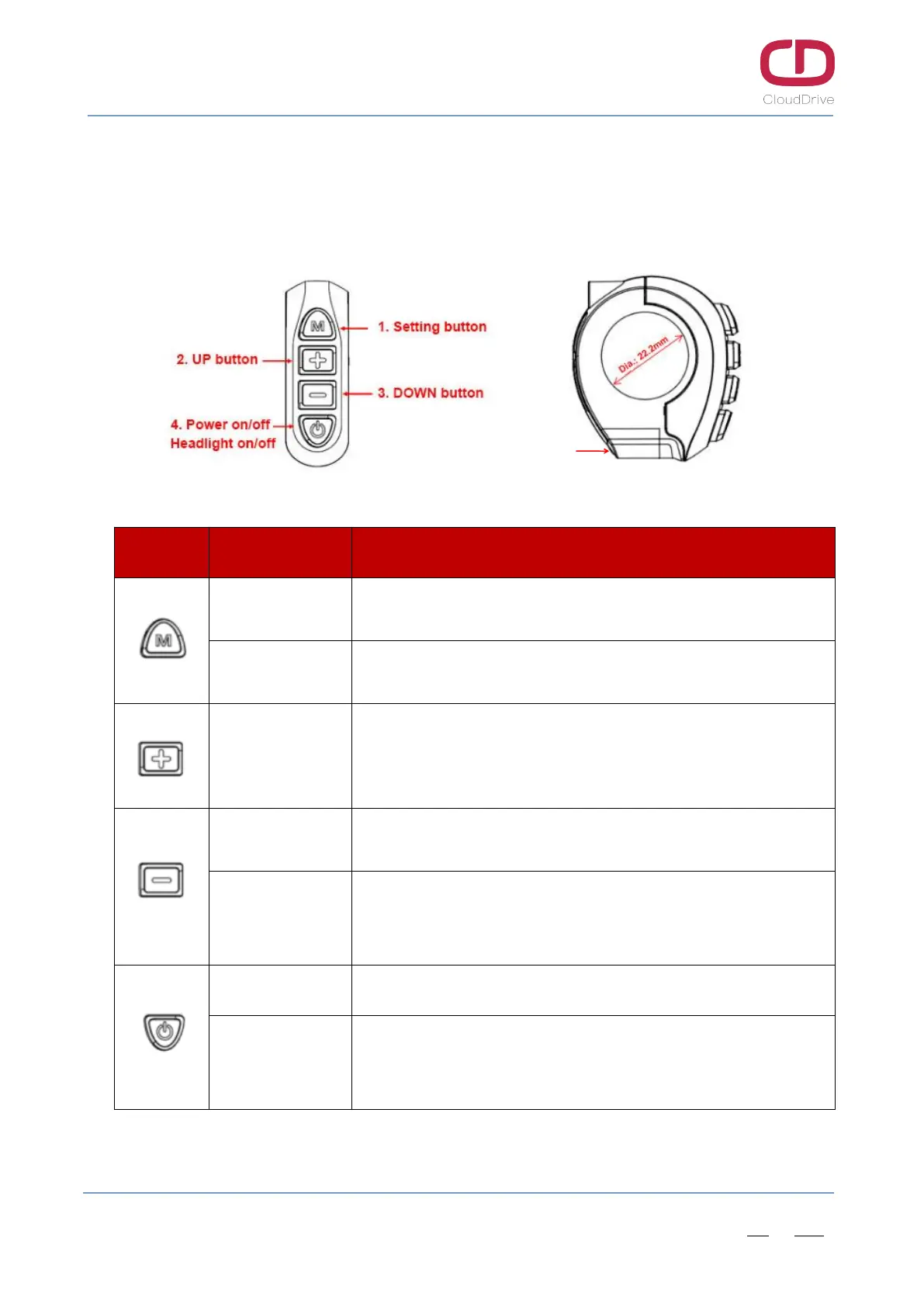
The equipped CDButton2 has four buttons, including M(setting) button, UP button, DOWN button
and POWER button.
Figure4-1 Button definition
Button Operation Functions
Long press 3s
- While in main interface, enter the setting menu;
- While in setting interface, back to the main interface.
Click
- While in main interface, turn on/off USB charging function;
- While in setting interface, it is OK and interface switch function;
Click
- While in main interface, increase the PAS level;
- While in setting interface, switch options;
- While in password interface, increase the password number.
Long press 3s
- While in main interface at level 0, start 6km/h walk assistance
function (release the button to cancel this function).
Click
- While in main interface, decrease the PAS level;
- While in setting interface, switch options;
- While in password interface, decrease the password number.
Long press 3s - Power off when in any interface.
Click
- While under power-off state, power on;
- While in main interface, turn on/off headlight;
- While in power-on password interface, switch password digits.
Table2- Button functions definition
/USB charging on/off
USB charging port


 To Next Page