www.clouddrive.tech
Empower and serve the global eBike industry
Business Cooperation
Jim@clouddrive.tech
Page
10
of 19
7. General Setting
7.1. Speed unit setting
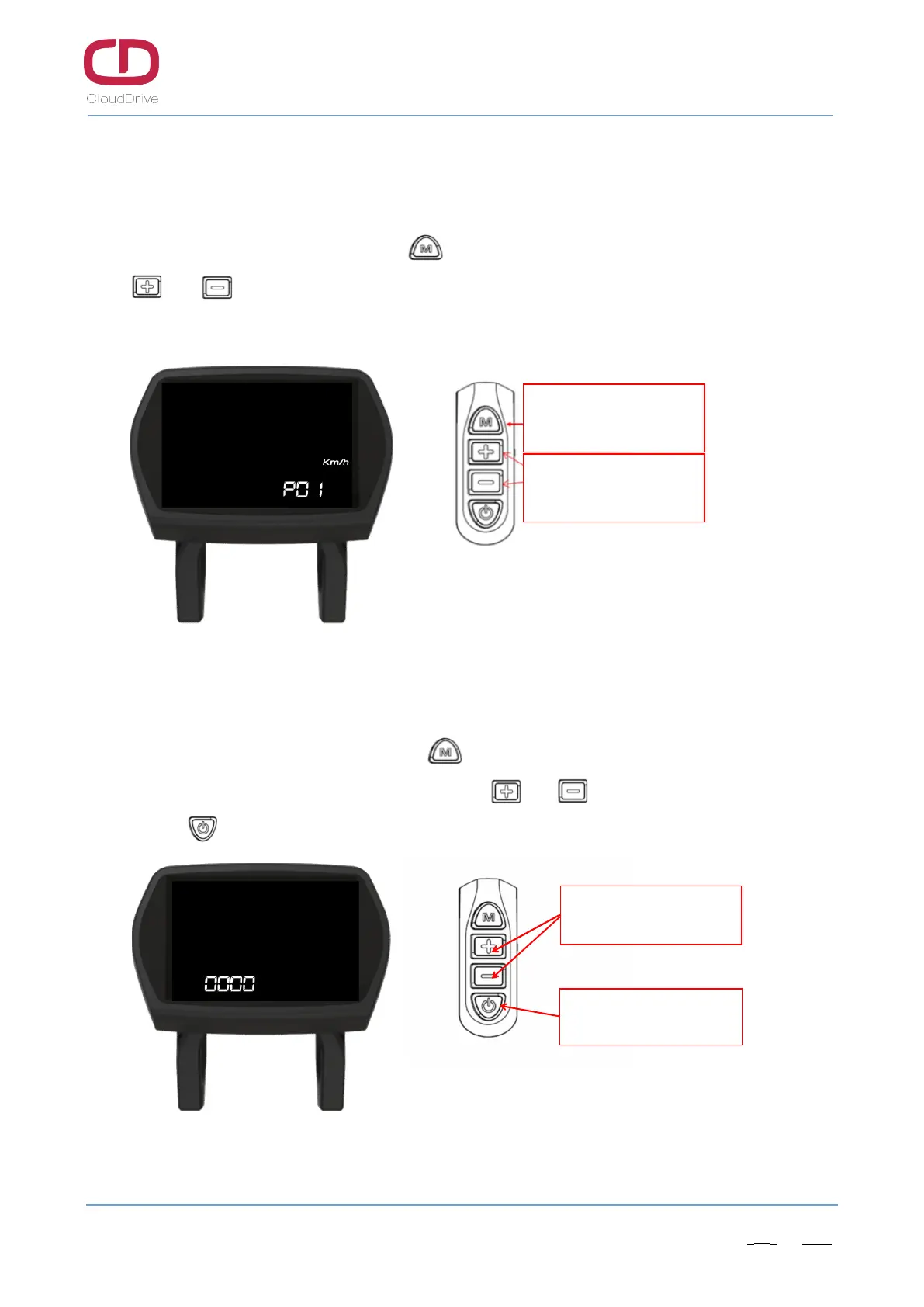
Under power on condition, long press button for 3s to enter the speed unit setting interface,
click or button to switch the speed unit(Km/h or MPH), default speed unit is Km/h. If no
operation within 6 seconds, current interface will exit automatically and back to main working interface.
Figure7-1 Speed unit setting interface
7.2. Password input interface of setting menu
After finish the speed unit setting, click button to enter the password input interface of
setting menu. Input the default password 1919. Click or button to change the password
number, click button to switch the digits.
Figure7-2 Password input interface of setting menu
电源键切换位数
加减键调数值
Click UP or DOWN button to
change the password number
Click POWER button to switch
the password digits.
Under power-on condition,
long press M button to enter
the speed unit setting interface
Click UP or DOWN button to
switch the speed unit


 To Next Page