Save a Contact from a Recent Call
• Message .................................................................................................... 8
Send a Message
Receiving a Message
• Camera ........................................................................................................ 8
• Gallery ........................................................................................................... 9
View Pictures and Videos
Edit Pictures and Videos
Share Pictures and Videos
Settings
• Network & Internet .......................................................................... 10
Wi-Fi
Mobile Network
Airplane Mode
Hotspot and Tethering
• Connected Devices .......................................................................... 11
Pair a New Device
View Previously Connected Devices
Connection Preferences
Bluetooth®
Device Name
Pair a Bluetooth Device
Cast
Printing
Locate a File Received via Bluetooth
Nearby Share
Device Visibility
Data
Sharing Options
• Apps .............................................................................................................. 14
Default Apps
Screen Time
Unused Apps
Special App Access
• Notifications .......................................................................................... 15
App Settings
Notification History
Conversations
Device and App Notifications
Notifications on Lock Screen
Home Screen
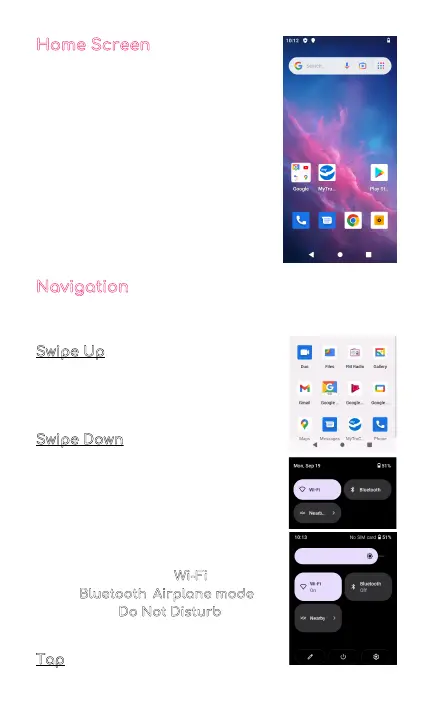
The home screen will look similar
to the picture to the right.
• To switch between screens, simply
slide your finger across the touch
screen.
• The home screen contains
shortcuts to your most-used
apps and widgets.
• The status bar displays system
information, such as current time,
wireless connectivity and phone
battery.
Navigation
The touch screen responds best to a light touch. Do not
use excessive force or other objects on the touchscreen.
Swipe Up
When you swipe up, all your apps will
appear. Here, you can see all your
available apps.
Swipe Down
When you swipe in a downwards
motion on your screen, you can
quickly review your notifications
in the Notification Panel.
Swipe down again to display the fast
access menu, where you can modify
the functions such as Wi-Fi
, Battery
Saver, Bluetooth
, Airplane mode,
Auto-rotate, Do Not Disturb
, and
brightness.
Tap
Lightly tap on apps to select or launch them.
5



 To Next Page