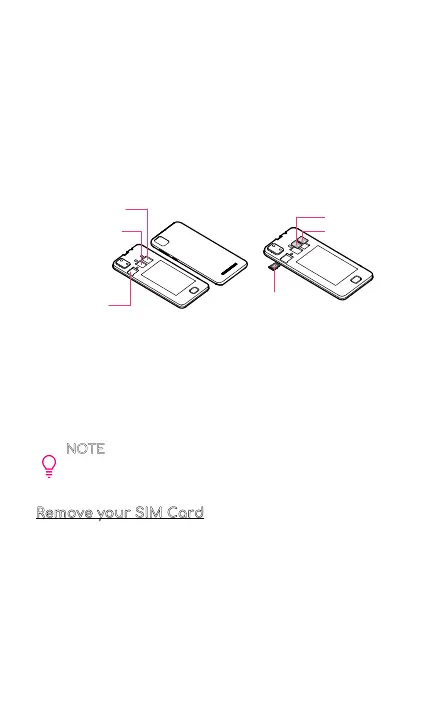
4. Place the back phone cover aside. You’ll need it later.
5. Find the SIM card slots located in the middle of your
phone. Each slot is labeled with a number (1 or 2).
6. Gently slide the SIM card into the slot with the numeric
label of “1” .
7. If you have a second SIM card, slide the SIM card into
the other slot. Make sure the SIM card's gold chip is
facing down. The phone only requires one SIM card to
be operational. Dual SIM is supported.
8. After the SIM card is inserted, reattach the back
cover to your phone by applying light pressure to the
back panel. Make sure to press the cover back into
place. Once your SIM card is installed, turn on your
phone, and wait a few minutes for your phone to find
a network.
NOTE
To avoid damage to phone, do not use any
other kind of SIM card, or any non-standard Nano
SIM card cut from a SIM card.
Remove your SIM Card
1. Place your phone screen side down. Make sure it is on
a soft and dry surface.
2. Locate the cut-out slot at the bottom left corner of
your phone.
3. Insert your fingernail into the cut-out slot to remove
the back cover of your phone.
4. Place the back phone cover aside. You'll need it later.
5. Find your SIM card you want to remove.
6. Press on your SIM card to lift the cover and gently
remove your SIM card.
2
SIM Card 2 Slot
SIM Card 1 Slot
Memory SD
Card Slot
SIM Card 2
SIM Card 1
Memory
SD Card



 To Next Page