
 Need help?
Do you have a question about the CME WIDI JACK and is the answer not in the manual?
Improper connection may cause damage to the device.
Copyright © 2021 CME Pte. Ltd. All rights reserved. CME is a registered trademark.
CME provides a one-year standard Limited Warranty for this product against defects.
Precautions to avoid injury or death from electrical shock, fire, or other hazards.
Lists available optional cables for WIDI Jack with model, description, and image.
Explains the meaning of the LED lights on the WIDI Jack device.
Instructions on how to add Bluetooth MIDI functionality to standard MIDI devices.
Steps to connect two WIDI Jack devices wirelessly.
Instructions for connecting WIDI Jack with devices that have built-in Bluetooth MIDI.
Guide to connecting WIDI Jack with macOS devices.
Instructions for connecting WIDI Jack with iOS devices using the 'midimittr' app.
Steps for connecting WIDI Jack with Windows 10 computers.
Guide to connecting WIDI Jack with Android devices using the 'MIDI BLE Connect' app.
How to set up group connections for multiple WIDI Jacks.
The WIDI Jack is a versatile wireless Bluetooth MIDI interface designed to add Bluetooth MIDI capabilities to a wide range of MIDI devices. It facilitates both transmitting and receiving MIDI data wirelessly, making it a valuable tool for musicians and producers looking to integrate their existing MIDI equipment into a modern wireless setup.
The primary function of the WIDI Jack is to enable Bluetooth MIDI communication for devices that typically rely on physical MIDI connectors. This includes a broad spectrum of instruments and equipment such as synthesizers, MIDI controllers, keytars, electric wind instruments, v-accordions, electronic drums, electric pianos, electronic portable keyboards, audio interfaces, and digital mixers. Beyond connecting to other WIDI Jack units, it can also establish connections with devices and computers that have built-in BLE MIDI functionality, such as standard Bluetooth MIDI controllers, iPhones, iPads, Mac computers, Android mobile phones, and PC computers.
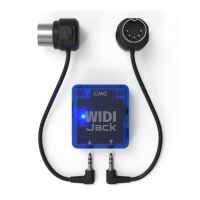
The WIDI Jack interface features two 2.5mm mini TRS MIDI sockets and a USB-C power supply socket. One TRS socket, marked with a downward-pointing triangle, is designed to connect to the MIDI OUT of a MIDI device using an optional accessory cable. This connection serves a dual purpose: it receives MIDI information from the device and, in many cases, draws power for the WIDI Jack. The MIDI data received is then converted into Bluetooth MIDI messages and transmitted to other compatible devices. The second TRS socket, marked with an upward-pointing triangle, connects to the MIDI IN of a MIDI device via another optional accessory cable. This allows the WIDI Jack to send received Bluetooth MIDI messages to the connected MIDI device.
Powering the WIDI Jack is flexible. If the MIDI OUT socket of the connected MIDI device provides sufficient power (typically 3.3v-5v), the WIDI Jack can draw its power directly from this connection. However, if the MIDI OUT does not supply power, or if the WIDI Jack is only connected to a MIDI IN socket (which typically does not provide power), a standard 5-volt USB power source (such as a charger, power bank, or computer USB socket) can be used via the USB-C socket. It's important to note that the USB-C socket is solely for power supply and does not support data transfer.
The device also includes an on/off switch and a slide switch. The slide switch, located on the back of the WIDI Jack, is crucial for adapting to different TRS MIDI cable specifications. It allows users to switch the input polarity of the mini TRS jack between Type-A and Type-B, ensuring compatibility with most TRS MIDI devices on the market. This feature addresses a common challenge in MIDI connectivity, where different manufacturers might use varying wiring standards for their TRS MIDI ports.
The WIDI Jack offers several usage features that enhance its versatility and user experience:
LED Indicator: A multi-color LED provides visual feedback on the device's status. When power is supplied normally, the LED lights up. A slow blue flash indicates that the device has started successfully and is awaiting a connection. A constant blue light signifies a successful connection. Rapid blue flashes indicate that the device is in central mode, connected, and actively sending or receiving MIDI messages. A light blue (turquoise) LED also indicates central mode with connections to other peripheral devices. A green LED signals firmware upgrade mode, prompting users to use the WIDI App for updates.
Quick Operations: A push switch on the right side of the interface enables quick operations, particularly useful for troubleshooting or specific setup configurations. For instance, if the WIDI Jack is not powered on, pressing and holding the button while powering it on until the green LED flashes three times will reset the device to factory defaults. If the WIDI Jack is already powered on, pressing and holding the button for three seconds will set it to "force peripheral" mode, terminating any existing connections to other BLE MIDI devices. These operations require firmware v0100 or higher.
Magnetic Attachment: The WIDI Jack incorporates a magnet inside its back, allowing it to be easily attached to a MIDI device using an included magnet patch accessory. This provides a convenient and secure way to mount the interface directly onto the equipment it's connected to.
Connecting Multiple WIDI Jacks: Two WIDI Jacks can automatically connect to each other, enabling wireless MIDI communication between two standard MIDI devices. Once both devices are powered on, the WIDI Jacks will pair, and their blue LEDs will transition from slow flashing to constant light, flashing in sync with MIDI data transmission.
Connecting with Bluetooth MIDI Devices: The WIDI Jack can automatically connect with other Bluetooth MIDI devices that have built-in BLE MIDI modules. This includes a variety of standard Bluetooth MIDI controllers.
macOS X Connectivity: For macOS users, the WIDI Jack integrates seamlessly. After powering on the MIDI device with the WIDI Jack, users can connect through the Audio MIDI Setup utility. The WIDI Jack will appear in the MIDI studio window, and clicking "Connect" will establish the Bluetooth MIDI link. It's recommended to keep the MIDI studio running in the background to maintain the connection, as macOS might disconnect it to optimize resources if no music software is active.
iOS Device Connectivity: iOS users can connect the WIDI Jack using the free "midimittr" application (or any other app with Bluetooth MIDI connection functionality). After enabling Bluetooth on the iOS device and powering on the WIDI Jack, the "midimittr" app can discover and pair with the WIDI Jack. Once connected, the app can be minimized, and other music applications can use the WIDI Jack as a MIDI input device.
Windows 10 Connectivity: Connecting the WIDI Jack to Windows 10 requires music software that integrates Microsoft's UWP API for Bluetooth class-compliant MIDI drivers. While many applications don't yet support this directly, alternative solutions exist, such as using the Korg BLE MIDI driver. From firmware v0.1.3.7 onwards, WIDI Jacks are fully compatible with the Korg BLE MIDI Windows 10 driver, supporting multiple WIDIs simultaneously. The process involves downloading and installing the Korg driver, upgrading WIDI firmware, and then connecting through Windows Bluetooth settings.
Android Device Connectivity: Similar to Windows, Android music apps need to integrate the universal Bluetooth MIDI driver. Since this is not always the case, users can employ dedicated apps like "MIDI BLE Connect" as a bridge. After enabling Bluetooth on the Android device and powering on the WIDI Jack, the app can scan for and connect to the WIDI Jack, allowing other music apps to utilize it as a MIDI input.
Group Connection (Multiple WIDI Devices): WIDI Jack supports group connections for advanced setups, enabling two-way data transmission for 1-to-4 MIDI Thru and 4-to-1 MIDI merge. This feature, available from firmware v0100 and higher, allows for simultaneous use of multiple groups. The setup process involves using the WIDI App (iOS/Android) to upgrade firmware, set each WIDI Jack to "force peripheral" role, rename them, and then create and configure groups by dragging WIDI Jacks to central and peripheral positions within the app. The group settings are saved in each WIDI Jack, allowing them to automatically connect as a group upon subsequent power-ons.
The WIDI Jack is designed for ease of use and minimal maintenance, with key features focused on ensuring reliable performance:
Firmware Upgrades: The device supports over-the-air firmware upgrades using the WIDI App available on iOS and Android. This allows users to keep their WIDI Jack updated with the latest features, bug fixes, and compatibility improvements, ensuring long-term usability and performance. Regular firmware updates are crucial for maintaining optimal functionality, especially as new Bluetooth MIDI standards or operating system updates are released.
Factory Reset: The quick operation feature to reset to factory defaults is a valuable maintenance tool. If the device encounters unexpected behavior or configuration issues, a factory reset can often resolve these problems by returning the WIDI Jack to its initial settings.
Troubleshooting Polarity Issues: The slide switch for TRS MIDI polarity adjustment is a built-in troubleshooting mechanism. If MIDI messages are not being sent or received correctly between the WIDI Jack and a connected MIDI device, users can easily switch the polarity to match the cable and device specifications, resolving potential communication issues without needing external adapters or complex diagnostics.
Compatibility Support: CME emphasizes ongoing compatibility support. If users encounter issues with automatic pairing with other Bluetooth MIDI devices or experience unstable connections, they are encouraged to contact CME through BluetoothMIDI.com for technical assistance. This commitment to support helps users overcome potential compatibility challenges that can arise in the diverse ecosystem of MIDI and Bluetooth devices.
Connection Stability and Latency Management: The manual provides guidance on addressing connection instability or noticeable latency, particularly after firmware or operating system updates. It recommends clearing previous Bluetooth pairing caches and restarting Bluetooth on the host device (iOS/macOS) to establish a fresh, stable connection. This proactive advice helps users maintain optimal performance.
Environmental Considerations: The manual highlights that wireless connection distance, latency, and signal intermittency can be affected by strong interference or obstructions in the environment, such as trees, reinforced concrete walls, or electromagnetic waves. While not a maintenance feature of the device itself, this information helps users understand and mitigate environmental factors that could impact performance, guiding them to optimize their setup for reliable wireless MIDI.
In summary, the WIDI Jack is a robust and adaptable wireless MIDI interface that extends the capabilities of traditional MIDI devices into the wireless realm. Its thoughtful design, including flexible power options, polarity switching, and comprehensive connectivity features across various operating systems, makes it a powerful tool for modern musicians. Coupled with accessible firmware updates and dedicated support, it aims to provide a seamless and reliable wireless MIDI experience.
 General
| Type | Wireless MIDI Jack |
|---|---|
| Connectivity | Bluetooth |
| Bluetooth Standard | Bluetooth 5 |
| MIDI Ports | 5-Pin DIN |
| Latency | 3ms |
| Range | Approx. 20 meters |
| Power Supply | USB-C |
| Charging | USB-C |
| Connectors | 5-Pin DIN, USB-C |

 To Next Page