11
EN
Use While Traveling
You should try to use SpinaLogic at the same time every day.
The clock inside the device counts each day starting at midnight Pacific
Standard Time (PST), 7:00 AM Greenwich Mean Time (GMT), and will only
allow one treatment every 24 hours. If you travel outside of your normal
time zone, you should try to treat at the same time you normally would
at home. Do not take the SpinaLogic device through airport x-ray
machines because the x-rays may damage the device.
Troubleshooting Information
If you hear beeps before your 30-minute treatment is complete, there
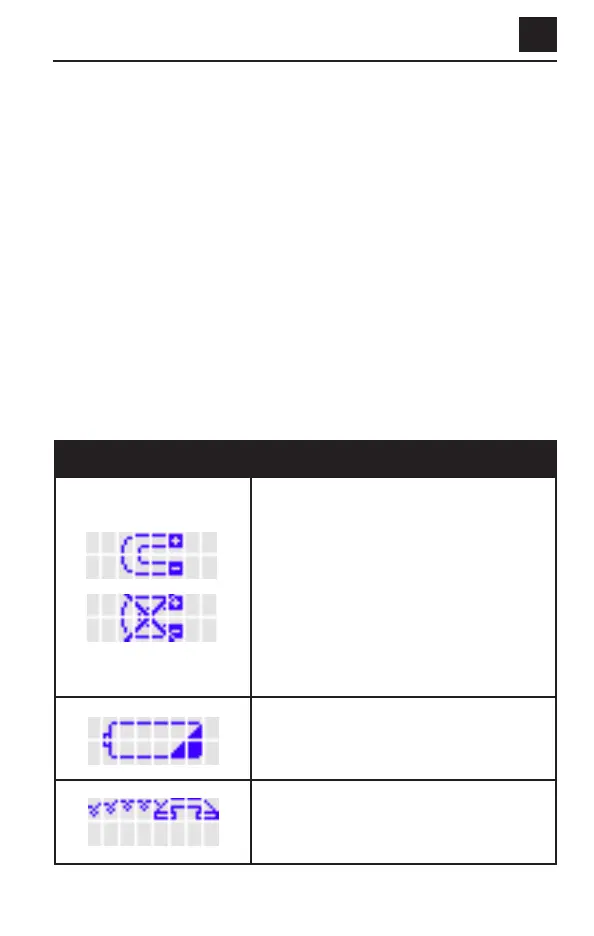
may be a problem with your device. Look at the LCD screen for a picture.
Table 1 below shows pictures that may appear on the LCD screen and
other common problems (left side of table). The action to take for each
picture or problem is on the right side of the table.
TABLE 1. DISPLAY MESSAGES
(Troubleshooting continues on page 12)
DISPLAY PICTURE ACTION TO BE TAKEN
Magnetic Interference – announced by
three beeps. The “X” will flash.
1. If the device looks damaged, call
Customer Care.
2. If not, try moving to another location in
your house. Make sure you are not near
metal objects.
3. If the picture is still displayed, replace
the batteries with new ones.
4. If the device still shows the picture, call
Customer Care.
Replace Battery – announced by three
beeps. Replace the batteries with new ones.
Phone For Help – announced by three
beeps. Call Customer Care.


 To Next Page