10
Section 4 Maintenance & Service
4C-2.ReplacinganOzoneModule
1. Open the DEL AOP 50 as described in SECTION 4C-1.
2. Locate the Ozone Modules on the left wall of the enclosure.
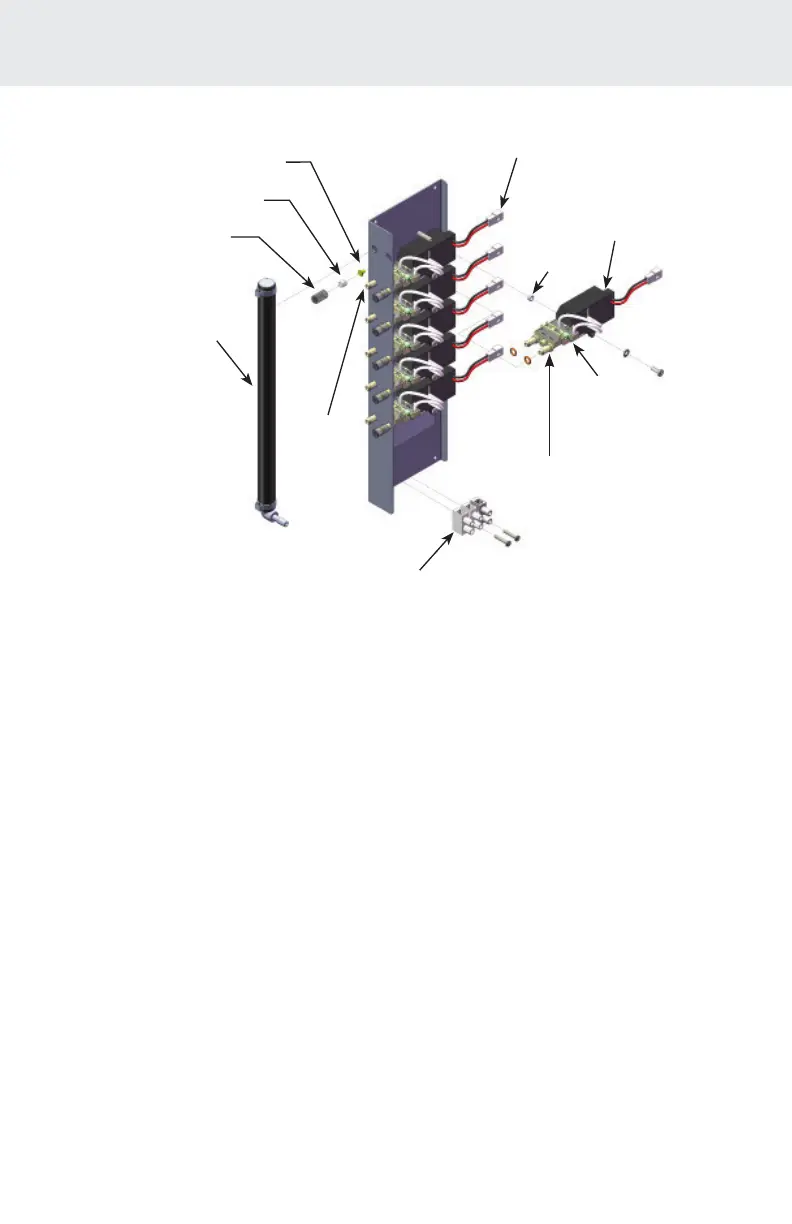
3. Remove the Filter Cap Assembly from the right tube tting of the
Ozone Module. Make sure you keep the Cap, Filter and Orice
together.
4. While holding the Ozone Outlet Manifold, gently pull the left tube
tting out of the manifold and both tube ttings through the holes
in the Ozone Module Bracket. Let the Ozone Module hang down.
5. Disconnect the Ozone Gas Line and unscrew the two front
mounting screws of the Ozone Bracket. Swing the ozone Bracket
forward and locate the Power Connector (black and red wires)
from the Module Power Supply and disconnect from the wire
harness. Refer to Figure 6.
6. Unscrew the Ozone Module from the Module Bracket and remove
the Module assembly from the unit.
7. Install the new Ozone Module by reversing the above steps. Refer
to Figure 5 for visual instruction. Do not misplace spacer.
POWER
CONNECTOR
FILTER
OZONE
OUTLET
MANIFOLD
TERMINAL
BLOCK
OZONE
MODULE
OZONE
MODULE
LIGHT
MODULE POWER
SUPPLY
TUBE
FITTING
Figure5:OzoneGeneratorSubassembly
CAP
ORIFICE
SPACER



 To Next Page