Page 4
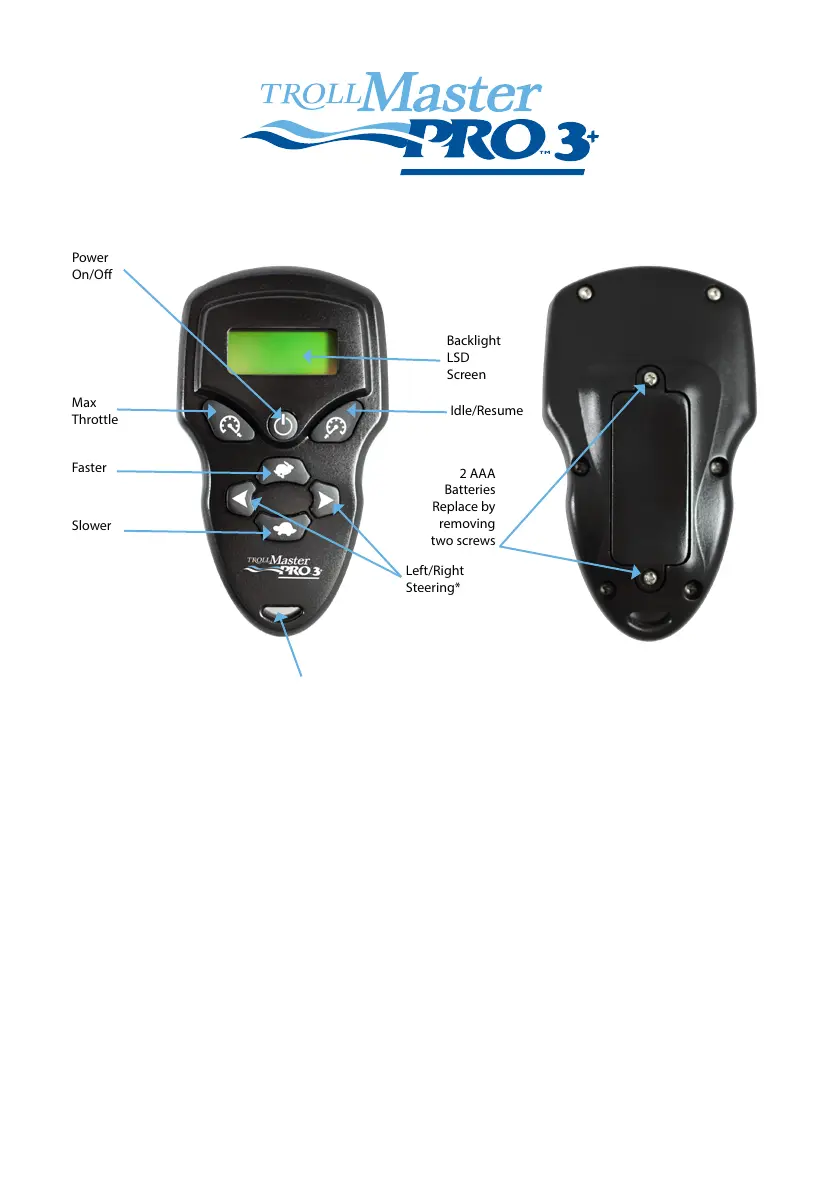
Power
On/O
Backlight
LSD
Screen
Idle/Resume
Left/Right
Steering*
2 AAA
Batteries
Replace by
removing
two screws
Lanyard Hook
Max
Throttle
Faster
Slower
REMOTE FUNCTIONS
POWER
Power On
To power on your remote, push the Power On/O button for one second.
You will see TROLL Master on the screen. Select any function to start using
the remote.
Power O
To power o your remote, push the Power ON/O button for two seconds
until the display clears.
Sleep Mode
If you do not touch any buttons for one minute, the remote will go into sleep
mode. In order to wake it, touch any button on the remote and it will resume to
your last used function.
Batteries
The remote runs on two standard AAA batteries. You will get a ‘Low Battery’
indication on the screen when it is time to change them.



 To Next Page