Page 7
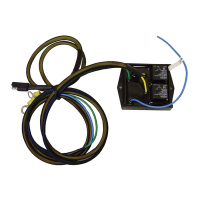
6. (Optional Steering Device) Route the steering cable 6ft (1.8m) from your
receiver to the location of your Panther Electro Steer motor and connect
the 2-Way molded connector until they are fully engaged. Do not plug
into the 3-way molded connector in an existing relay control.
NOTE: Keep in mind that depending on which side your electro steer is
mounted on your kicker motor the turn controls might be reversed. To
change this you can reverse the polarity of the connection. First, disconnect
the unit from the battery. Then cut the wires between the receiver and
connector. Now reconnect the wires, but connect red to black and black
to red. Be sure to use proper connections, like Butt T splices or wire nuts.
7. Pair your remote to your receiver. Push the pairing button on the receiver
and you will see a solid activity light. Then press any button on the remote.
Once the light goes o your remote is paired. It will always pair to the
most recent unit. If you need to replace your remote, following this step
will pair your new remote and does not store you older remote.
8. Once everything is connected and paired, ensure that operation is correctly
working by using your remote to verify that the servo (and steering)
are responding to inputs. Once this has been veried, tie down any loose
cables securely.
TROUBLESHOOTING
Inputs to remote do not cause the servo or steering to respond.
• Double check that your battery that is charged.
• Verify that your power cables are connected securely.
• Try pairing the remote one more time and ensure that the Activity Light
comes on to verify power.
• Check that the screen on the remote is in fact showing any kind of text
after pushing the power button. For testing ensure there is a clear line of
sight between the remote and the receiver. Once that works place back
in your preferred location and retest.
• There is a optional wired remote that can be purchased to verify wireless
receiver functionality. Visit trollmasters.com and look for the Parts Shop link.



 To Next Page