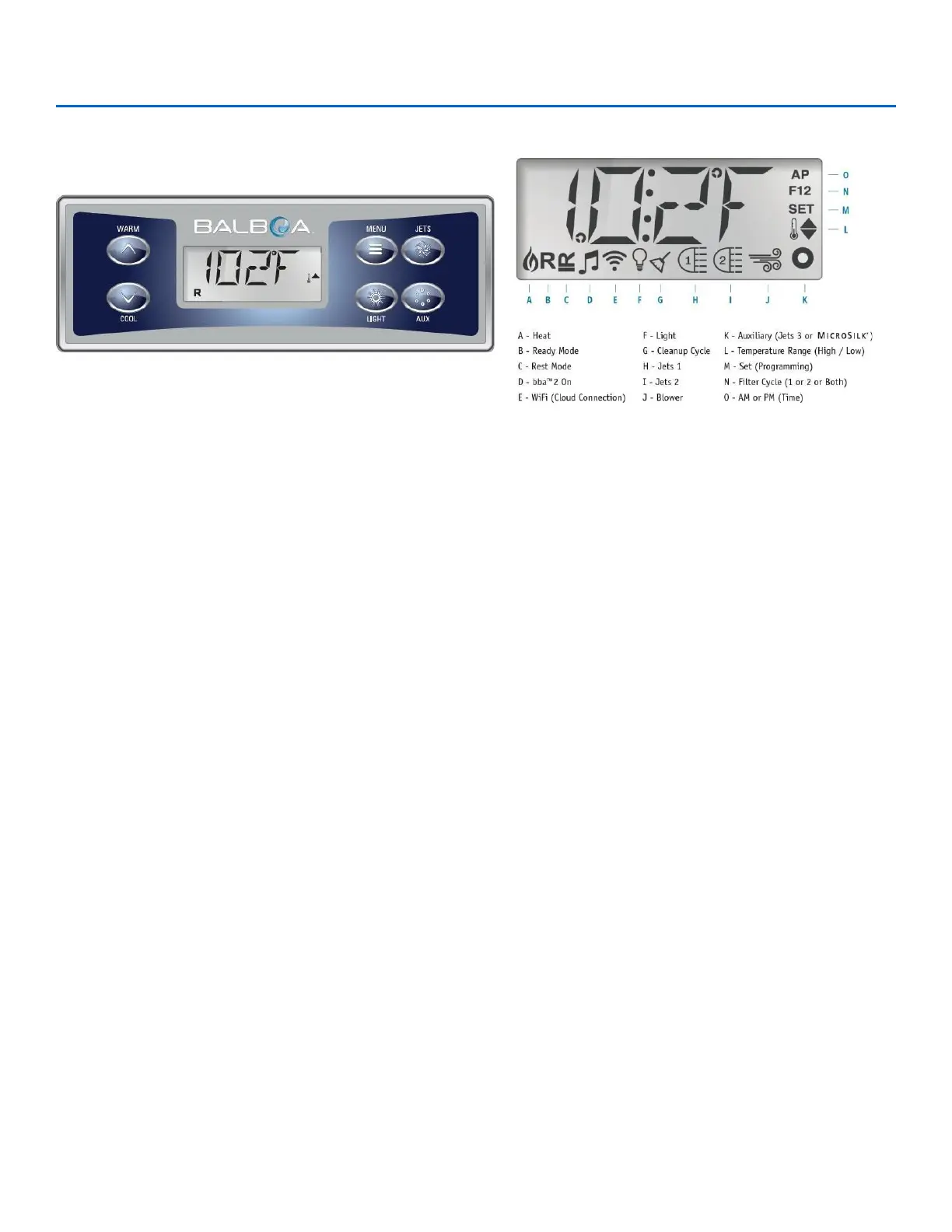
OASIS SPA CONTROL PANEL
Navigation
Navigating the entire menu structure is done with 2 or 3 buttons on
the control panel. Some panels have separate WARM (Up) and
COOL (Down) buttons, while others have a single Temperature
button. In the navigation diagrams Temperature buttons are
indicated by a single button icon. Panels that have two
Temperature buttons (Warm and Cool) can be used both to
simplify navigation and programming where a single Temperature
icon is shown. The MENU/SELECT Button is used to choose the
various menus and navigate each section. Typical use of the
Temperature button(s) allows changing the Set Temperature while
the numbers are flashing in the LCD. The menus can be exited
with certain button presses. Simply waiting for a few seconds will
return the panel operation to normal.
Preparation and Filling
Fill the spa to its correct operating level. Be sure to open all valves
and jets in the plumbing system before filling to allow as much air
as possible to escape from the plumbing and the control system
during the filling process. After turning the power on at the main
power panel, the topside panel display will go through specific
sequences. These sequences are normal and display a variety of
information regarding the configuration of the hot tub control.
Adjusting the Set Temperature
When using a panel with Up and Down buttons (Temperature
buttons), pressing Up or Down will cause the temperature to flash.
Pressing a temperature button again will adjust the set
temperature in the direction indicated on the button.
When the LCD stops flashing, the spa will heat to a new set
temperature when required. If the panel has a single
temperature button, pressing the button will cause the
temperature to flash. Pressing the button again will cause the
temperature to change in one direction (e.g., UP). After allowing
the display to stop flashing, pressing the Temperature Button
will cause the temperature to flash and the next press will
change the temperature.
Press-and-Hold
If a Temperature button is pressed and held when the
temperature is flashing, the temperature will continue to change
until the button is released. If only one temperature button is
available and the limit of the Temperature Range is reached
when the button is being held, the progression will reverse
direction.
Dual Temperature Ranges
This system incorporates two temperature range settings with
independent set temperatures. The High Range designated in
the display by a thermometer and an “up” arrow, and the Low
Range designated in the display by a thermometer and “down”
arrow. These ranges can be used for various reasons, with a
common use being a “ready to use” setting vs. a “vacation”
setting. The Ranges are chosen using the menu structure
below. Each range maintains its own set temperature as
programmed by the user. This way, when a range is chosen,
the spa will heat to the set temperature associated with that
range. For example: High Range might be set between 80°F
and 104°F. Low Range might be set between 50°F and 99°F.




 To Next Page