1111
11
Restore the settings of the EXPLORER 510
The EXPLORER 510 has a restore button that has two functions: To restore all settings to
factory settings or to restore WLAN settings only.
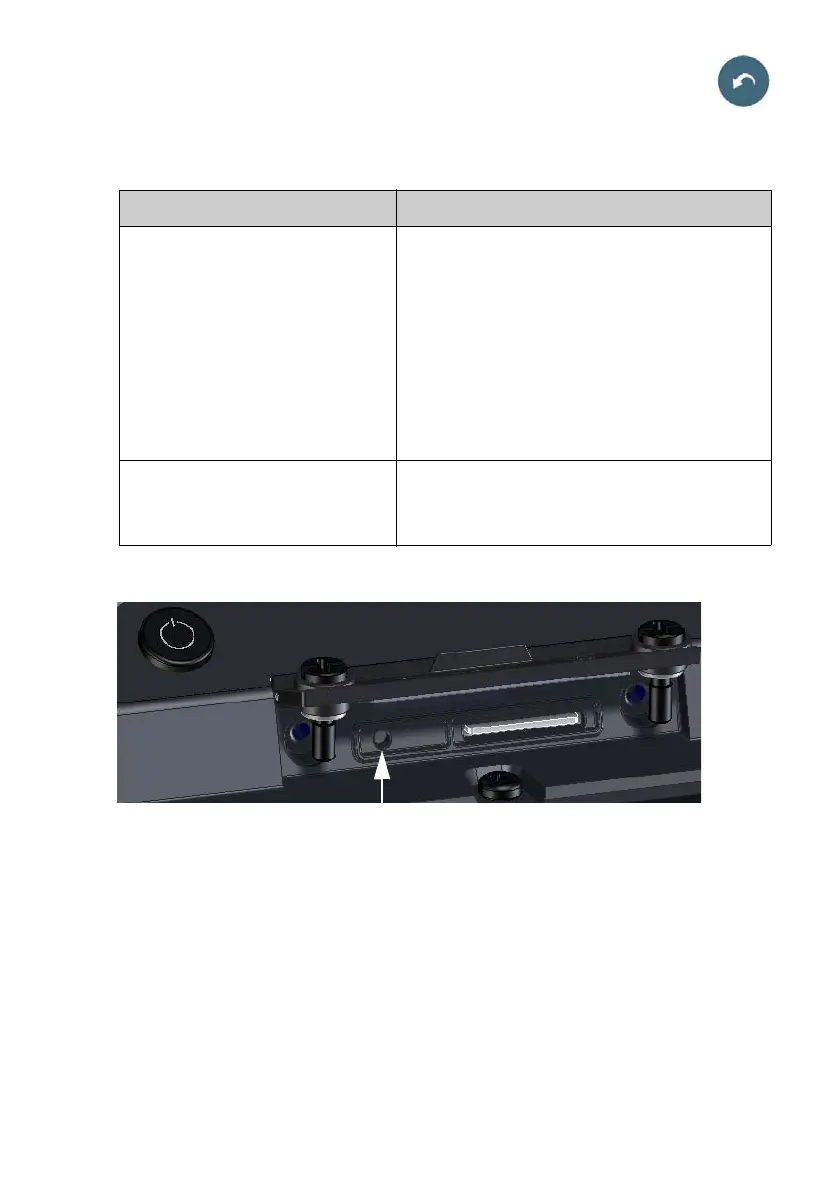
The restore button is located inside the small hole next to the SIM slot.
Do as follows:
1. Loosen the two screws holding the SIM
cover.
2. Lift the cover.
3. Use a pointed device to push the restore
button.
4. Close the cover and tighten the two
screws carefully.
This is important in order to maintain the
IP grade of the EXPLORER 510.
Action Function
Push and hold the Restore button for
2-10 seconds
WLAN settings are restored to default. The WLAN
LED lights yellow.
Default WLAN settings:
• Broadcast SSID is EXPLORER510
• Encryption standard is WPA2-AES
• Encryption key is the serial number of the
EXPLORER 510
• Region is Other, i.e. the most restrictive setting
Push and hold the restore button for
> 10 seconds
The EXPLORER 510 restores factory settings and
reboots the system. All changes to the
configuration are lost.



 To Next Page