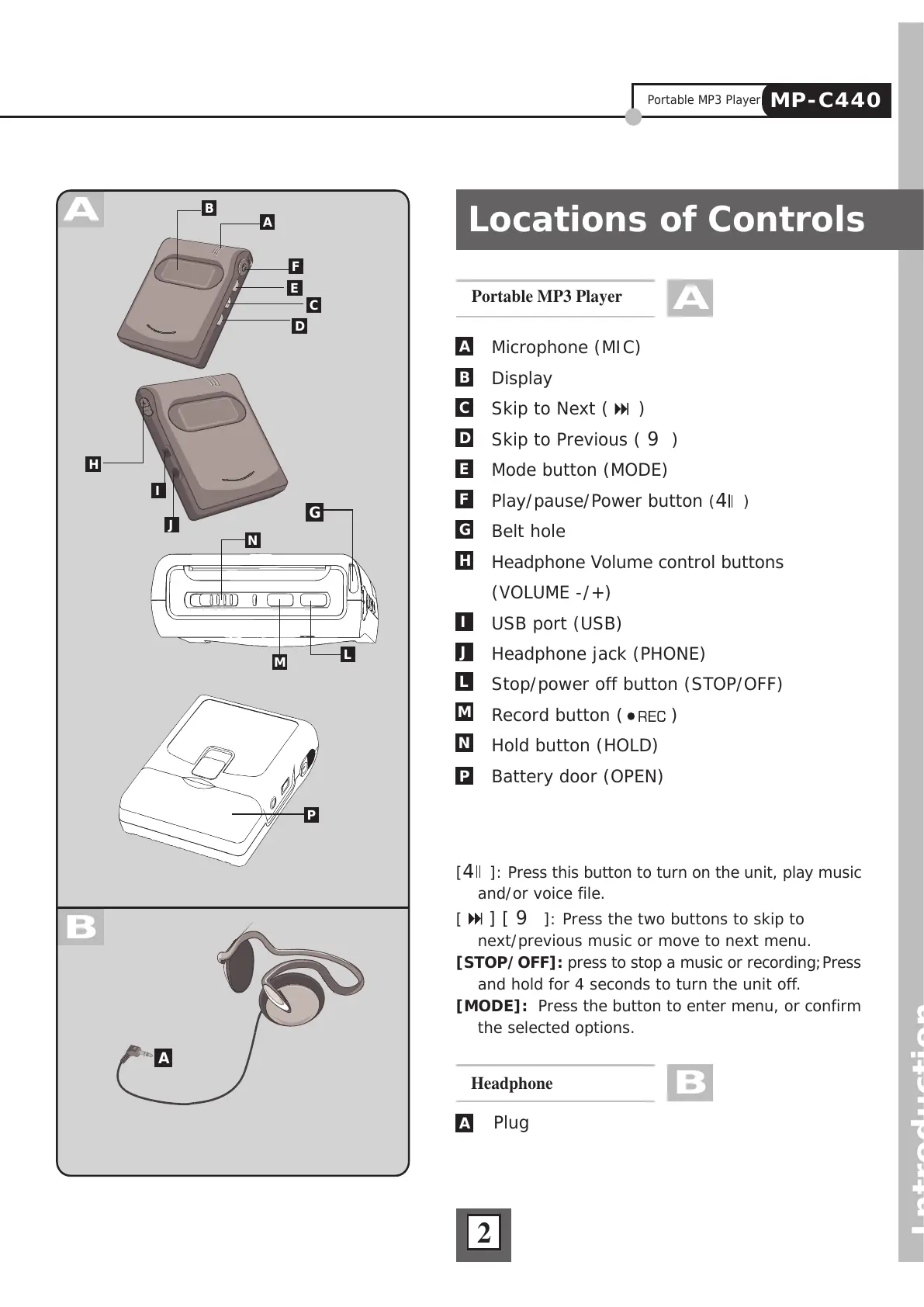
Locations of Controls
Introduction
2
Portable MP3 Player
A
Plug
Headphone
B
A
[4 ]: Press this button to turn on the unit, play music
and/or voice file.
[
] [ 9 ]: Press the two buttons to skip to
next/previous music or move to next menu.
[STOP/OFF]: press to stop a music or recording;Press
and hold for 4 seconds to turn the unit off.
[MODE]: Press the button to enter menu, or confirm
the selected options.
Microphone (MIC)
Display
Skip to Next (
)
Skip to Previous ( 9 )
Mode button (MODE)
Play/pause/Power button (4 )
Belt hole
Headphone Volume control buttons
(VOLUME -/+)
USB port (USB)
Headphone jack (PHONE)
Stop/power off button (STOP/OFF)
Record button ( )
Hold button (HOLD)
Battery door (OPEN)
A
B
C
D
E
F
G
H
P
N
M
L
J
I



 To Next Page