3.4 Fine Tuning / Trimming
If you nd the drone is veering in a particular direction, you may need to ne tune the control to
keep the Cocoon FPV HD Camera Drone steady. This should only be done when there is no or very
minimal wind.
While the drone is in the air, depress the left thumb stick (i.e. press the left thumbstick into its
centre, don’t move the thumbstick down) and at the same time use the right or left thumb stick as
per the following instructions depending on the direction that needs ne tuning. Do not lift the
left thumb stick until you have nished ne tuning.
Operation
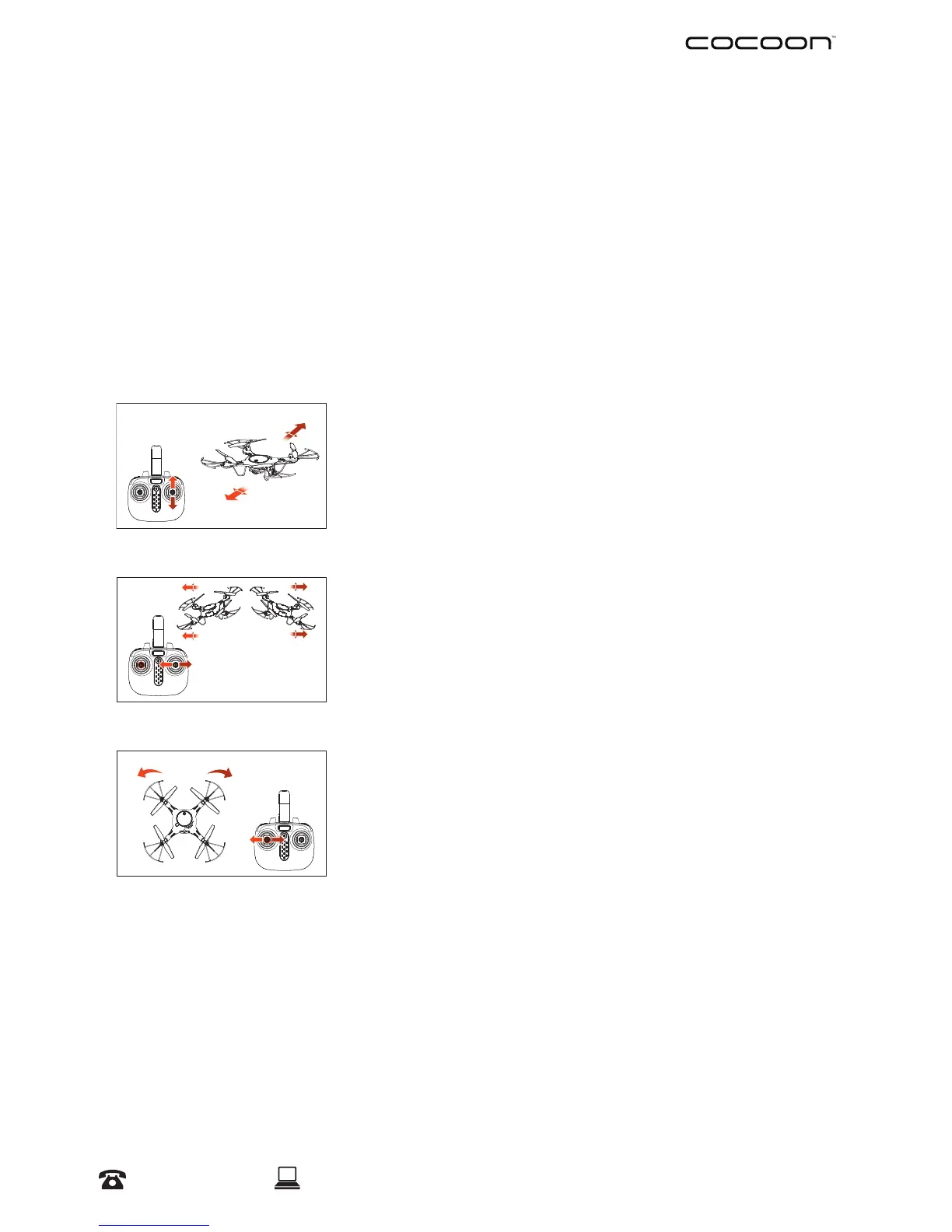
Forward/Backward Fine Tune
Depress the left thumb stick into its centre, move the right
thumb stick up or down
Left/Right Fine Tune
Depress the left thumb stick into its centre, move the right
thumb stick to the left or right
Turn Left/Right Fine Tune
Depress the left thumb stick into its centre, move the left thumb
stick to left or right
NOTE:
• You may need to ne tune your drone multiple times during ight due to air ow conditions
Reset Trimming
In order to reset trimming, land the drone and then turn the remote control OFF. Then whilst
depressing the left thumb stick, turn the remote control ON. The remote control will beep three
times to conrm the trim has been reset.


 To Next Page