25
LINUS12C 4. OPERATION
4.1.4 Delay
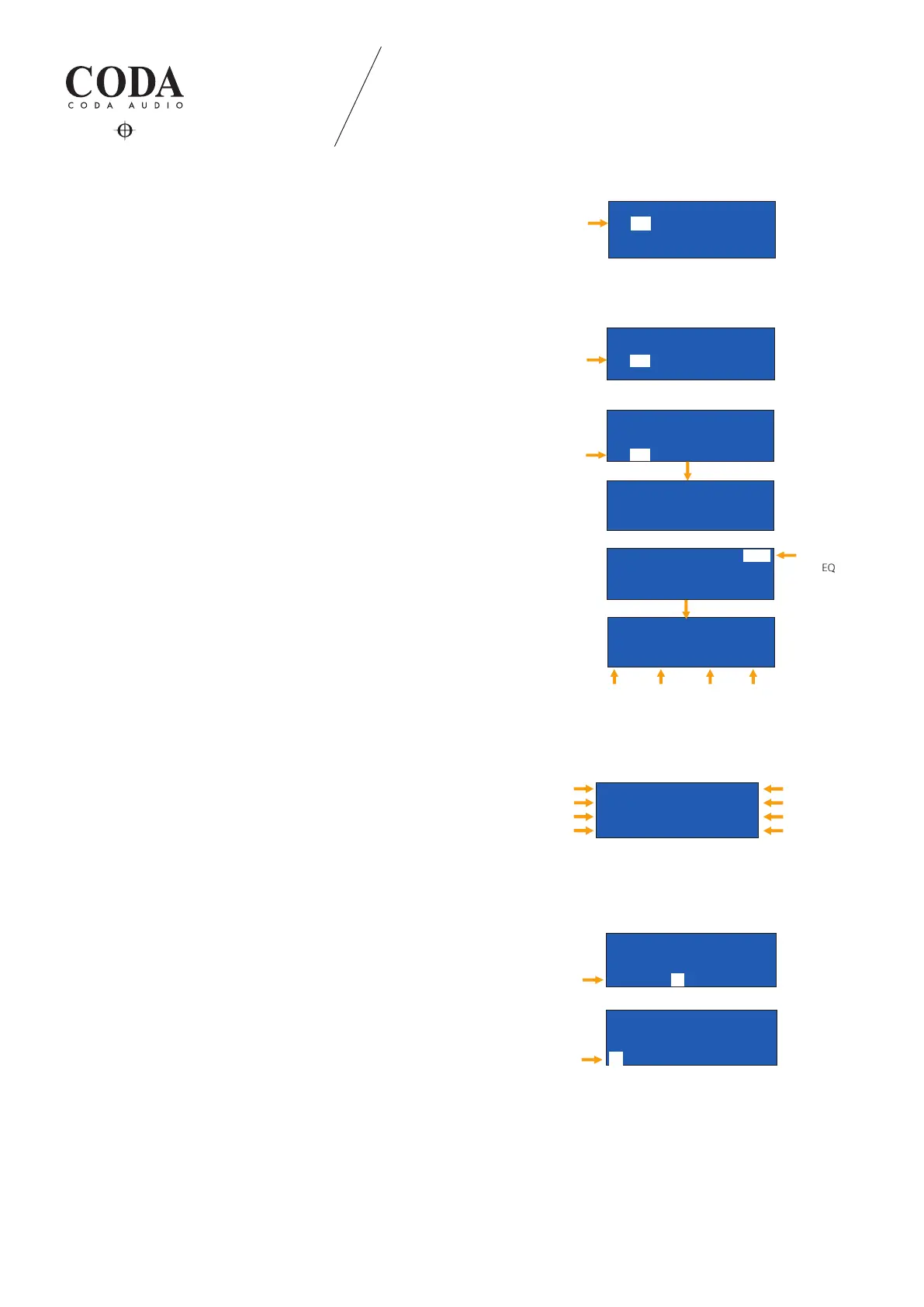
Press the “DOWN” button to skip to second operation page.
Move selection eld to position “D” (DELAY).
Push the encoder knob on the corresponding output channel that
you want to delay, then choose its value and conrm.
The delay is shown in ms (milliseconds).
4.1.5 Input gain
Adjust the GAIN (position “G”) of the selected channel and push to
conrm.
4.1.6 Tuning
Go to position “T” (TUNING) and push the encoder knob to enter
tuning page.
Tuning page
- Array (type in total amount of used line array elements in one hang)
- Sizing
- High Shelf
- Human EQ
- Low Boost
- Sub Sonic
Go to position “EQ” and push the encoder knob to enter FULL
PARAMETRIC EQ’s page.
Seven parametric EQs are available.
Please refer to LINUS Control operation manual for detailed
information about tuning tools.
4.1.7 Device information and display settings
Press the “DOWN” button twice
(in the main page).
4.1.8 Analog fallback
ANALOG FALLBACK can be activated as redundant analog signal
for LiNET signal source.
Select "INPUT" on the main page. Numbers indicate LiNET
and letters indicate analog fallback signal source.
Signal hierarchy:
(1) LiNET
(2) Analog
I 1K00 0.0 3.00
N 1K00 0.0 3.00
1 1K00 0.0 3.00
1K00 0.0 3.00
<-Tune:1
EQ->
Array 8x Sizing 1.0
HFShlf 0.0 Human 0.0
LowBst 0.0 SubSon 0.0
<-Tune:1 EQ->
Array 8x Sizing 1.0
HFShlf 0.0 Human 0.0
LowBst 0.0 SubSon 0.0
0 1_ 2_ 3_ 4_
D 0.0 0.0 0.0 0.0
G 0.0 0.0 0.00.0
T 1-> 2-> 3-> 4->
Gain
0 1_ 2_ 3_ 4_
D 0.0 0.0 0.0 0.0
G 0.0 0.0 0.0 0.0
T 2-> 3-> 4-> 1->
Tuning
Full parametric EQ
Output Ch
Frequency Gain
Q Factor
LINUS12C SERIAL:XXXXXXXX
192.168. 1. 1 FW:3.68
LED METERS:OUTPUT LCD:0
FALLBACK:OFF Lock->
Gain
IP Address
LED Indication
Analog Fallback
Serial number
Firmware version
LCD Contrast
Lock device
L V
LINUS12C SERIAL:XXXXXXXX
192.168. 1. 1 FW:3.68
LED METERS:OUTPUT LCD:0
FALLBACK: Lock->ON
Analog Fallback
LIMIT
SIGNAL
PROTECT
MUTE
SEL
ESC
UP
DOWN
1 2
3
4
STORE
P1:SNAPSHOT #01
TIR TIR TIR TIR
PF-S> PF-S> PF-S> PF-S>
1a 1a 1a1a
AFB input
P1:SNAPSHOT #01
TIR TIR TIR TIR
PF-S> PF-S> PF-S> PF-S>
A**** A**** A**** A****
AFB active
STATE Window
Recover Fallback
LIMIT
SIGNAL
PROTECT
MUTE
SEL
ESC
UP
DOWN
1 2
3
4
STORE
I 1K00 0.0 3.00
N 1K00 0.0 3.00
1 1K00 0.0 3.00
1K00 0.0 3.00
<-Tune:1
EQ->
Array 8x Sizing 1.0
HFShlf 0.0 Human 0.0
LowBst 0.0 SubSon 0.0
<-Tune:1 EQ->
Array 8x Sizing 1.0
HFShlf 0.0 Human 0.0
LowBst 0.0 SubSon 0.0
0 1_ 2_ 3_ 4_
D 0.0 0.0 0.0 0.0
G 0.0 0.0 0.00.0
T 1-> 2-> 3-> 4->
Gain
0 1_ 2_ 3_ 4_
D 0.0 0.0 0.0 0.0
G 0.0 0.0 0.0 0.0
T 2-> 3-> 4-> 1->
Tuning
Full parametric EQ
Output Ch
Frequency Gain
Q Factor
LINUS12C SERIAL:XXXXXXXX
192.168. 1. 1 FW:3.68
LED METERS:OUTPUT LCD:0
FALLBACK:OFF Lock->
Gain
IP Address
LED Indication
Analog Fallback
Serial number
Firmware version
LCD Contrast
Lock device
L V
,
P1:SNAPSHOT #01
TIR TIR TIR TIR
PF-S> PF-S> PF-S> PF-S>
1 2 3 4
Rack Number
P1:SNAPSHOT #01
TIR TIR TIRTIR
PF-S> PF-S> PF-S> PF-S>
1 2 3 4
Speaker
Load Speaker Channel=1
Series: LineArr.
92 1WAY Single LineArr.
TiR PF-S> 1WAY #1
Speaker Series
Load Speaker Channel=1
Series:LineArr.
LineArr.<92 1WAY Single>
TiR PF-S> 1WAY #1
Speaker Files
P1:SNAPSHOT #01
TIR TIR TIR TIR
PF-S> PF-S> PF-S> PF-S>
2 3 41
Signal Input
0 1_ 2_ 3_ 4_
D 0.0 0.0 0.00.0
G 0.0 0.0 0.0 0.0
T 1-> 2-> 3-> 4->
Delay


 To Next Page