26
LINUS12C 4. OPERATION
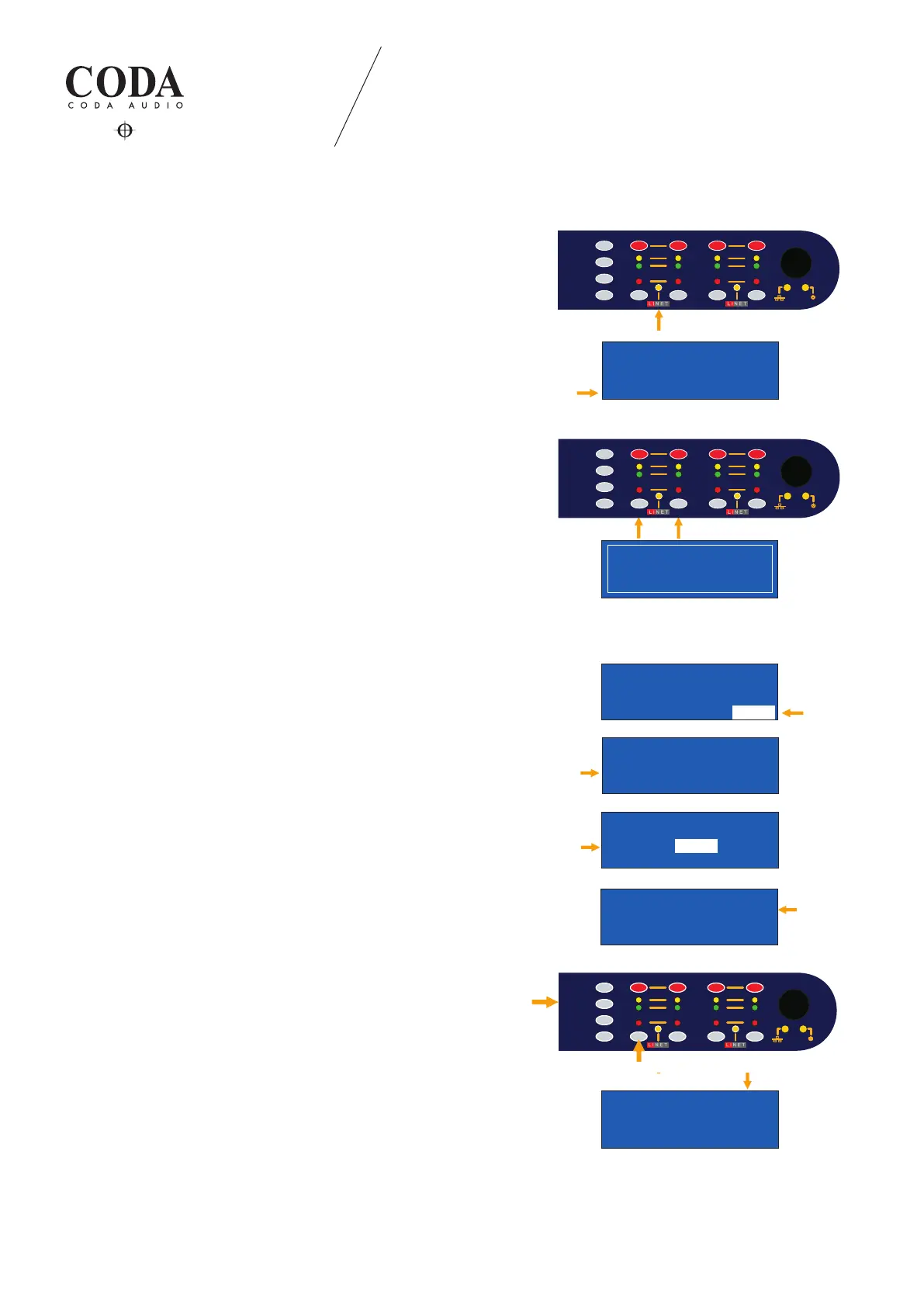
LiNET LED indication:
- LED on → LiNET audio input (clock present)
- LED ashes constantly (slow) - - - → No LiNET audio input
(clock missing)
- LED ashes with interval (fast) - o → Analog fallback enabled.
Analog audio input in use (clock present).
Display indication:
If there is no clock present, the unit will switch automatically to the
selected analog signal source. Indicated with capital letter and four
stars (per channel).
RECOVER FALLBACK:
If clock is present, the LED will ash fast, LiNET source can be
recovered by pressing CH buttons 1+2.
4.1.9 Lock device
Navigate to the device overview page and select the “LOCK“
function.
Dene your new password (in numbers) and conrm.
After the denition of password add it into the “CURRENT PASSWORD“
eld and press “LOCK“.
Device can be unlocked by entering the pre-dened password into
the “ENTER PASSWORD“ eld.
Press “UNLOCK“ to unlock the device.
4.1.10 Quick lock device
You can “QUICK LOCK“ your device anytime.
Press “STORE“ and the 1st channel “SELECTION“ button (the same
for unlock).
Display will switch automatically to the main conguration page
and it will indicate the lock of the device with the capital letter “L”.
-
LINUS12C SERIAL:XXXXXXXX
192.168. 1. 1 FW:3.68
LED METERS:OUTPUT LCD:0
FALLBACK: Lock->ON
Analog Fallback
LIMIT
SIGNAL
PROTECT
MUTE
SEL
ESC
UP
DOWN
STORE
P1:SNAPSHOT #01
TIR TIR TIR TIR
PF-S> PF-S> PF-S> PF-S>
1a 1a 1a1a
AFB input
P1:SNAPSHOT #01
TIR TIR TIR TIR
PF-S> PF-S> PF-S> PF-S>
A**** A**** A**** A****
AFB active
STATE Window
Recover Fallback
LIMIT
SIGNAL
PROTECT
MUTE
SEL
ESC
UP
DOWN
1 2
3
4
STORE
LIMIT
SIGNAL
PROTECT
MUTE
SEL
ESC
UP
DOWN
1 2
3
4
STORE
Device
Lock-> Unlock->
New Password *****
Confirm New *****
Enter Password
0
Device
Lock-> Unlock->
New Password *****
Confirm New *****
LINUS12C SERIAL:XXXXXXXX
192.168. 1. 1 FW:3.68
LED METERS:OUTPUT LCD:0
FALLBACK:OFF Lock->
P1:SNAPSHOT L#01
TIR TIR TIR TIR
PF-S> PF-S> PF-S> PF-S>
1 2 3 4
LIMIT
SIGNAL
PROTECT
MUTE
SEL
ESC
UP
DOWN
1 2
3
4
STORE
Device
Lock-> Unlock->
New Password *****
Confirm New *****
Enter Password
0
Device
Lock-> Unlock->
New Password *****
Confirm New *****
LINUS12C SERIAL:XXXXXXXX
192.168. 1. 1 FW:3.68
LED METERS:OUTPUT LCD:0
FALLBACK:OFF Lock->
P1:SNAPSHOT L#01
TIR TIR TIR TIR
PF-S> PF-S> PF-S> PF-S>
1 2 3 4
LIMIT
SIGNAL
PROTECT
MUTE
SEL
ESC
UP
DOWN
1 2
3
4
STORE
Device
Lock-> Unlock->
New Password *****
Confirm New *****
Enter Password
0
Device
Lock-> Unlock->
New Password *****
Confirm New *****
LINUS12C SERIAL:XXXXXXXX
192.168. 1. 1 FW:3.68
LED METERS:OUTPUT LCD:0
FALLBACK:OFF Lock->
P1:SNAPSHOT L#01
TIR TIR TIR TIR
PF-S> PF-S> PF-S> PF-S>
1 2 3 4



 To Next Page