27
LINUS12C 4. OPERATION
4.1.11 Store snapshot
Store your customised user settings (inclusive tuning parameters)
in the library positions (01) to (10) of the unit.
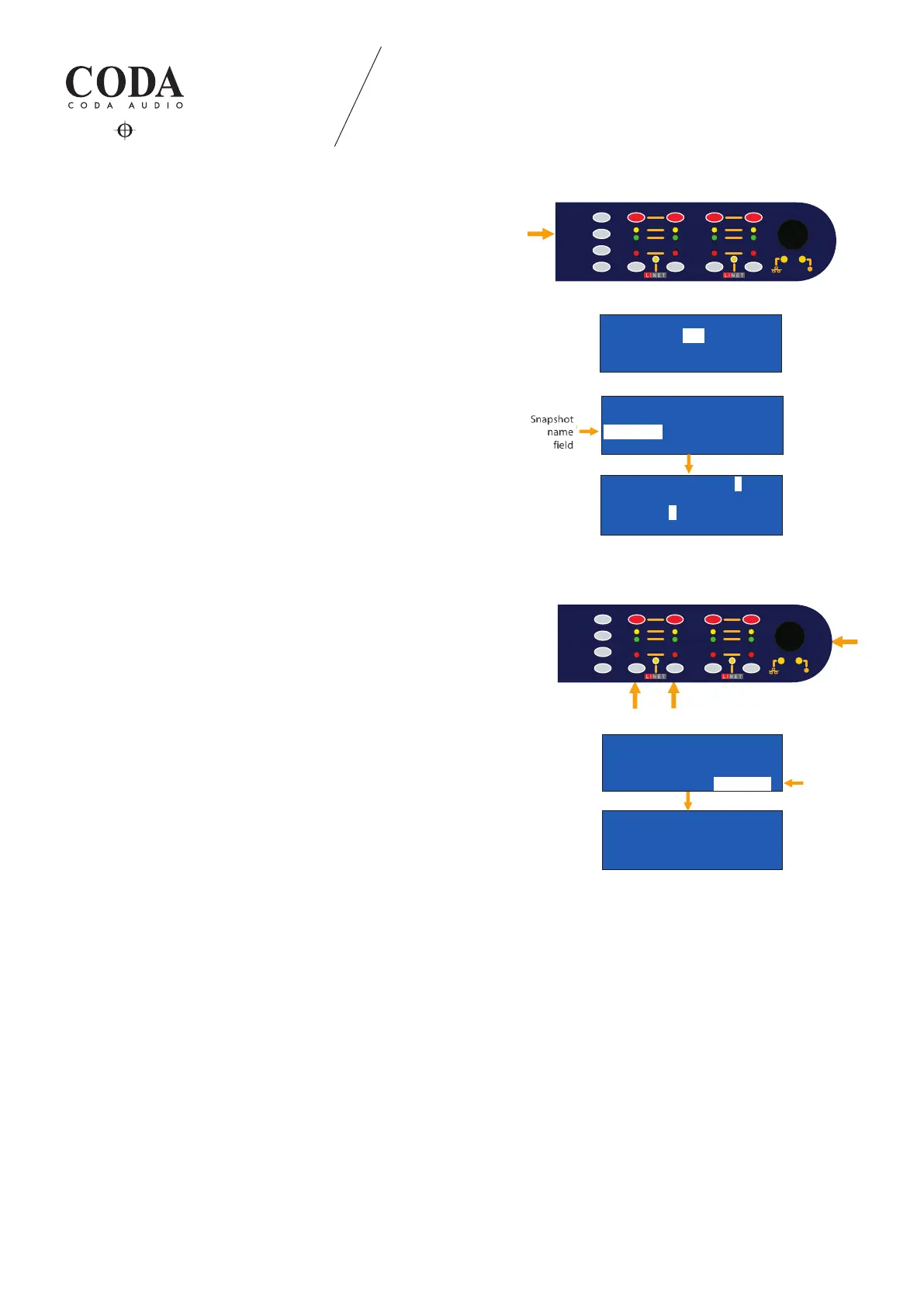
SNAPSHOT NAME:
Use encoder knob to navigate to the name eld and press it.
Text position cursors are channel selection buttons
1= << and 2= >> digit selection via encoder knob.
Press encoder knob to conrm.
Use encoder knob to navigate to the store eld and press it.
Dened “SNAPSHOT“ is displayed now in the snapshot library. It
includes all the dened speaker, signal routing and tuning parameters.
Store Snapshot
Store to - -S01
Cancel > Store >
Store Snapshot
Store to -S01-
Snapshot
Cancel > Store >
Snapshot name eld
Store Snapsho[XYZ_ -012]_
Store to -S01-
Snapshot 1
F1=cursor<< F2=cursor>>
Store Snapshot
Store to -S01-
Snapshot 1
Cancel > Sttore >
P1:SNAPSHOT 1 #01
TIR TIR TIR TIR
PF-S> PF-S> PF-S> PF-S>
1 2 3 4
LIMIT
SIGNAL
PROTECT
MUTE
SEL
ESC
UP
DOWN
1 2
3
4
STORE
LIMIT
SIGNAL
PROTECT
MUTE
SEL
ESC
UP
DOWN
1 2
3
4
STORE
Store Snapshot
Store to - -S01
Cancel > Store >
Store Snapshot
Store to -S01-
Snapshot
Cancel > Store >
Snapshot name eld
Store Snapsho[XYZ_ -012]_
Store to -S01-
Snapshot 1
F1=cursor<< F2=cursor>>
Store Snapshot
Store to -S01-
Snapshot 1
Cancel > Sttore >
P1:SNAPSHOT 1 #01
TIR TIR TIR TIR
PF-S> PF-S> PF-S> PF-S>
1 2 3 4
LIMIT
SIGNAL
PROTECT
MUTE
SEL
ESC
UP
DOWN
1 2
3
4
STORE
LIMIT
SIGNAL
PROTECT
MUTE
SEL
ESC
UP
DOWN
1 2
3
4
STORE
Store Snapshot
Store to - -S01
Cancel > Store >
Store Snapshot
Store to -S01-
Snapshot
Cancel > Store >
Snapshot name eld
Store Snapsho[XYZ_ -012]_
Store to -S01-
Snapshot 1
F1=cursor<< F2=cursor>>
Store Snapshot
Store to -S01-
Snapshot 1
Cancel > Sttore >
P1:SNAPSHOT 1 #01
TIR TIR TIR TIR
PF-S> PF-S> PF-S> PF-S>
1 2 3 4
LIMIT
SIGNAL
PROTECT
MUTE
SEL
ESC
UP
DOWN
1 2
3
4
STORE
LIMIT
SIGNAL
PROTECT
MUTE
SEL
ESC
UP
DOWN
1 2
3
4
STORE
Store Snapshot
Store to - -S01
Cancel > Store >
Store Snapshot
Store to -S01-
Snapshot
Cancel > Store >
Snapshot name eld
Store Snapsho[XYZ_ -012]_
Store to -S01-
Snapshot 1
F1=cursor<< F2=cursor>>
Store Snapshot
Store to -S01-
Snapshot 1
Cancel > Sttore >
P1:SNAPSHOT 1 #01
TIR TIR TIR TIR
PF-S> PF-S> PF-S> PF-S>
1 2 3 4
LIMIT
SIGNAL
PROTECT
MUTE
SEL
ESC
UP
DOWN
1 2
3
4
STORE
LIMIT
SIGNAL
PROTECT
MUTE
SEL
ESC
UP
DOWN
1 2
3
4
STORE



 To Next Page