Code Blue
•
259 Hedcor Street
•
Holland, MI 49423 USA
•
800.205.7186
•
www.codeblue.com
GU-137-Bpage 23 of 40
IP1500/2500
User Guide
HardwareSettings
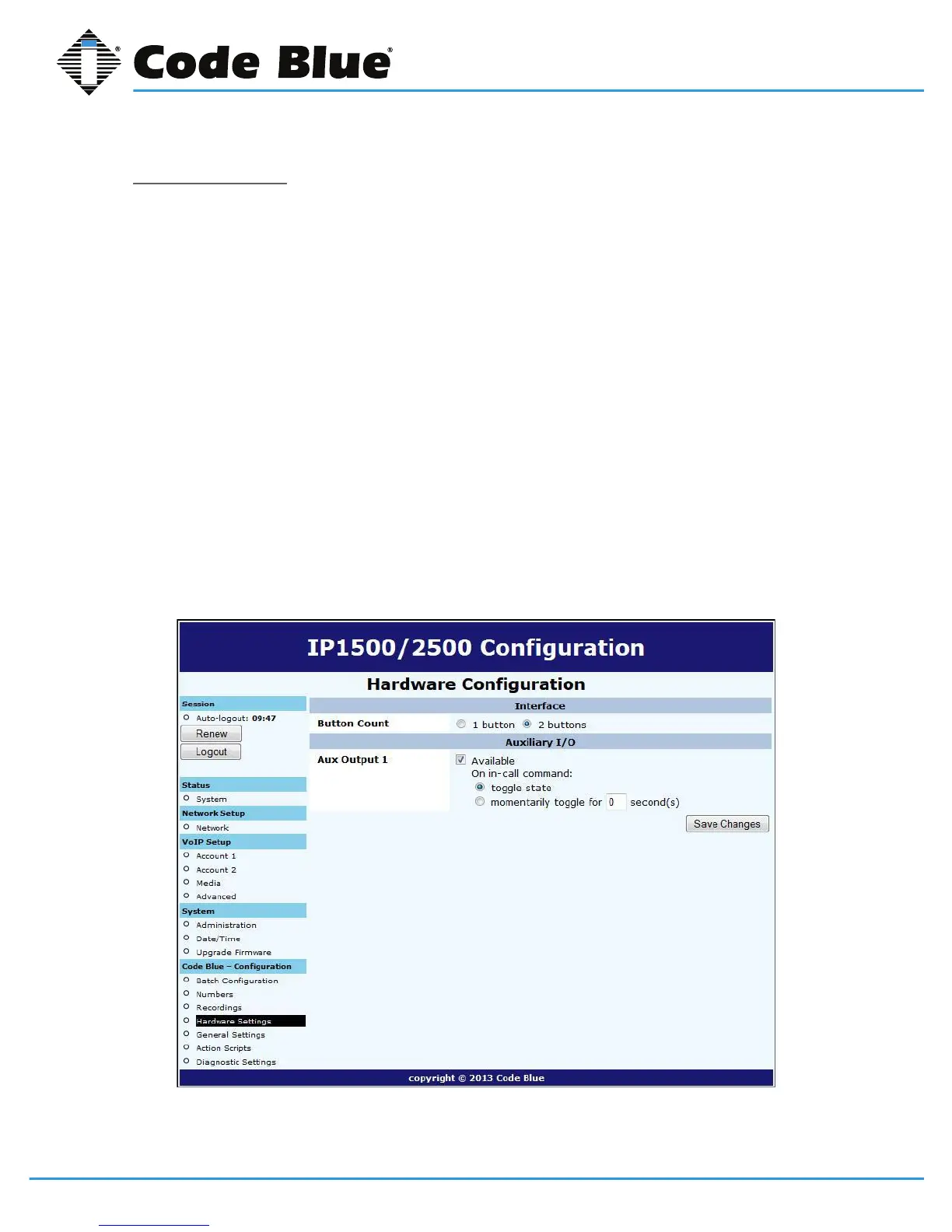
TheIP1500/2500speakerphonehardwaresettingsareconguredby:
1. SelectingHardware SettingsunderCode Blue(seefarleft-handcolumn).
2. SelecttheappropriateButton Count, Keypad AvailablesettingsundertheInterface
section.
3. CheckingAuxOutput1willenabletheauxoutputrelay.Bydefault,theportissettoenable
(ToggleState)whenusedinanActionScript.
When Momentary togglechoicehasbeenselected,thecalledpartynowhastheability
toactivatetheauxoutputremotelyforthetimeperiodchosenviaDTMFtonesfromtheir
phoneskeypad.
Note:Momentary toggleisintendedforremotecontrolusebythecalledparty.It’s
importanttounderstandthatscripteduseoftheauxoutputnotbeusedonanyauxoutput
portthathasbeenselectedtoactinthemomentary(remotecontrolaspect)togglefunction.
AlsoitisnotrecommendedtousetheGeneral Settings > Incoming Calls > Aux Output 1
Enable on Incoming Callcheckbox.
4. Withselectionsmade,clickSave Changes.



 To Next Page