35
Status Screen
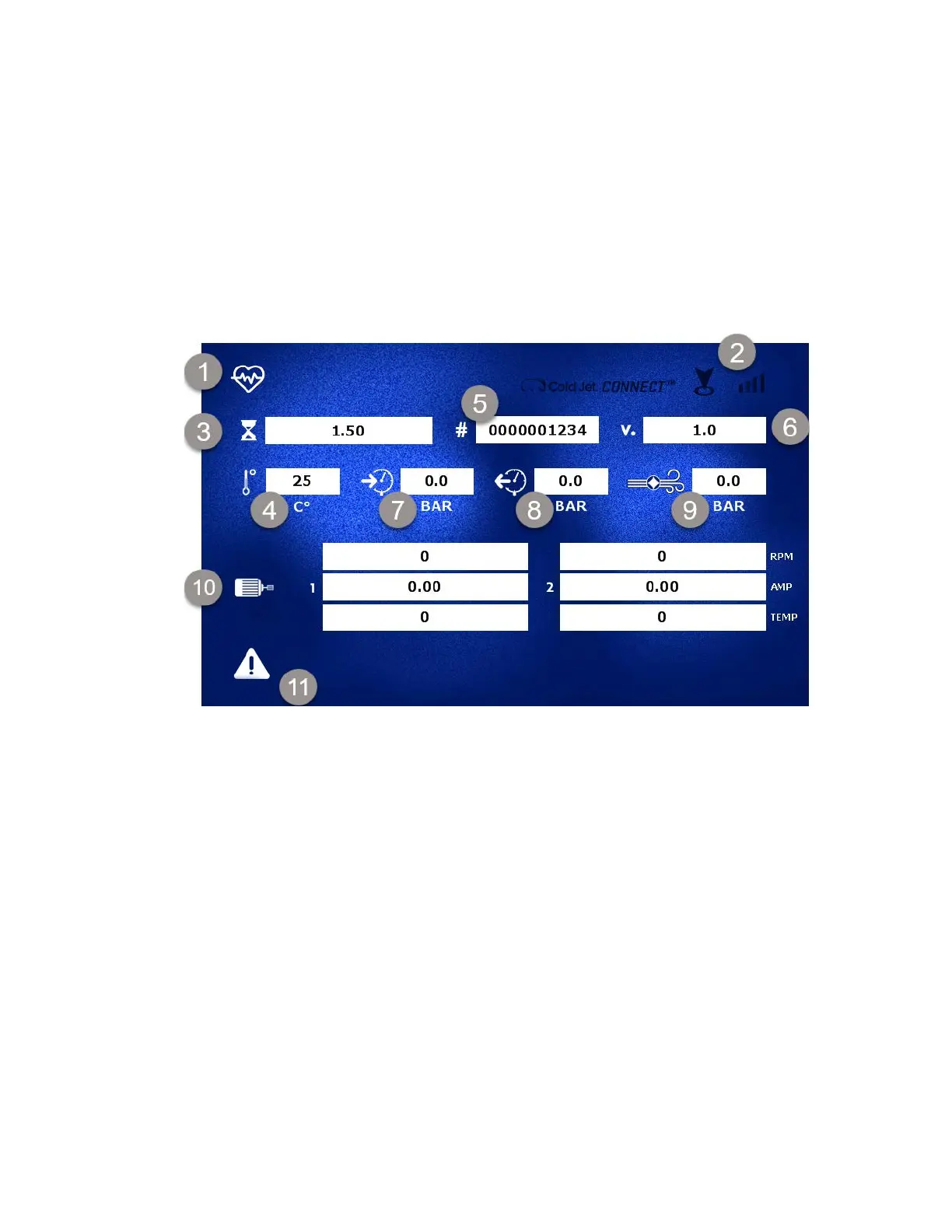
The status screen displays information about the machine such as serial number, software version,
hours of operation, pressure values and more. Additionally, there is information about the operation
of the motors and feeder. The MicroClean 2 is automatically connected via 3G/LTE service to the
Cold Jet ConnectTM platform where you can view the machine’s operating conditions. In addition,
through the machine’s control panel you can initiate Diagnostic Mode when working with Cold Jet’s
technical service personnel which will send a sustained burst of more detailed operating data for
help in evaluating technical issues. To initiate the diagnostic mode, hold the rotary encoder button
down for 8 seconds.
Status Screen Legend:
1. Status Screen
2. Cellular IoT Signal (if there are no signal bars the machine will not be able to connect)
3. Hour Meter
4. PCU Temperature
5. Serial Number
6. Firmware Version
7. Air Pressure In
8. Air Pressure Out
9. Blasting Pressure
10. Motor Status
11. Error Codes



 To Next Page