EasyManua.ls Logo

Comcast DPC3939B - User Manual

Comcast DPC3939B
8 pages
Print Icon
To Next Page IconTo Next Page
Loading...
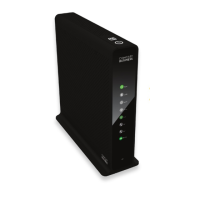
Business Wireless Gateway
Model Number: DPC3939B
Quick Start Guide
Business Wireless Gateway
Set up your Private and Public WiFi networks
WiFi
Devices
Question and Answer IconNeed help?

Do you have a question about the Comcast DPC3939B and is the answer not in the manual?

Summary

About the Business Wireless Gateway

Find Your Default Wireless Network Info

Locate and write down the default Network Name (SSID) and Network Key (Password) for your wireless gateway.

Connect Your Private Wireless Network

Connect your WiFi devices to the 2.4 GHz and optionally 5 GHz network using the default credentials.

Connect to Your XFINITY WiFi Hotspot

Log in to the public 'xfinitywifi' network using your Comcast Business Internet credentials for guest access.

Log In and Secure the Admin Tool

Access the gateway's admin tool via a web browser and change the default password for enhanced security.
WiFi Connectivity Tips

Business Wireless Gateway Placement

5 GHz in Your Business

About WiFi and the Business Wireless Gateway

Comcast DPC3939B Specifications

General IconGeneral
BrandComcast
ModelDPC3939B
CategoryGateway
LanguageEnglish

Related product manuals