19
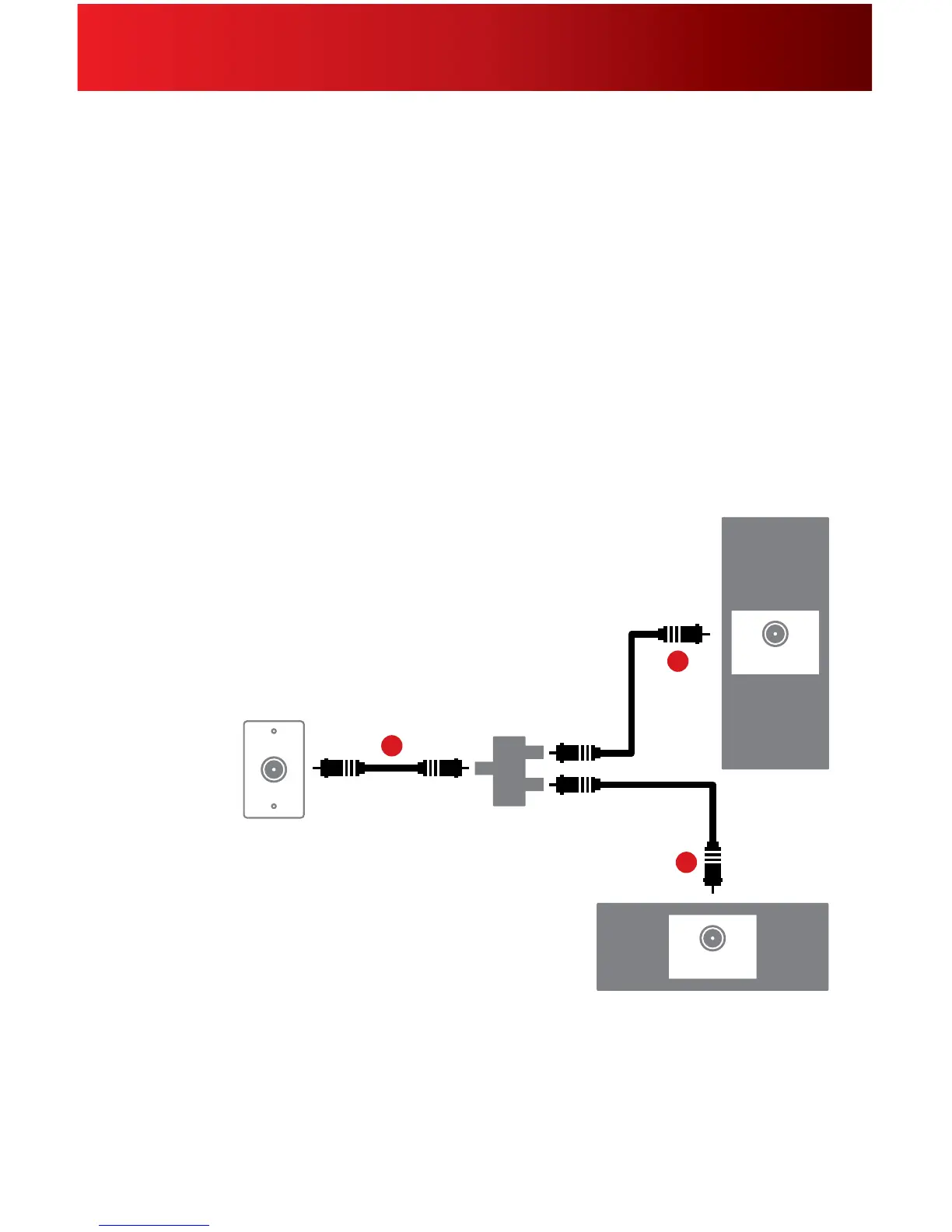
Alternate C o nnection Using a Splitter
1.Unplugallofyourdevicesfromtheelectricaloutlet.
2.Locatethecoaxcablecomingfromyourcablewalloutletanddisconnectitfromthebackofyourexisting
device.
3.Connectthecoaxcablefromyourcablewalloutlettothesingle-connectorsideofthetwo-waysplitter.
4.Connectoneendofthe3-ft.coaxcabletooneportonthedouble-connectorsideofthesplitter,andconnect
theotherendtotheCable In/RF Inconnectiononthebackofyourexistingdevice.
5.Connectoneendofthe20-ft.coaxcabletotheotherportonthedouble-connectorsideofthesplitter,and
connecttheotherendtotheCable In/RF In connectiononthebackofyournewdevice.
6.Makesureallconnectionsaresecure.
7. Plugallofyourdevicesintoanelectricaloutlet.
Cable Wall Outlet
Coax Cable
Cable In/RF In
Existing Device
New Device
Splitter*
Coax Cable
Coax Cable
Cable In/RF In
3
4
5
Digital Set-Top Box Connection
*Splitter not included in Self-Installation Kit.



 To Next Page