5
Using Your Remote Control
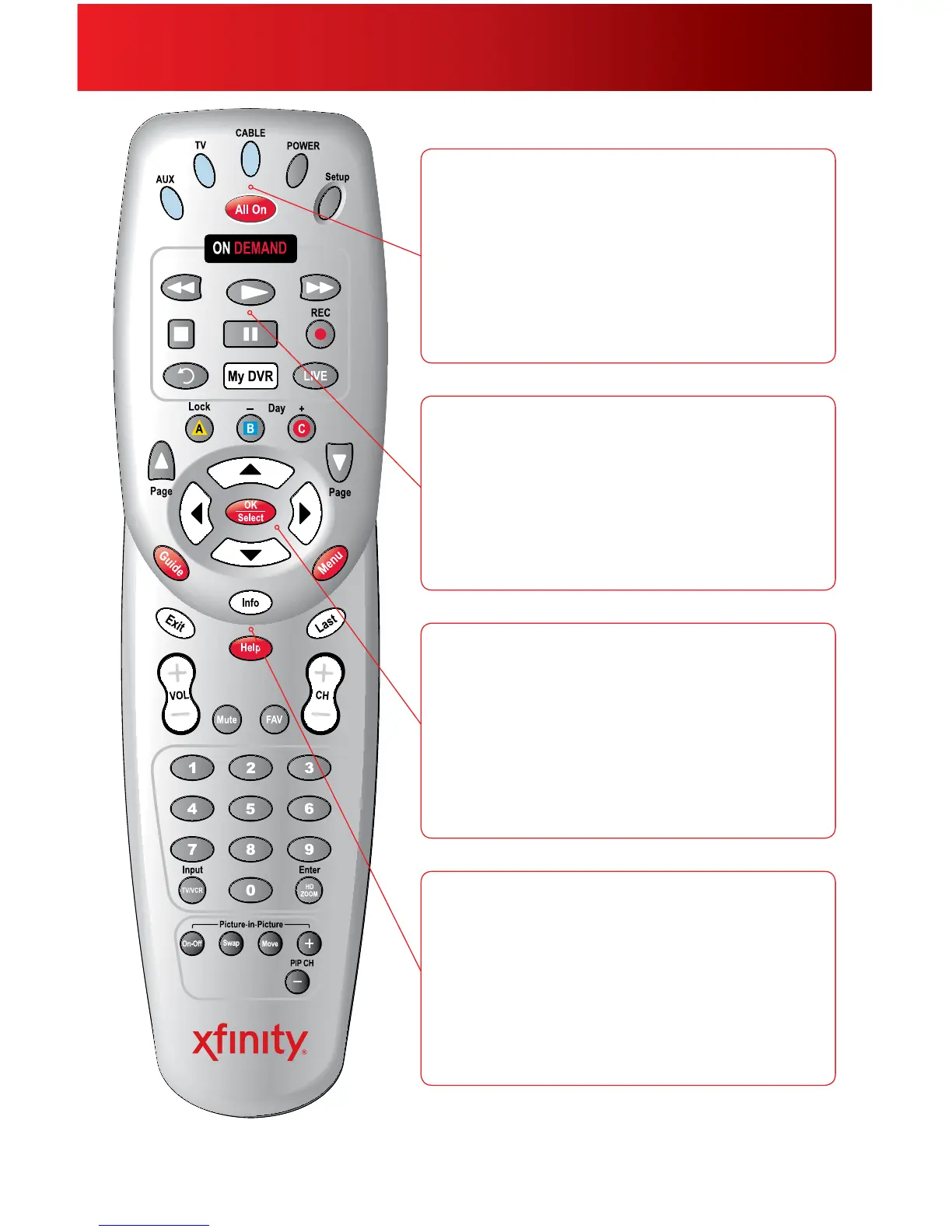
Your remote may vary slightly from the one pictured here, but the basic functions should remain the same. Some features require your remote to
be programmed for operation and may not be available in all areas.
AUX: Whenprogrammed,enablescontrolofyourDVD
player,VCRoraudiodevice.
TV: Whenprogrammed,enablescontrolofyourTV.
Cable: EnablescontrolofyourDigitalSet-TopBox.
Power:TurnsonorofftheDigitalSet-TopBox,TVorAUX
component.
Setup: ProgramsyourremotetocontrolyourTV,DVD
player,VCRoraudiodevice.
All On:Turnsonoroffallofthedevicesprogrammedinto
theremotecontrol.
On Demand: ProvidesaccesstoOnDemand.
Video Controls: ControlOnDemandandDVRviewing—
play,pause,fast-forward,rewindandstop.IntheAUXmode,
thesebuttonswillcontrolaVCRorDVDplayer.
Instant Replay: Jumpsback15secondswithinaprogram
withDVRservice.
My DVR: DisplaystheDVRMenuoptions.
Live:SkipsforwardtothelivepointofaprogramwithDVR
service.
Lock:Restrictsviewingorpurchaseofachannelorprogram.
Day
–
/+:WhileviewingTVListings,jumpaheadorback24
hoursatatime.
Page Up/Down:Displaysthenextorpreviouspageof
programlistingsintheon-screenguide.Alsoskipsaheador
skipsback5minuteswithDVRserviceorOnDemand.
Arrows:Movesthehighlighttothenexteldwithinthe
on-screenguide.
OK/Select:Selectsahighlighteditem.Alsodisplaysthe
Mini-GuidewhilewatchingTV.
Guide:ShortcuttoTVListings.
Info:Providesadescriptionofaprogram.
Menu:Entersorexitstheon-screenguidemenus.
Exit:ExitsguidescreensandreturnsyoutoviewingTV.
Last:Returnsyoutothepreviouschannelorguidescreen.
FAV:Allowsyoutoviewandsetupyourfavoritechannels.
Input TV/VCR:Incablemode,thisbypassestheDigitalSet-
TopBox.InTVandAUXmode,thisselectsavailableinputs.
Swap:Jumpsbetweentwotunerssoyoucancontrolthe
playbackoftwochannels.



 To Next Page