5
Programming keys and display
Alphanumeric keypad
MENU To enter the programming menus
Can be used to select the various menu options
Can be used to move the cursor in order to change the entered data
OK Confirm the displayed information or data entered
CANC Delete the data entered
ESC Cancelling the selected option and exiting the programming menu
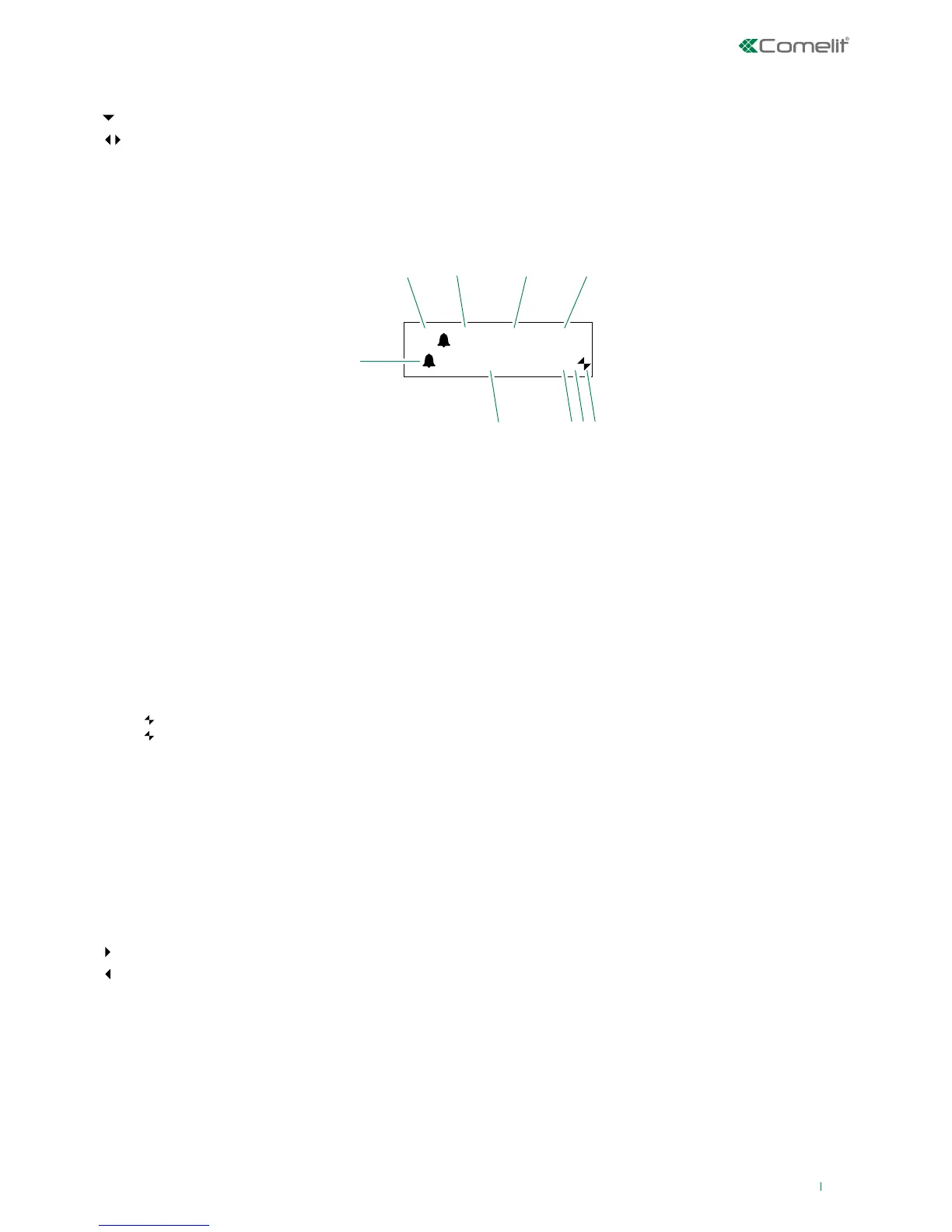
Switchboard display screens:
1 A AUDIO mode
V VIDEO mode
2 (- -) indicates the number of unanswered calls in DAY mode
if the text NIGHT appears, it indicates the system is operating in this mode
3 operation in AUTO mode is only displayed during DAY mode
4 time (hours: minutes)
5 indication of unanswered calls in NIGHT mode
6 day (Mon, Tue, etc.) and date (day/month/year)
Available from IR006:
7 ! the switchboards configured are NOT compatible
? the switchboard has not yet detected the presence of the remote switchboard
8 P indicates that the switchboard is configured in parallel
S indicates that the switchboard is configured in series
9
fixed indicates correct operation of the serial line
flashing indicates malfunctioning of the serial line
LM KO indicates a short circuit on the riser line, the text is accompanied by a tone which sounds repeatedly. The
switchboard rejects any attempts to call or transfer calls to internal units; however, all incoming calls from the external
unit will be dealt with normally.
!PC when the menu for point 6- DOWNLOAD NAMES FROM PC is activated, indicates that the serial port is ready and
waiting to receive data from the PC.
For several of the functions, the keypad can be used to enter both numbers and letters; this can be done by pressing the same
button several times, for example if you press 2 several times, A - B - C - 2 will appear in succession. If a dierent button is
pressed, the cursor on the display will move onto the next letter.
Moves the cursor onto the next letter
Moves the cursor onto the previous letter
OK Confirms the data entered
CANC Deletes the data entered


 To Next Page