14
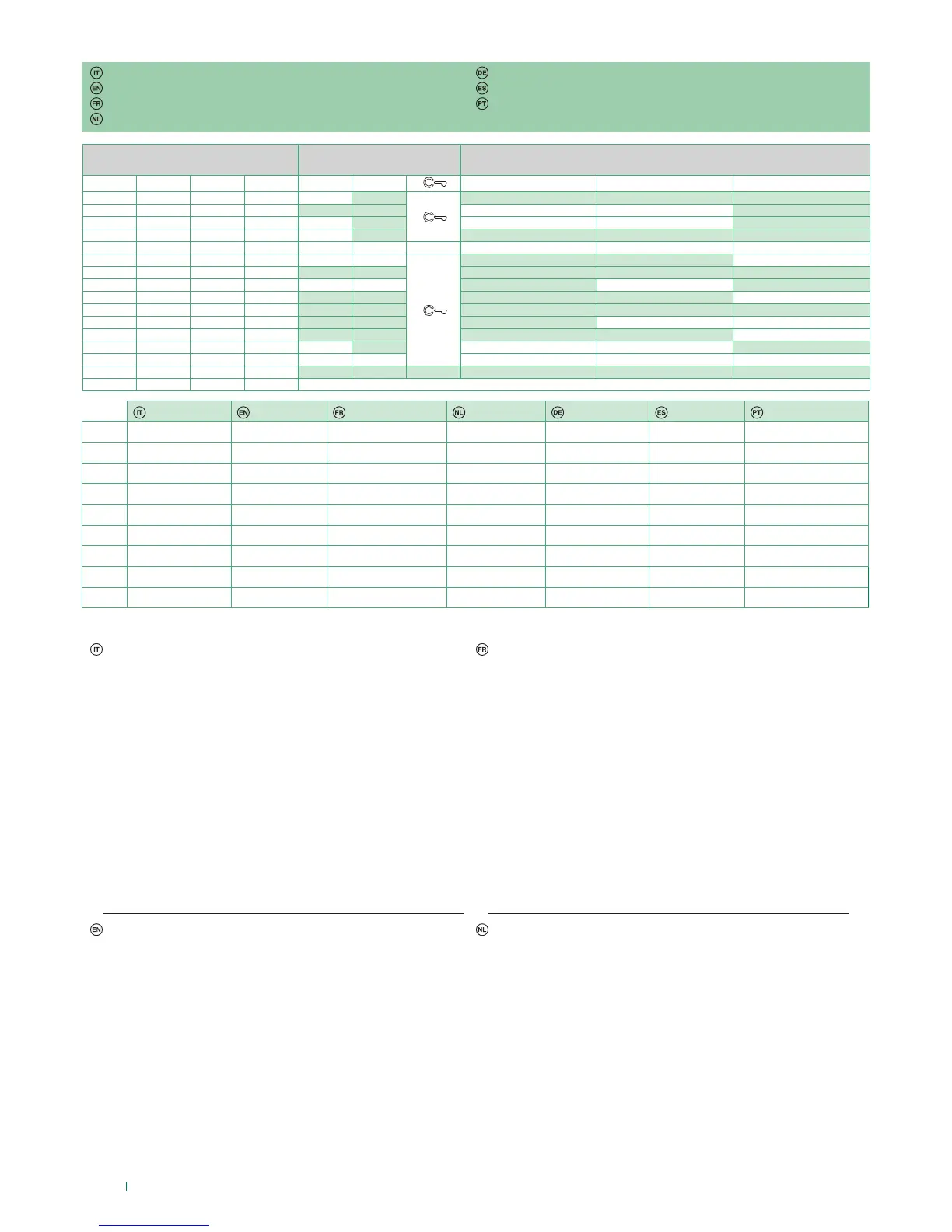
DIP S2 Art. 6721W(/BM) + Art. 6734
DIP 1 DIP 2 DIP 3 DIP 4 P1 P2 P3 P4 P5
0 0 0 0
AI CCS D PAN
1 0 0 0
CCS AI D
0 1 0 0
AI CCS
1 1 0 0
CCS CCP PAN K
0 0 1 0
1 0 1 0
CCS CCP
0 1 1 0
AI D K CCS CCP
1 1 1 0
AI PAN
0 0 0 1
CCS PAN D AI
1 0 0 1
K CCS PAN CCP AI
0 1 0 1
CCP K PAN
1 1 0 1
PAN CCP CCS K
0 0 1 1
AI D
1 0 1 1
0 1 1 1
NULL NULL NULL NULL NULL NULL
1 1 1 1
PROG
Legenda Legend Légende Legenda Legende Leyenda Legenda
A Apriporta Lock- release Ouvre-porte Deuropener Turöffnertaste Abrepuertas Abertura da porta
AI Autoaccensione Self-ignition Auto-allumage Beeldoproep Selbsteinschaltung Autoencendido Acendimento automático
CCP*
Chiamata a centralino
principale
Main switchboard call Appel standard principal Bellen naar hoofcentrale
Ruf an Haupt-
Pförtnerzentrale
Llamada a la centralita
principal
Chamada à central
principal
CCS*
Chiamata a centralino
secondario
Secondary switchboard
call
Appel au standard secondaire
Bellen naar secundaire
portierscentrale
Ruf an
Zusatz-Pförtnerzentrale
Llamada a la centralita
secundaria
Chamada
à central secundária
K
Chiamata citofono
guardiano
Guardian door-entry
phone call
Appel combiné parlophonique
gardien
Oproep deurtelefoon
bewaker
Ruf an Wechselsprechgerät
des Wachmanns
Llamada al telefonillo del
vigilante
Chamada ao telefone
intercomunicador do vigilante
D Dottore Doctor Docteur Arts Arztruf Doctor Médico
PAN* Panico Panic Panique Paniek Notruf Pánico Pânico
NULL Nessuna funzione No function Aucune fonction Geen functie Keine Funktion Ninguna función Nenhuma função
PROG Funzioni programmate
Programmed functions Fonctions
programmées
Geprogrammeerde
functies
Programmierte Funktionen Funciones programadas Funções
programadas
* non utilizzabile su impianti
kit
* cannot be used in kit
systems
* non utilisable sur les systèmes
kit
* kan niet worden gebruikt
op kit-systemen
* nicht verwendbar bei
Anlagen-Sets
* No se puede utilizar en
instalaciones con kit
* não utilizável em sistemas kit
Programmazioni pulsanti per altre funzioni
Esempio:
su monitor con codice utente 5 programmazione P5= autoaccensione,
P6= chiamata a centralino secondario
1. Posizionare DIP 5-6 di S2 in combinazione 01
2. Consultare la tabella pag. 14 e scegliere una combinazione in cui
compaiono le funzioni desiderate/necessarie per i pulsanti che si
intendono programmare.
3. Premere e rilasciare i tasti a cui si vogliono associare le funzioni
4. Per uscire dalla programmazione posizionare i DIP 5-6 di S2 in
combinazione 00
5. Al termine della programmazione posizionare i DIP 1-2-3-4 di
S2 in combinazione 1111.
ES: per P5= autoaccensione P6= chiamata a centralino impostare
DIP 1-2-3-4 di S2 in combinazione 0011 (P5=AI, P6=CCS)
» il led privacy lampeggia
» il led privacy si spegne
» il led apriporta si accende
» viene emesso un tono di conferma
Programming buttons for other functions
Example:
on a monitor with user code 5, P5 programming = self-ignition, P6 =
Secondary switchboard call
1. Set S2 DIP switch 5-6 to the combination 01
2. Refer to the table on page 15 and select a combination in which
the desired/necessary functions are listed for the keys you wish to
program.
3. Press and release the keys to which you wish to assign the functions
4. To exit programming mode, set S2 DIP switches 5-6 to the
combination 00
5. When programming is complete, set S2 DIP switches 1-2-3-4
to the combination 1111.
E.g.: for P5= self-ignition, P6= switchboard call, set S2 DIP
switches 1-2-3-4 to the combination 0011 (P5=AI, P6=CCS)
» the privacy LED flashes
» the privacy LED switches o
» the lock-release LED lights up
» une tonalité de confirmation retentit.
Programmation des boutons pour d'autres fonctions
Exemple :
sur moniteur avec code usager 5 programmation P5= auto-allumage,
P6=Appel au standard secondaire
1. Placer DIP 5-6 de S2 en combinaison 01
2. Consulter le tableau page 15 et choisir une combinaison qui
ache les fonctions choisies/nécessaires pour les boutons qui
doivent être programmés.
3. Appuyer sur les touches auxquelles associer les fonctions puis les
relâcher
4. Pour quitter la programmation, mettre les DIP 5-6 de S2 en
combinaison 00
5. Au terme de la programmation, mettre les DIP 1-2-3-4 de S2
en combinaison 1111.
ex : pour P5= auto-allumage P6= appel au standard, programmer
DIP 1-2-3-4 de S2 en combinaison 0011 (P5=AI, P6=CCS)
» la led privacy clignote
» la led privacy s’éteint
» la led ouvre-porte s’allume
» une tonalité de confirmation retentit.
Programmering drukknoppen voor andere functies
Voorbeeld:
op de monitor met gebruikerscode 5 is programmering P5 =
beeldoproep, P6 = bellen naar secundaire portierscentrale
1. Stel de dipswitches 5-6 van S2 in op de combinatie 01
2. Raadpleeg de tabel op pag.15 en kies een combinatie waarin de
gewenste/nodige functies verschijnen voor de drukknoppen die u
wenst te programmeren.
3. Druk op de toetsen waaraan u de functies wilt koppelen en laat ze
weer los
Voorbeeld: voor P5 = beeldoproep en P6 = bellen naar intercom-
centrale, stelt u de dipswitches 1-2-3-4 van S2 in op de combina-
tie 0011 (P5=AI, P6=CCS)
» de privacy-led gaat knipperen
» de led voor deur openen gaat aan
» Er klinkt een bevestigingstoon.
4. Per uscire dalla programmazione posizionare i DIP 5-6 di S2 in
combinazione 00
5. Aan het eind van de programmering stelt u de dipswitches
1-2-3-4 van S2 in op de combinatie 1111.
» de privacy-led gaat uit
Tastenprogrammierung für andere Funktionen
Programación de los pulsadores para otras funciones
Programação dos botões para outras funções



 To Next Page