Vers. 1.0 Page 10
■ Connections and Operations
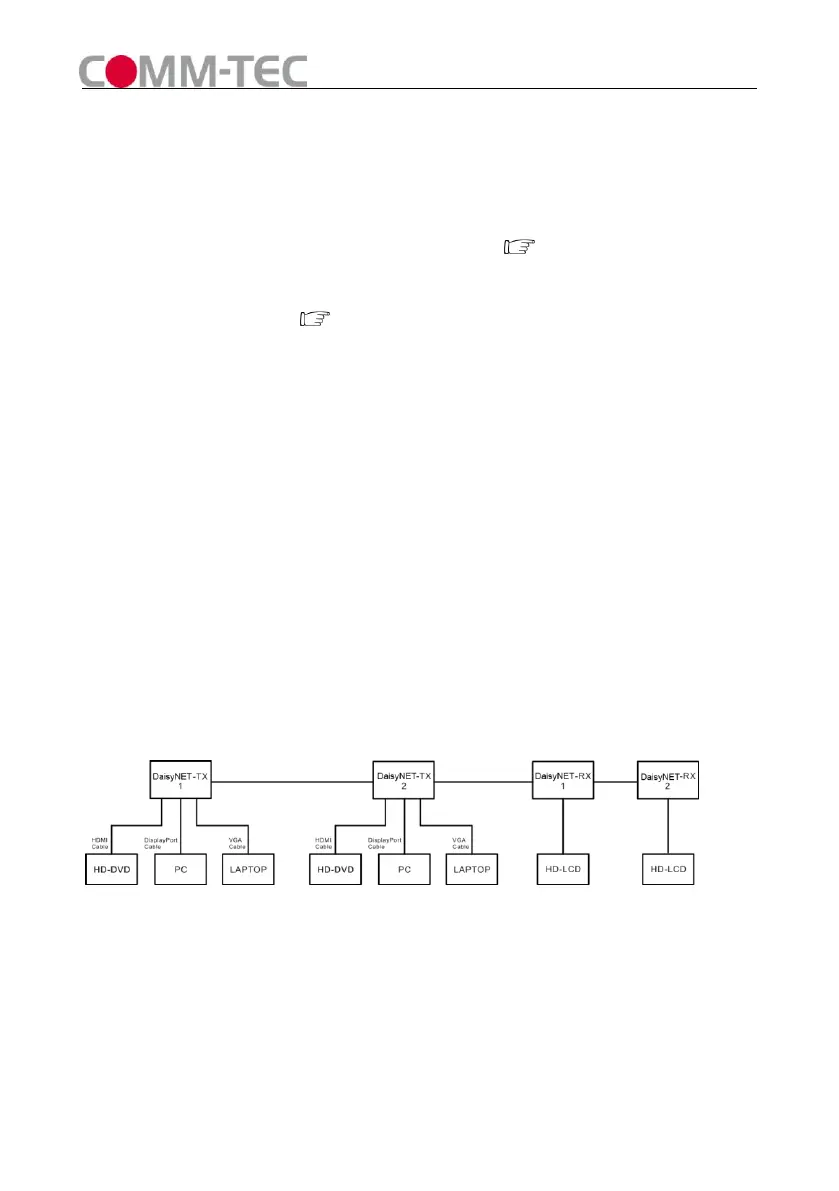
1) Use two DaisyNET-TXs and two DaisyNET-RXs for example.
2) Connect the HDMI/Displayport/VGA input source ( such as HD-DVD、PS3、
STB、PC etc. ) to DaisyNET-TX1 and DaisyNET-TX2.
3) Connect the HDMI sink( such as HD-LCD、HD-DLP)to DaisyNET-RX1 and
DaisyNET-RX2.
4) Connect a CAT-5E/6E AWG 23 cable from UTP output of DaisyNET-TX1 to UTP
input of DaisyNET-TX2.
5) Connect a CAT-5E/6E AWG 23 cable from UTP output of DaisyNET-TX2 to UTP
input of DaisyNET-RX1.
6) Connect a CAT-5E/6E AWG 23 cable from UTP output of DaisyNET-RX1 to UTP
input of DaisyNET-RX2.
7) Connect Ethernet Port of DaisyNET-TX/RX to PC/Network Switch/Router.
Attention: Please insert and extract cables gently.
■ Connections Diagram:
Figure 6



 To Next Page