The COMM-TEC DAN-B202 is a 2x2 Dante/AES67 Surface Mount Interface designed for integrating analog audio into networked AV systems. It offers high-quality, uncompressed audio with near-zero latency, making it suitable for a wide range of applications from simple installations to large-capacity networks running thousands of audio channels. The device supports PoE (IEEE802.3af) power capability and a small form factor, making it easy to put Dante connectivity wherever needed.
Function Description
The DAN-B202 serves as a bridge between analog audio signals and a Dante/AES67 network. It features two analog inputs (MIC/LINE IN) and two analog outputs (LINE OUT), both using 3-pin Green Terminal Blocks. The device also supports 48V phantom power, which is software selectable for each input.
Key functions include:
- Audio Conversion: Converts analog microphone/line level signals to Dante/AES67 network audio and vice versa.
- Phantom Power: Provides 48V phantom power for condenser microphones on its inputs.
- Gain Control: Offers adjustable gain for both inputs and outputs, allowing precise level matching.
- Volume Control: Output volume can be controlled from -60dB to 0dB.
- Sample Rate Support: Supports 44.1kHz or 48kHz audio sample rates.
- Network Connectivity: Connects to a Dante network via an RJ45 Ethernet port, supporting PoE.
- Web-UI Control: Allows users to interact with the device through a web-based graphical interface for configuration and monitoring.
- Dante Controller Integration: Fully compatible with Dante Controller software for comprehensive network management, routing, and device configuration.
- API Commands: Supports control via Telnet using specific commands for various functions like gain adjustment, mute, phantom power, and status queries.
Important Technical Specifications
- Inputs: (2) MIC/LINE IN, (2) 3-pin Green Terminal Blocks.
- Phantom Power: 48V, software selectable.
- Outputs: (2) LINE OUT, (2) 3-pin Green Terminal Blocks.
- Output Type: Balanced line level with automatic muting on loss of Dante signal.
- Gain:
- Input: 0 ~ +48dB, 6dB per step.
- Output: -60 ~ 0dB, 1dB per step.
- Max Level:
- Input: +18dBu @ 0dB input gain.
- Output: +18dBu @ 0dB output gain.
- Input Impedance: >1.8kΩ.
- Effective Input Noise (EIN): -119dBu @ 48dB gain.
- Output Noise: <-79dBu @ 0dB gain.
- THD: <0.05% at any gain.
- Sample Rate: 44.1kHz or 48kHz.
- Control Port: (1) Dante Network.
- Connector: (1) RJ45.
- External Power Supply: Input: AC 100~240V, 50/60Hz; Output: 12V DC 1A.
- Operation Temperature: -10°C ~ +55°C.
- Storage Temperature: -25°C ~ +70°C.
- Relative Humidity: 10%-90%.
- Dimension (WHD): 185mm x 115mm x 22mm.
- Net Weight: 500g.
- Power: PoE (IEEE802.3af) or 12V DC.
Usage Features
- Easy Installation: Surface mount design allows for flexible placement.
- Intuitive Front Panel: LEDs indicate power (SYS), system status (SYNC), master/slave device status (M/S), and error conditions (ERROR). A RESET button is also available.
- Dante Controller Software: Provides a powerful interface for:
- Viewing all Dante-enabled audio devices and their channels on the network.
- Viewing Dante-enabled device clock and network settings.
- Routing audio between devices.
- Connecting to Dante Domain Manager and control enrolled devices.
- Locking and unlocking Dante devices.
- Changing audio channel labels.
- Customizing receive latency.
- Saving and applying audio routing presets.
- Editing presets offline.
- Viewing and setting per-device configuration options (device name, sample rate, clock settings, network information, firmware and license information).
- Identifying a device by flashing LEDs.
- Viewing network status information, including multicast bandwidth and transmit/receive bandwidth.
- Viewing device performance information, including latency statistics and packet errors.
- Viewing clock status information for each device, including frequency offset history and clock event logs.
- Web-based GUI: Accessible via a web browser by entering the device's IP address (default 169.254.1.178). This interface allows users to:
- View device information (model, name, IP address, MAC address).
- Lock/unlock parameters.
- Configure input settings (name, gain, phantom power, channel status).
- Configure output settings (name, volume, assigned RX channel).
- Configure credential settings (user name, password).
- Configure device settings (model, device name, sample rate, preferred encoding).
- Configure network settings (DHCP, static IP, subnet mask, gateway).
- Import/export network settings.
- Update firmware.
- Multicast Flow Management: Dante Controller allows users to create and manage multicast flows, enabling efficient audio distribution to multiple receivers.
- Unicast Flow Management: Transmit and delete unicast flows for direct point-to-point connections.
- Device Renaming: Easily rename the device for better identification within the network.
- Sample Rate Selection: Choose between 44.1kHz or 48kHz sample rates.
- Latency Adjustment: Adjust device latency for optimal performance.
- API Control: Advanced users can control the device using Telnet commands, allowing for integration into custom control systems.
Maintenance Features
- Firmware Updates: The web-based GUI allows for firmware updates, ensuring the device remains up-to-date with the latest features and bug fixes.
- Factory Reset: The device can be reset to factory defaults via the web-based GUI or API commands.
- Troubleshooting Indicators: Front panel LEDs provide quick visual cues for system status and errors, aiding in basic troubleshooting.
- Documentation: The user manual provides detailed instructions for installation, configuration, and troubleshooting.
- Customer Service: COMM-TEC offers customer service for support, warranty claims, and documentation.
- Warranty: The product comes with a limited warranty period of three years, covering manufacturing defects. Warranty exclusions include normal wear and tear, misuse, damage by force majeure, and unauthorized servicing.
- Documentation for Warranty: Customers are required to provide documentation such as the purchase date, type of product, serial number, and distributor name for warranty claims.
- Shipping Fees: Shipping fees, installation, or labor charges for installation or setup of the product are not covered under warranty.

 Need help?
 General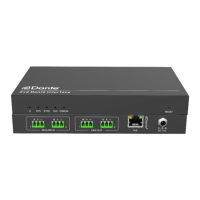

 To Next Page