36
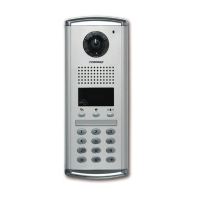
① Press Program Button "P".
② Press Management Password.
③ Press Call Button "E".
④ Press "14" (number fourteen).
⑤ Press Call Button "E".
⑥ Press the Unit Number and press Call Button "E".
⑦ Press "0" (number zero as Master lobby phone or Press a corresponding lobby phone
number) and press Call Button "E". Status of the household unit appears (Please refer to
below for the status).
⑧ To check another unit status, repeat 6 & 7 procedures.
⑨ As the status check is done press Cancel Button "X" to exit.
Status of household unit indication
• Standby : standby mode
(applies even when the household unit monitor is
communicating with an individual door phone of the unit or
via telephone line.)
• Busy Line : Busy mode
(applies when the household unit monitor is communicating
with another household unit or security station.
• If there is a function to set away mode in household unit, you can
check below.
• Away status : Away mode
• Emergency : in case of emergency
(emergency, fire, gas leak, burglar)



 To Next Page