EasyManua.ls Logo

Commodore A 2091-40 - Page 66

Commodore A 2091-40
75 pages
Print Icon
To Next Page IconTo Next Page
To Previous Page IconTo Previous Page
Loading...
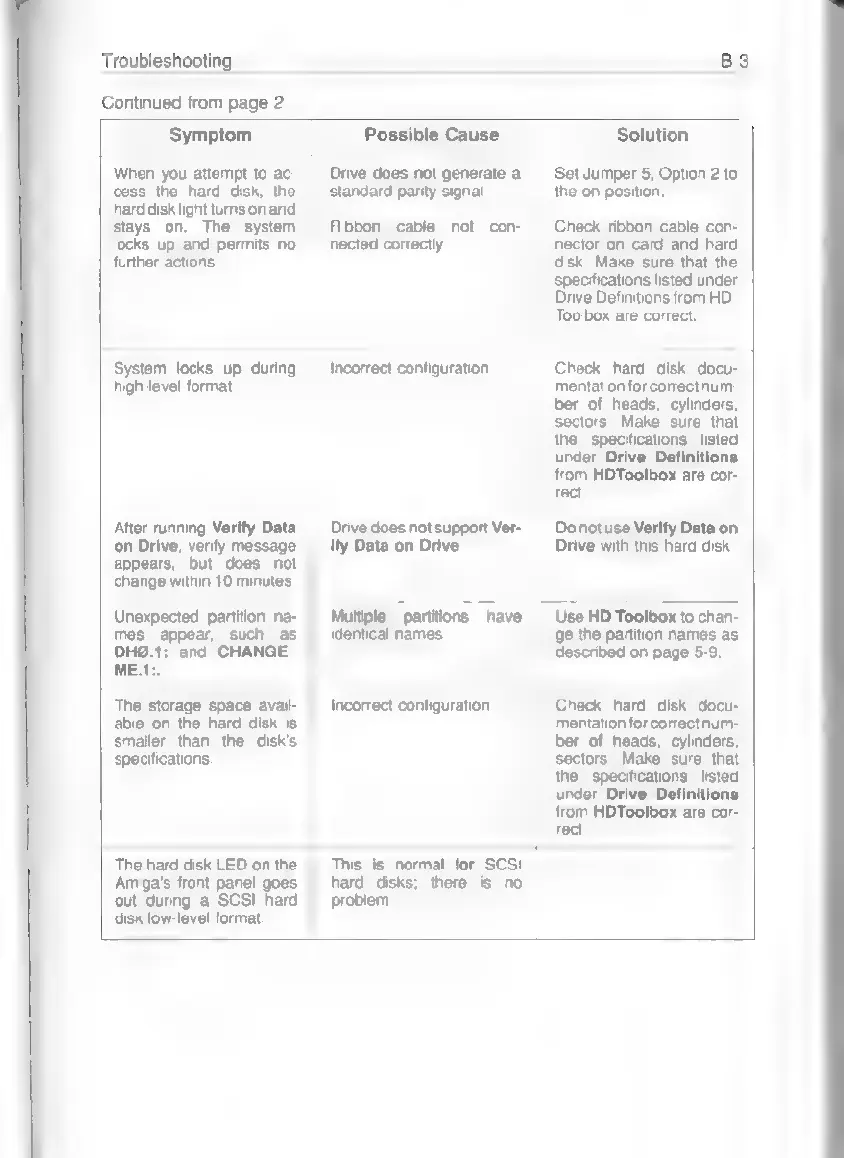
Troubleshooting
Continued
from
page
2
Symptom
Possible
Cause
Solution
When
you
attempt
to
ac-
cess
the
hard
disk,
the
hard
disk
light
turns
on
and
stays
on.
The
system
locks
up
and
permits
no
further
actions.
System
locks
up
during
high-level
format.
After
running
Verity
Data
on
Drive,
verify
message
appears,
but
does
not
change
within
10
minutes.
Unexpected
partition
na-
mes
appear,
such
as
DHO.1:
and
CHANGE
ME.1:.
Drive
does
not
generate
a
standard
parity
signal
Ribbon
cable
not
con-
nected
correctly.
Incorrect
configuration.
Drive
does
not
support
Ver-
ity
Data
on
Drive.
Multiple
partitions
have
identical
names.
Set
Jumper
5,
Option
2
to
the
on
position.
Check
ribbon
cable
con-
nector
on
card
and
hard
disk.
Make
sure
that
the
specifications
listed
under
Drive
Definitions
from
HD-
Toolbox
are
correct,
Check
hard
disk
docu-
mentation
for
correct
num-
ber
of
heads,
cylinders,
sectors.
Make
sure
that
the
specifications
listed
under
Drive
Definitions
from
HDToolbox
are
cor-
rect.
Do
not
use
Verity
Data
on
Drive
with
this
hard
disk.
©
Use
HD
Toolbox
to
chan-
ge
the
partition
names
as
described
on
page
5-9.
The
storage
space
avail-
able
on
the
hard
disk
is
smaller
than
the
disk's
specifications.
Incorrect
configuration.
Check
hard
disk
docu-
mentation
for
correct
num-
ber
of
heads,
cylinders,
sectors.
Make
sure
that
the
specifications
listed
under
Drive
Definitions
from
HDToolbox
are
cor-
rect.
The
hard
disk
LED
on
the
Amiga's
front
panel
goes
out
during
a
SCSI
hard
disk
low-level
format.
This
is
normal
for
SCSI
hard
disks;
there
is
no
problem.