EasyManua.ls Logo

Commodore A 2091-40 - Page 65

Commodore A 2091-40
75 pages
Print Icon
To Next Page IconTo Next Page
To Previous Page IconTo Previous Page
Loading...
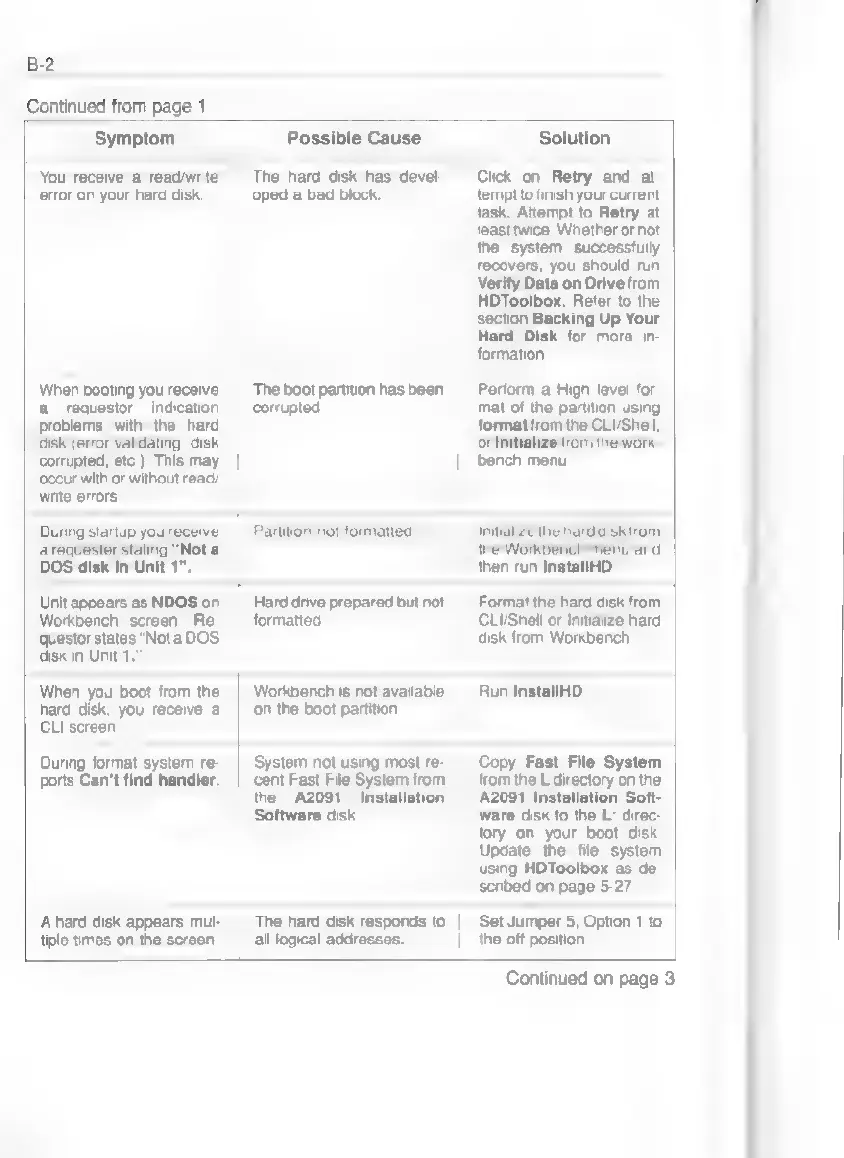
B-2
Continued
from
page
1
Symptom
Possible
Cause
Solution
You
receive
a
read/write
error
on
your
hard
disk.
The
hard
disk
has
devel-
oped
a
bad
block.
When
booting
you
receive
a
requestor
indication
problems
with
the
hard
The
boot
partition
has
been
corrupted.
Click
on
Retry
and
at-
tempt
to
finish
your
current
task.
Attempt
to
Retry
at
least
twice.
Whether
or
not
the
system
successfully
recovers,
you
should
run
Verify
Data
on
Drive
from
HDToolbox.
Refer
to
the
section
Backing
Up
Your
Hard
Disk
for
more
in-
formation.
Perform
a
High
level
for-
mat
of
the
partition
using
format
from
the
CLI/Shell,
disk
(error
validating,
disk
or
Initialize
from
the
work-
corrupted,
etc.).
This
may
bench
menu.
occur
with
or
without
read/
write
errors.
During
startup
you
receive
|
Partition
not
formatted.
Initialize
the
harddisk
from
a
requester
stating
"Not
a
the
Workbench
menu
and
DOS
disk
in
Unit
1".
then
run
InstallHD.
Unit
appears
as
NDOS
on
Workbench
screen.
Re-
questor
states
"Nota
DOS
disk
in
Unit
1.”
Hard
drive
prepared
but
not
formatted.
Format
the
hard
disk
from
CLI/Shell
or
Initialize
hard
disk
from
Workbench.
When
you
boot from
the
hard
disk,
you
receive
a
CLI
screen.
Workbench
is
not
available
on
the
boot
partition
Run
InstallHD.
During
format
system
re-
ports
Can't
find
handler.
System
not
using
most
re-
cent
Fast
File
System
from
the
A2091
Installation
Software
disk.
Copy
Fast
File
System
from
the
L
directory
on
the
A2091
Installation
Soft-
ware
disk
to
the
L:
direc-
tory
on
your
boot
disk
Update
the
file
system
using
HDToolbox
as
de-
A
hard
disk
appears
mul-
tiple
times
on
the
screen.
scribed
on
page
5-27.
The
hard
disk
responds
to
|
Set
Jumper
5,
Option
1
to
all
logical
addresses.
the
off
position.
Continued
on
page
3