Key functions
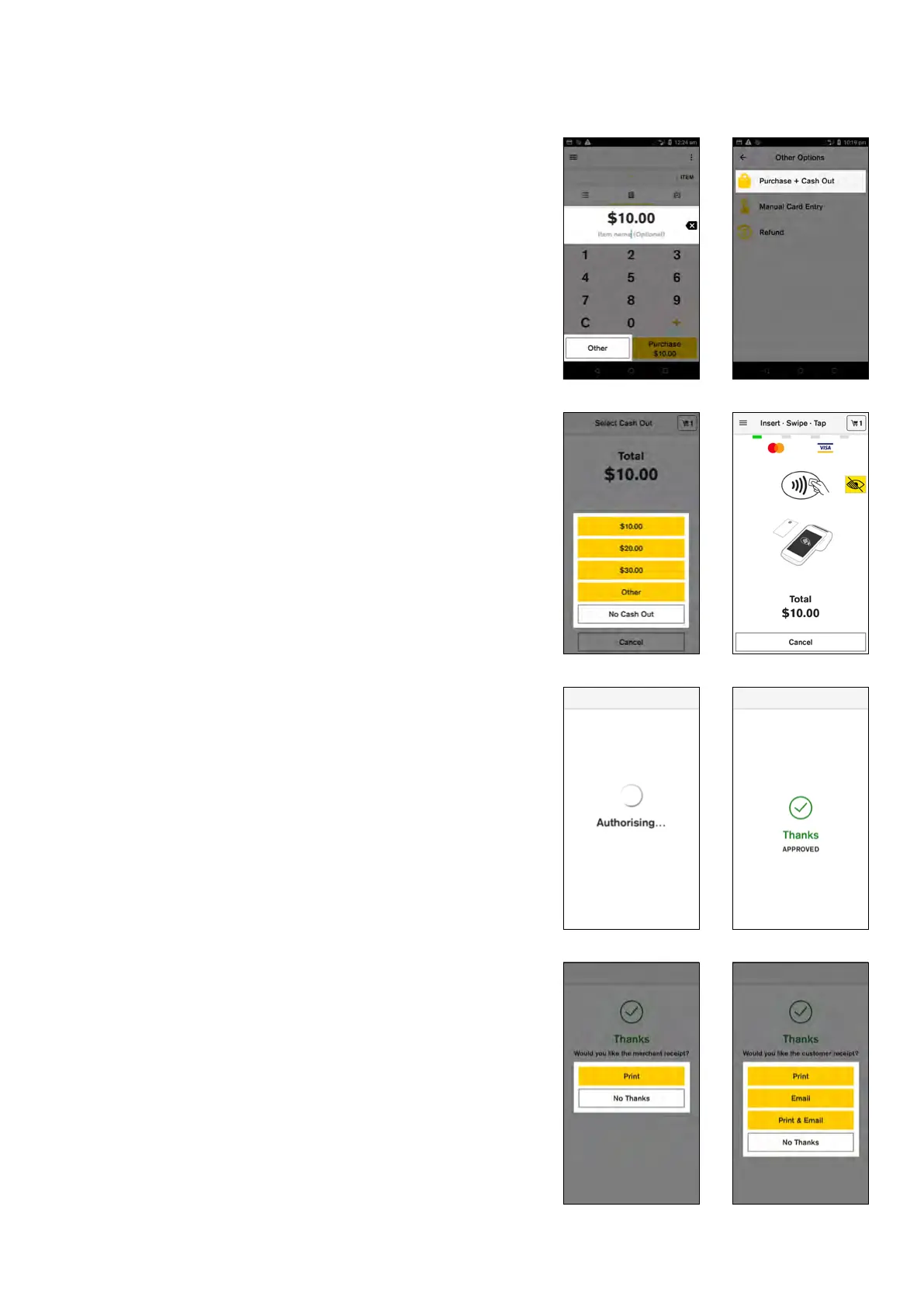
Payment transaction with ‘Cash Out’
1. Enter the transaction amount
2. Tap ‘Other’
3. Tap ‘Purchase + Cash Out’
4. Select the cash out amount from the list or tap
‘Other’ to enter a custom amount
NOTE: If you select ‘No Cash Out’ the transaction will
proceed with no cash out amount added.
5. Total transaction amount is displayed on screen. Your
customer presents their card and enters their PIN
NOTE: Contactless tap is not available for ‘Purchase +
Cash Out’ transactions.
6. Your Smart terminal processes the transaction and
then displays ‘Approved’ or ‘Declined’
7. If a card is inserted, the terminal prompts to remove
the card from the chip card slot
8. Merchant receipt prints
9. By default your terminal will print a customer receipt
and ask if you would like to email a copy to the
customer
10. The customer can now enter their email address and
a copy of the receipt will be sent to the nominated
email
9 Commonwealth Bank of Australia | Smart User Guide



 To Next Page