Key functions
MOTO (Mail Order/Telephone Order)
To enable MOTO you will need to complete an application
with the Merchant Helpdesk team on 1800 230 177.
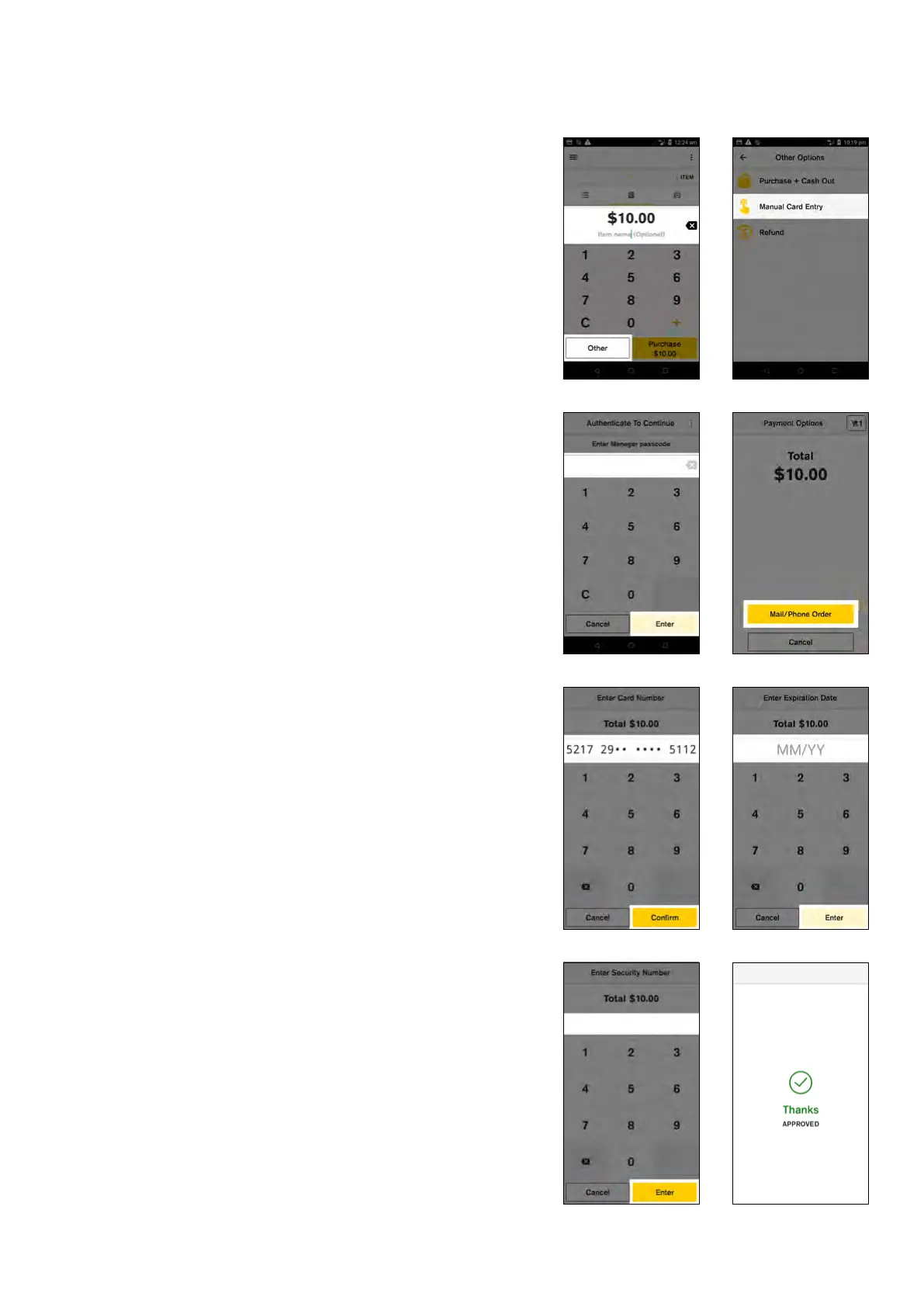
To process a Mail Order or Telephone Order card-not-
present transaction on your Smart terminal:
1. Enter transaction amount
2. Tap ‘Other’
3. Tap ‘Manual Card Entry’
4. Enter your ‘Manager passcode’ and tap ‘Enter’
5. Tap ‘Mail/Phone Order’
6. Enter your customer’s card number and tap ‘Enter’
and ‘Confirm’
NOTE: For your customer’s security, your Smart terminal
will not display the full number on screen.
7. Enter the card expiration date in the format MM/YY
8. Enter the card security number and tap ‘Enter’
NOTE: To skip entering in a security number (step 9)
simply tap ‘Enter’ and select a reason to bypass.
9. Merchant receipts prints
10. Select ‘Print’ to print a customer receipt or ‘No
Thanks’ to continue back to the payment screen.
13 Commonwealth Bank of Australia | Smart User Guide



 To Next Page